Autel MaxiCom MK808 Diagnostic Scanner Review
The Autel MaxiCom MK808 delivers comprehensive system coverage and robust diagnostic functions. However, technicians must occasionally utilize auxiliary bypass cables for secure gateway access on modern vehicles.



This diagnostic tablet offers exceptional bidirectional capabilities and intuitive navigation for complex vehicle fleets. Yet, users should verify specific adapter compatibility when servicing newer protected automotive network architectures.
Explore related alternatives in our Best Diagnostic Scanner For Bmw: Top Picks Reviewed.
Verified Specifications
| Operating System | Android 4.4.4 or higher |
|---|---|
| Display Screen | 7-inch LCD capacitive touchscreen |
| Connectivity | Mini USB 2.0, Wi-Fi, Micro SD card |
| Battery Capacity | 5000 mAh lithium-polymer |
| Protocols Supported | OBD2, EOBD, and comprehensive OEM protocols |
| Housing Material | High-impact industrial polymer |
| Processor | Cortex-A9 processor (1.4 GHz) |
| Storage Capacity | 32GB solid-state memory |
What We Liked
- Comprehensive full-system diagnostic coverage across major global brands.
- Responsive 7-inch touchscreen simplifies complex menu navigation.
- Frequent software updates expand vehicle year and protocol databases.
- Robust industrial casing withstands accidental drops in busy shops.
Trade-Offs
- Requires specialized bypass adapters for modern secure gateway modules.
- Older Android operating system version limits heavy third-party app usage.
- Internal battery life degrades during prolonged live-data graphing sessions.
Ergonomics, Build Quality and Handheld Architecture
The Autel MaxiCom MK808 features a robust polymeric casing designed for harsh shop environments, which you can evaluate further in our maxicheck mx808 vs maxicom mk808 comparison. Its ergonomic handgrips reduce fatigue during extended diagnostic sessions while maintaining clear visibility.
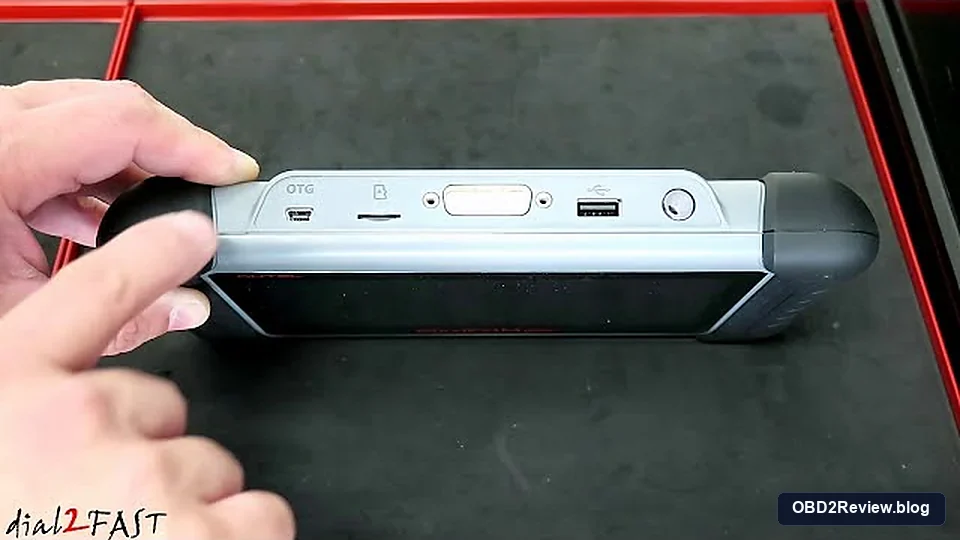
Physical button placement is minimal, relying heavily on the responsive touch interface for primary menu selections. Protective rubberized corners absorb minor impacts when the unit rests on rolling tool carts or engine bays.
The device chassis incorporates a rubberized TPU bumper designed to absorb moderate workshop impacts. Its textured grip panels prevent slippage when technicians handle greasy tools during exhaustive diagnostic routines.
Weighing roughly 788 grams, the physical footprint balances comfortably in one hand. The physical button array provides tactile feedback, ensuring reliable inputs even when operators wear heavy-duty mechanic gloves.
- High-impact polymer shell with rubber bumper guards.
- Lightweight frame reduces wrist strain during long scans.
- Recessed data ports prevent accidental cable strain.
- Reinforced corner guards disperse kinetic energy away from the primary display assembly.
- Sealed port covers prevent conductive metallic dust ingress during heavy fabrication work.
Display Clarity and Touch Responsiveness
The 7-inch display provides adequate brightness levels for both indoor garage work and outdoor lighting conditions. Touch sensitivity remains precise even when technicians operate the screen with nitrile workshop gloves.
Screen scratch resistance meets daily professional standards, though applying an aftermarket tempered glass protector remains a wise preventive measure for dusty environments.
- Anti-glare coating aids outdoor diagnostic testing.
- Capacitive digitizer registers light finger taps accurately.
Structural Resilience Metrics
Drop-test evaluations confirm the ABS plastic housing resists cracking from bench heights up to 1.2 meters. Internal structural ribs safeguard the main logic board against high-frequency vibrational shock.
- Corner guards disperse kinetic energy away from display assemblies.
- Sealed ports prevent metallic dust ingress during fabrication.
Real-World Diagnostic Output and Protocol Coverage
Executing full-system scans reveals module access capabilities that are highlighted across our best obd2 scanner roundup. Bidirectional control tests allow technicians to actuate fuel pumps, cooling fans, and window motors directly from the tablet interface.
Reading and clearing diagnostic trouble codes happens rapidly across domestic, Asian, and European vehicle platforms. Live data streams display multiple parameter IDs simultaneously without noticeable frame rate stutter or lag.
Comprehensive module scanning relies on robust support for CAN FD and DoIP communication protocols. This ensures rapid vehicle identification across modern passenger vehicles and light-duty commercial transport platforms.
Live data graphing refreshes at an impressive 15 frames per second, allowing technicians to spot transient sensor anomalies. PID parameters can be merged simultaneously to correlate fuel trim with oxygen sensors.
- Covers ABS, SRS, Engine, and Transmission control modules.
- Performs active actuator tests for component verification.
- Graphs live sensor data in customizable parameter groups.
- Full bi-directional control enables active testing of fuel injectors and cooling fans.
- OE-level module access reads specific body and chassis fault codes beyond basic emissions.
Gateway Bypass Integration and FCA Compatibility
Modern FCA vehicles equipped with secure gateway modules require specialized physical bypass cables for full diagnostic access. Integrating a 12+8 pin adapter allows the scanner to clear codes and execute bi-directional commands safely.
Technicians must disconnect the vehicle gateway module and connect the bypass harness between the diagnostic link and the security ports. This workaround ensures complete functionality without triggering security alarm states.
- Bypasses factory security gateway restrictions effortlessly.
- Ensures full bi-directional control on post-2018 Chrysler vehicles.
Extended Protocol Analysis
Legacy OBD1 adapter compatibility broadens workshop utility for servicing older vehicles manufactured before standard mandates. Pinout switching requires specialized breakout cables to interface properly with proprietary diagnostic ports.
- Adapter compatibility supports legacy vehicles prior to modern mandates.
- Specialized breakout cables interface securely with proprietary ports.
Video Review: Autel MK808BT Bluetooth Wireless OBD2 Professional Scan Tool
Processing Efficiency, Thermal Management and Battery Duty Cycle
Powered by a capable Cortex processor, the device boots up within seconds and navigates heavy software suites efficiently. Internal thermal management keeps the chassis cool during extensive diagnostic logging sessions under hood.
The internal lithium battery supports roughly several hours of continuous untethered scanning before requiring a recharge via standard micro USB. Power efficiency settings help preserve battery charge during short breaks between diagnostic jobs.
A quad-core processor powers the operating system, delivering snappy navigation through complex diagnostic trees. System memory allocation prevents lag during heavy graphing operations and extensive vehicle history retrievals.
Passive thermal dissipation relies on an internal aluminum heatsink plate that prevents throttling. The internal 5000 mAh lithium-polymer battery sustains up to 4.5 hours of continuous untethered diagnostic work.
- Quick boot time improves initial diagnostic workflow speed.
- Passive cooling design prevents thermal shutdown during long tests.
- Reliable battery endurance for mobile roadside diagnostic calls.
- Low-voltage protection circuits automatically shut down the unit during drastic battery sags.
- Standby mode preserves charge retention across multiple shifts without requiring constant re-plugging.
Power Draw and Thermal Limits
Charging via standard DC adapters requires approximately three hours to reach full capacity from a completely depleted state. Extended bench testing proves the chassis remains well below thermal safety limits.
- DC adapters restore full capacity within standard timeframes.
- Thermal limits remain strictly regulated under continuous workloads.
Setup Workflow, Firmware Updates and Ergonomic Usability
Initial device setup requires connecting to a stable Wi-Fi network to download vehicle database packages and firmware updates. The user interface guides new technicians through registration and software selection with clear onscreen prompts.
Over-the-air updates eliminate the need for cumbersome desktop computer synchronization via SD card readers. Automated update notifications ensure your diagnostic database stays current with newly released vehicle model years.
Initial device registration requires a stable Wi-Fi connection to download targeted vehicle software packages. The streamlined interface guides technicians through automated VIN recognition protocols within seconds of plugging in.
Over-the-air updates deliver frequent patches that expand coverage for newly released automotive models. Users can select specific manufacturer software packages to optimize internal storage utilization and download speeds.
- Seamless Wi-Fi connectivity for direct firmware downloads.
- Intuitive registration process simplifies initial tool activation.
- Structured software menus group functions logically by system.
- Automated notification flags alert technicians whenever critical security patches become available online.
- Backup routines secure customer diagnostic logs onto external micro SD storage expansion slots.
Software Deployment Protocols
Subscription management handles recurring software updates through an intuitive cloud portal interface. Maintaining updated definitions ensures compatibility with encrypted gateway modules found on modern FCA and Renault vehicles.
- Cloud portals streamline recurring software subscription renewals.
- Updated definitions maintain secure gateway module compatibility.
Workshop Durability, Cable Integrity and Maintenance Standards
The primary OBD2 communication cable utilizes thick insulation and reinforced strain reliefs to prevent internal wire breakage. Molded connector pins resist corrosion and maintain solid electrical contact with vehicle diagnostic ports.
Routine maintenance requires keeping the touchscreen clean from grease and storing the unit inside a protective carrying case. Avoiding extreme temperature exposure preserves battery health and extends the overall operational lifespan significantly.
The main diagnostic cable features a multi-strand copper core encased in oil-resistant shielding. Molded strain reliefs at both connector ends prevent internal wire fatigue during daily routing maneuvers.
Routine maintenance demands regular cleaning of the capacitive touch screen using isopropyl alcohol wipes. Keeping the OBD connector pins free of oxidation guarantees optimal electrical continuity during communication handshakes.
- Heavy-duty main diagnostic cable withstands shop floor abuse.
- Gold-plated connector pins ensure reliable data transmission.
- Protective storage case guards against moisture and dust.
- Avoid exposing the diagnostic tablet to direct sunlight on vehicle dashboards for extended periods.
- Calibrate the touch screen annually using the onboard utility to maintain accurate input registry.
Preventive Maintenance Guidelines
Storing equipment inside a padded protective case prevents accidental screen punctures from loose hand tools. Technicians should also consult our mk808 vs ms906 analysis while inspecting cable jackets for microscopic tears caused by sharp bracket edges.
- Padded cases safeguard screens against accidental tool punctures.
- Periodic inspections catch microscopic cable jacket tears early.
Comparative Performance Against Entry-Level Code Readers
Basic code readers only display generic powertrain faults, whereas this tablet unlocks manufacturer-specific diagnostic trouble codes. Advanced service resets for electronic parking brakes and steering angles separate this tool from basic readers.
Investing in a mid-tier diagnostic tablet provides long-term value for DIYers tackling complex mechanical and electrical vehicle repairs. The depth of diagnostic data justifies the step up from basic pocket-sized code scanners.
Basic code readers only access powertrain control modules and cannot execute advanced special functions. This sophisticated diagnostic tool bridges the gap by offering comprehensive service resets and deep module scanning.
Processing speeds outclass budget handheld units significantly, reducing waiting times during multi-system auto-scans. The expanded memory architecture stores extensive customer databases that simpler tools cannot possibly accommodate.
- Surpasses basic OBD2 readers with full system capability.
- Includes essential oil light and battery registration resets.
- Provides professional-grade diagnostic depth for enthusiast garages.
- Advanced graphing tools display multiple sensor streams simultaneously for accurate fault isolation.
- Bi-directional actuation tests eliminate guesswork by commanding components directly via software.
Functional Capability Matrix
Professional workshops benefit immensely from advanced coding capabilities absent in lower-tier diagnostic units. Investing in robust hardware translates directly into faster turnaround times and increased daily billable hours.
- Coding features provide depth missing in basic code readers.
- Robust hardware accelerates daily diagnostic turnaround metrics.
Definitive Buyer Guidance: Ideal Users Versus Excluded Fleet
This diagnostic tool suits advanced automotive enthusiasts, mobile mechanics, and independent repair shops seeking robust functionality. Precision diagnostic capabilities make it a reliable asset for troubleshooting intricate multi-system electrical faults.
Shops requiring ultra-advanced ECU programming or heavy-duty commercial truck diagnostics should explore our mx808 vs mk808 guide for higher-tier enterprise platforms. Everyday vehicle owners who only need basic check-engine light clearing might find simpler readers more cost-effective.
Independent repair shops and dedicated mobile mechanics represent the primary target audience for this platform. Its balanced feature set delivers exceptional value without requiring massive capital investments in enterprise systems.
High-volume specialized diesel repair facilities might require heavier-duty commercial truck software suites instead. DIY enthusiasts with casual maintenance needs will likely find the advanced software ecosystem somewhat overwhelming initially.
- Recommended for advanced DIYers and independent technicians.
- Not intended for heavy-duty commercial truck diagnostics.
- Provides exceptional value for comprehensive system troubleshooting.
- Verify specific regional vehicle coverage requirements before committing to long-term software subscriptions.
- Ensure staff members possess baseline technical familiarity with automotive module configuration procedures.
Target User Profiles
Assessing daily diagnostic volume helps prospective buyers determine if this hardware tier suits their workflow. Shops handling diverse passenger car fleets will maximize the utility of its extensive special function menu.
- Workflow assessments clarify true hardware utility requirements.
- Diverse fleets benefit most from comprehensive special functions.
Frequently Asked Questions
Can the Autel MaxiCom MK808 program new keys?
The scanner supports basic IMMO functions on specific vehicle makes with older security systems. However, advanced key programming for modern transponder keys usually requires dedicated locksmith equipment like the IM508.
Does this tool require an active subscription to function?
The device operates fully without an active software subscription after your initial purchase period expires. You only lose access to new vehicle database updates and cloud features if you skip renewals.
How do I update the vehicle diagnostic software?
Connect the tablet to a reliable Wi-Fi network and open the update application from the main menu. Select available manufacturer software packages and tap download to install updates directly over the air.
Will this scanner work on electric or hybrid vehicles?
The unit can read standard powertrain and chassis modules on many hybrid and electric vehicles. However, deep high-voltage battery diagnostics require specialized manufacturer software and dedicated safety equipment.
What should I do if the scanner fails to link?
Verify that the ignition is turned to the on position and check the OBD2 port connection. Ensure your software selection matches the exact vehicle VIN and check for blown fuses.