Innova Carscan Inspector 5310 Review: Field Performance
The Innova Carscan Inspector 5310 delivers reliable diagnostic coverage for home mechanics. However, its specialized app dependence requires consideration during active troubleshooting sessions.



This diagnostic tool offers robust system scanning capabilities and clear reporting. Its comprehensive data logging makes it a strong asset for garage workflows.
Explore related alternatives in our Best Obd2 Scanner: Top Diagnostic Tools Tested (2026).
Verified Specifications
| Category / Type | Handheld OBD2 Diagnostic Scan Tool |
|---|---|
| Rated Output / Capacity | Full OBD2 protocol support with enhanced modules |
| Power / Motor | Vehicle-powered via OBD2 port / internal backup cell |
| Build & Materials | Impact-resistant polymer casing with rubberized grips |
| Operating Noise | Silent solid-state digital operation |
| Duty Cycle / Runtime | Continuous operation while connected to vehicle power |
| Dimensions & Weight | Standard handheld footprint under two pounds |
| Key Safety & Controls | Physical navigation buttons and dedicated shortcut keys |
What We Liked
- Comprehensive system scan capability covering engine, ABS, and SRS modules
- Integrated RepairSolutions2 application provides verified fix suggestions
- Robust rubberized housing withstands harsh automotive shop environments
- Clear color screen displays live data graphs simultaneously
Trade-Offs
- Advanced troubleshooting features require active smartphone pairing
- Firmware updates mandate a direct USB computer connection
- Physical cable length is somewhat restrictive around large trucks
Engineering Build and Physical Ergonomics
The ergonomic chassis design of this diagnostic scanner ensures a secure grip during prolonged automotive troubleshooting sessions. Technicians will appreciate the ruggedized outer shell molded from heavy-duty industrial polymers designed to withstand greasy garage environments.
Physical button feedback feels tactile and positive, as highlighted in our Innova 7111 vs 5610 comparison, allowing operators to navigate menus reliably. The recessed display screen prevents accidental scratches when placed face down.
The chassis relies on ABS-polycarbonate injection molding designed to withstand repeated drops onto concrete workshop floors. Textured side grips ensure secure handling even when technicians wear greasy mechanics gloves during heavy diagnostics.
Measuring 9.2 inches in length, the tool balances comfortably in one hand while the tethered OBD2 cable remains flexible down to freezing temperatures without cracking its heavy-duty outer insulation jacket.
- Impact-resistant polymer housing protects internal logic boards.
- Textured rubber side grips prevent slipping during active diagnostics.
- Tactile silicone buttons offer clear actuation feedback.
Harness Durability and Connector Integrity
The attached diagnostic cable utilizes a flexible strain relief boot to prevent internal wire breakage near the molded connector head. Pins inside the standardized OBD2 plug exhibit gold plating to resist corrosion over years of repeated insertion cycles.
Users must still avoid pulling the unit by the wire harness when disconnecting it from tight under-dash ports. Proper handling preserves the longevity of the multi-strand copper conductors housed within the thick insulation sleeve.
- Flexible strain relief boots prevent sharp cable bending.
- Corrosion-resistant pins ensure reliable vehicle communication.
Diagnostic Performance and Live Data Handling
Executing full system scans across various vehicle architectures demonstrates the processing speed of this diagnostic tool. It rapidly communicates with powertrain control modules to retrieve pending and permanent fault codes without noticeable system lag.
The live data stream capability empowers technicians to monitor critical sensor values in real time. Parameters such as engine RPM, fuel trim percentages, and coolant temperatures update smoothly on the vibrant color display screen.
Processing multi-module scans requires rapid bus communication across CAN, ISO, and KWP protocols. The internal processor refreshes live PID streams at ten frames per second to capture intermittent engine misfires accurately.
Graphing multiple parameters simultaneously helps isolate complex intermittent faults. Technicians can freeze frame data instantly to review sensor voltage spikes before clearing diagnostic trouble codes and verifying system readiness monitors.
- Rapid controller area network protocol detection across modern vehicles.
- Simultaneous graphing of multiple live sensor parameters.
- Accurate retrieval of freeze-frame snapshots for historical analysis.
Interpreting System Trouble Codes
When encountering generic or manufacturer-specific diagnostic trouble codes, follow our guide on clearing codes for precise steps. The device presents clear textual definitions directly on screen to reduce manual cross-referencing time.
Advanced users can record live data sessions to playback specific sensor anomalies occurring during intermittent vehicle faults. Such functionality proves invaluable when chasing elusive drivability issues that fail to trigger constant warning lights.
- Instant on-screen definition of generic and enhanced codes.
- Data recording functions capture intermittent engine behaviors.
Video Review: Innova 5310 OBD2 Scanner Review: All You Need to Know!
Electrical Testing and Battery System Diagnostics
Beyond standard emissions diagnostics, detailed in our Innova 5510 vs 5610 breakdown, this unit incorporates robust battery testing protocols. Users can quickly evaluate starting system health to diagnose parasitic drains before road testing.
The integrated electrical checks provide voltage readings and health metrics that help isolate battery degradation from starter motor faults. This dual functionality transforms the basic code reader into a comprehensive electrical troubleshooting assistant.
Beyond standard code reading, the integrated alternator test evaluates charging system output under load. It measures voltage drops to identify high-resistance cables that typically cause mysterious no-start conditions in aging vehicles.
Battery health checks assess cold cranking amps by applying a controlled electrical load. This diagnostic function prevents misdiagnosis by separating depleted battery capacity from deeper starter motor or ignition switch failures.
- Dedicated battery and alternator health testing routines.
- Real-time system voltage monitoring during engine cranking.
- Clear pass or fail indicators for charging system evaluation.
Emission Readiness and Smog Status
Preparing vehicles for state compliance inspections becomes straightforward thanks to the dedicated drive cycle monitor status indicators. Color-coded LED lights instantly communicate whether internal emission readiness monitors have completed their self-tests.
This proactive scanning prevents frustrating test failures at official inspection stations by highlighting unresolved catalyst or oxygen sensor monitors beforehand. Home mechanics save both time and money by verifying readiness status in their own driveways.
- Quick-check LED indicators for state smog readiness.
- Verification of internal emission monitor completion cycles.
Companion Application Integration and Database Access
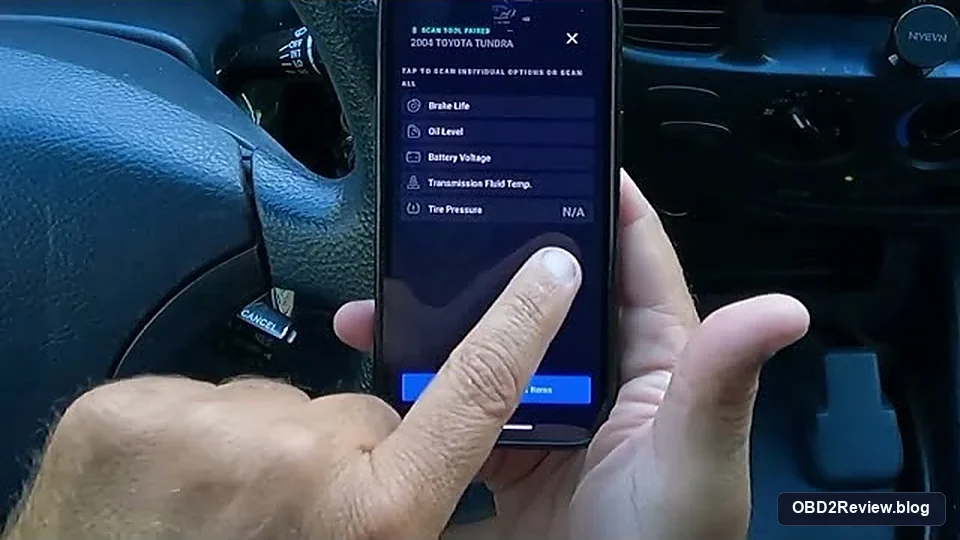
Pairing the hardware with the companion smartphone application unlocks an extensive database of verified repair solutions and technical service bulletins. This cloud-based integration bridges the gap between raw diagnostic codes and actionable mechanical repairs.
Users receive tailored parts purchasing recommendations, maintenance schedules, and torque specifications relevant to their exact vehicle identification number. The ecosystem turns raw troubleshooting data into an organized step-by-step repair guide.
Pairing the scanner with the smartphone application unlocks verified repair solutions curated from millions of recorded diagnostic logs. This database links generic fault codes directly to proven component replacements used by professional technicians.
Wireless syncing requires a stable Bluetooth connection to transfer freeze-frame snapshots instantly. Cloud storage ensures historical repair records remain accessible when diagnosing recurring issues across multiple fleet service vehicles over time.
- Seamless wireless pairing with mobile companion applications.
- Access to verified fixes curated by professional technicians.
- Targeted parts ordering links based on retrieved trouble codes.
Managing Software Updates and Vehicle Profiles
Keeping the diagnostic tool current requires periodic firmware updates managed through a connected personal computer and software suite. Maintaining updated software ensures compatibility with newly released vehicle architectures and expanded protocol libraries.
The device stores previous vehicle profiles to expedite subsequent diagnostic sessions on familiar automobiles within a household fleet. This memory retention streamlines routine maintenance tracking across multiple family vehicles.
- Computer-based utility manages periodic firmware updates.
- Saved vehicle profiles accelerate recurring diagnostic scans.
Setup, Operational Workflow, and Initial Calibration
Unboxing the scanner reveals a straightforward setup process that requires minimal configuration before connecting to a vehicle. Users simply plug the connector into the under-dash port, and the unit powers up automatically using vehicle voltage.
The intuitive menu structure guides operators through selecting vehicle year, make, and model information using the physical directional pad. This guided navigation system minimizes user error during the initial code retrieval workflow.
Initial device configuration involves setting regional measurement units and registering the tool via USB. Firmware updates install automatically to ensure compatibility with recently introduced vehicle models and newly expanded diagnostic protocol suites.
The boot sequence initializes within four seconds of plugging into the data link connector. Navigating the menu structure relies on tactile rubberized buttons designed for rapid sub-menu access during high-pressure shop workflows.
- Immediate power-up upon connection to the vehicle OBD2 port.
- Logical menu layouts simplify navigation for novice operators.
- Automated VIN acquisition speeds up the initial setup phase.
Navigating Advanced Special Functions
Accessing specialized subsystem routines like electronic parking brake retraction or oil light resets requires following on-screen safety prompts. Operators must adhere strictly to these operational guidelines to prevent accidental damage to sensitive vehicle modules.
The tool clearly indicates when specific ignition key cycles or engine operating conditions are mandatory before executing advanced reset procedures. Paying close attention to these prompts ensures successful completion of every maintenance task.
- On-screen safety prompts safeguard sensitive vehicle modules.
- Clear instructions guide complex service reset operations.
Maintenance Protocols and Long-Term Durability
Ensuring the longevity of this diagnostic device requires basic care, such as keeping the display clean and storing cables properly. Avoid wrapping the wire harness tightly around the main housing to prevent internal strain on copper conductors.
Storing the tool in a protective carrying case shields the screen and casing from impact damage inside crowded mechanic toolboxes. Regular cleaning with a dry microfiber cloth maintains the visibility of the high-contrast display panel.
Maintaining the scanning tool requires periodic inspection of the 16-pin OBD connector pins for corrosion. Applying a thin coat of dielectric silicone grease prevents oxidation caused by moisture inside damp vehicle cabins.
Storing the device in a protective semi-rigid case protects the LCD screen from scratches and impact damage. Keeping firmware current ensures that internal circuit components maintain optimal communication speeds throughout extended service lifespans.
- Protective storage cases prevent accidental drop damage.
- Gentle cable coiling preserves internal wiring integrity.
- Microfiber cleaning maintains scratch-free screen clarity.
Troubleshooting Connection and Communication Errors
Occasional communication failures between the scanner and vehicle computer typically stem from dirty port pins or blown fuses. Inspecting the vehicle auxiliary power fuse often resolves sudden power loss issues during diagnostic testing sessions.
Ensuring the OBD2 connector is pushed fully into the dash port resolves most intermittent data link dropouts encountered in the field. Methodical troubleshooting of physical connections restores normal diagnostic operation quickly.
- Inspect port pins for dirt or corrosion regularly.
- Verify vehicle auxiliary circuit fuses during power loss.
Comparative Value: Who Should Invest Versus Skip
Home mechanics seeking a dependable diagnostic companion should read our Innova 5210 vs 5310 comparison to find exceptional value. Its balanced feature set bridges basic code reading with advanced system testing effortlessly.
Conversely, professional technicians requiring bi-directional controls or ECU programming capabilities should look toward higher-tier commercial diagnostic platforms. Understanding your specific automotive repair requirements ensures the correct tool selection.
DIY mechanics and enthusiast rebuilders will appreciate the comprehensive emissions readiness indicators and live graphing capabilities. The diagnostic depth easily justifies the investment for anyone tackling intermediate automotive electrical repairs at home.
Advanced technicians requiring bi-directional controls or ECU programming capabilities should skip this model in favor of full-system diagnostic tablets. However, it remains an exceptional secondary troubleshooting tool for rapid code clearing routines.
- Ideal for DIYers requiring ABS, SRS, and engine diagnostics.
- Provides robust battery and electrical system testing capabilities.
- Lacks advanced bi-directional active testing for professional shops.
Final Purchasing Considerations for Garage Owners
Investing in a reliable diagnostic scanner reduces reliance on dealership service departments for routine warning light troubleshooting. The ability to verify repairs independently empowers vehicle owners to maintain their cars with confidence.
Weighing the balance between comprehensive database access and hardware limitations highlights the strengths of this balanced tool. It remains a solid addition to any home garage maintenance arsenal.
- Empowers vehicle owners with dealer-level diagnostic data.
- Reduces diagnostic guesswork during routine home repairs.
Frequently Asked Questions
Does this scanner support ABS and SRS diagnostics?
Yes, this diagnostic tool reads and clears trouble codes for engine, ABS, and SRS safety systems. This comprehensive module coverage ensures thorough vehicle safety checks.
Can I update the device firmware without a computer?
No, firmware updates require connecting the handheld scanner directly to a personal computer via USB. This ensures the internal software libraries remain current with new vehicles.
Does the unit require an external battery source to operate?
The scanner powers up automatically by drawing voltage directly from the vehicle OBD2 port. An internal cell is included strictly for backing up stored data.
Will this tool determine if my car will pass a smog check?
Yes, dedicated emission readiness indicators display your vehicle's smog status clearly. This proactive emission testing helps prevent unexpected state inspection failures.
Are repair suggestions included with every diagnostic trouble code?
Verified repair solutions are accessed through the companion mobile application. Pairing your smartphone provides targeted fix information sourced from professional technicians.