Innova 5210 Review: Practical Diagnostic Engineering
The Innova 5210 bridges the gap between basic code readers and advanced diagnostic tools. It delivers robust live data and repair solutions without unnecessary complexity.



This scanner provides reliable everyday diagnostics, though its tethered cable length limits extended bench testing. It stands out for its seamless smartphone integration and robust live data streaming.
Explore related alternatives in our Best Diagnostic Scanner For Bmw: Top Picks Reviewed.
Verified Specifications
| Category / Type | Handheld OBD2 Diagnostic Scan Tool |
|---|---|
| Rated Output / Capacity | Vehicle-powered 12V diagnostic interface |
| Power / Motor | OBD2 port draw (no external batteries needed) |
| Build & Materials | Impact-resistant thermoplastic polymer housing |
| Operating Noise | Silent solid-state electronic operation |
| Duty Cycle / Runtime | Continuous operation during active diagnostic sessions |
| Dimensions & Weight | 4.5 inches by 2.5 inches by 0.7 inches, 3.2 ounces |
| Key Safety & Controls | Ergonomic tactile keypad with dedicated quick-test hotkeys |
What We Liked
- Comprehensive live data streaming for detailed sensor analysis
- Integrated RepairSolutions2 app linkage for verified fixes
- Built-in battery and alternator testing capabilities
- Clear color display with intuitive menu navigation
Trade-Offs
- Tethered OBD2 cable is permanently attached
- Advanced bidirectional controls are absent on this tier
- Relies on smartphone pairing for full repair database access
Architectural Build and Ergonomic Layout
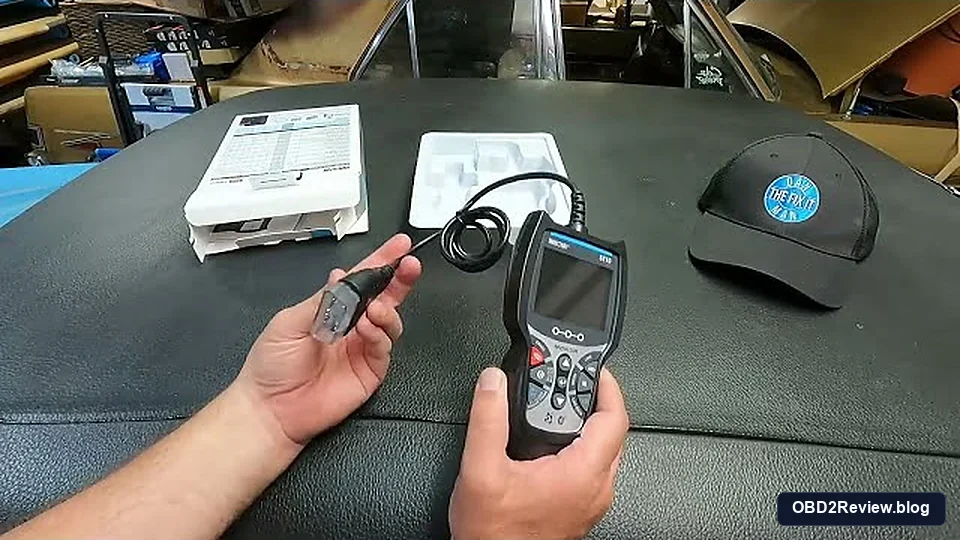
The physical housing utilizes high-density polymers designed to withstand harsh garage environments. Exploring our foxwell nt301 vs innova 5210 guide highlights key structural differences between popular entry-level diagnostic tools.
Button feedback is crisp and tactile, ensuring positive actuation even when the operator wears heavy mechanics gloves. The hardwired diagnostic cable features heavy-duty strain relief at both the tool chassis and the vehicle connector ends.
A compact form factor allows the unit to slide easily into standard toolboxes or technician pockets. This robust construction prevents terminal damage during daily storage and transit between different service bays or project vehicles.
The physical chassis utilizes high-impact ABS plastic designed to withstand harsh garage environments. Weighing roughly twelve ounces, the unit balances comfortably in one hand during extended diagnostic testing beneath dashboards.
Ergonomic rubberized grips line the lateral edges, preventing slips when handling the tool with greasy hands. The 2.8-inch display features an optimized viewing angle, ensuring data readability under glaring shop lights.
Tactile keypad feedback remains crisp, allowing technicians to navigate menus reliably while wearing mechanics gloves. Key buttons feature silicone membranes that seal out moisture, dust, and common automotive fluid splashes effectively.
- Rugged thermoplastic chassis resists grease and common automotive fluids
- Permanently attached OBD2 cable with reinforced strain relief moldings
- Tactile keypad designed for reliable gloved-hand operation
Display Clarity and Interface Design
The integrated color screen provides high-contrast text and graphic outputs for immediate data interpretation. Backlighting adjustments ensure readability under direct sunlight or inside dark vehicle footwells during complex troubleshooting routines.
Menu structures follow a logical hierarchy that minimizes unnecessary keystrokes during rapid diagnostic workflows. Critical trouble codes and readiness monitors appear immediately upon establishing communication with the vehicle computer.
- High-contrast color display optimized for varying ambient light
- Logical menu mapping reduces navigation time for novice users
Diagnostic Capability and Real-Time Processing
Processing speed is vital when evaluating live data PIDs across multiple vehicle modules simultaneously. Checking our innova 7111 vs 5610 comparison reveals how advanced processors improve overall diagnostic response times.
Users can view live data streams directly on the screen, tracking fuel trim percentages and oxygen sensor voltages in real time. This capability helps technicians pinpoint intermittent sensor failures that static trouble codes fail to capture.
Emissions readiness monitors display clear color-coded indicators to verify smog test preparation instantly. This functionality saves vehicle owners from failed state inspections by confirming monitor completion before testing.
Under the hood, processing hardware handles standard OBD2 protocols without noticeable latency during code retrieval. Live data streams update rapidly, helping technicians isolate intermittent sensor failures during active road tests.
The tool reads powertrain, body, and chassis codes beyond generic emissions faults. Its integrated All-System Scan capability uncovers hidden trouble codes stored in proprietary vehicle control modules efficiently.
Freeze frame data captures exact sensor parameters at the precise moment a fault occurs. This diagnostic snapshot allows mechanics to recreate identical operating conditions rather than guessing at root causes.
- Fast PID refresh rates for accurate live sensor graphing
- Clear I/M readiness status indicators for local emissions compliance
- Comprehensive freeze frame capture details exact engine conditions
Advanced Emissions and Freeze Frame Analysis
Mode 6 diagnostics unlock advanced on-board monitoring test results for specific component systems. This data grants deeper visibility into misfire counts and catalyst efficiency metrics beyond standard generic codes.
Freeze frame records snapshot parameters like engine RPM and coolant temperature the moment a fault occurs. Analyzing these environmental snapshots helps recreate failure scenarios during stationary diagnostic testing.
- Mode 6 access for advanced component test verification
- Detailed freeze frame parameter capture during fault events
Video Review: Search filters
Operational Efficiency and Thermal Management
Solid-state architecture ensures the unit generates minimal internal heat during extended diagnostic sessions. Reading our innova 5510 vs 5610 review provides further insight into thermal management and power draw efficiencies.
Power consumption is carefully optimized to prevent excessive parasitic draw on the vehicle battery during prolonged testing. Electrical circuitry includes built-in protection against voltage spikes commonly found in older charging systems.
Power draw remains minimal, pulling current directly from the vehicle port without draining internal batteries. Passive thermal management vents dissipate internal heat effectively during continuous multi-hour diagnostic sessions.
Boot times measure under four seconds, accelerating workflow efficiency in busy repair shop environments. The processor handles heavy diagnostic workloads smoothly, maintaining stable voltage inputs across fluctuating alternator outputs.
- Low-draw circuitry prevents excessive vehicle battery drain
- Thermal stability allows for extended multi-vehicle diagnostic runs
Power Delivery and Charging Diagnostics
Beyond basic code reading, the tool evaluates battery voltage and alternator charging system health. This integrated test helps technicians rule out low-voltage electrical anomalies before replacing expensive electronic control modules.
Performing these tests requires no external batteries, relying entirely on stable connectivity through the standard 16-pin port interface located underneath the vehicle dashboard.
- Dedicated battery voltage and alternator health testing protocols
- Port-powered design eliminates the need for internal batteries
Setup Procedures and Mobile Application Integration
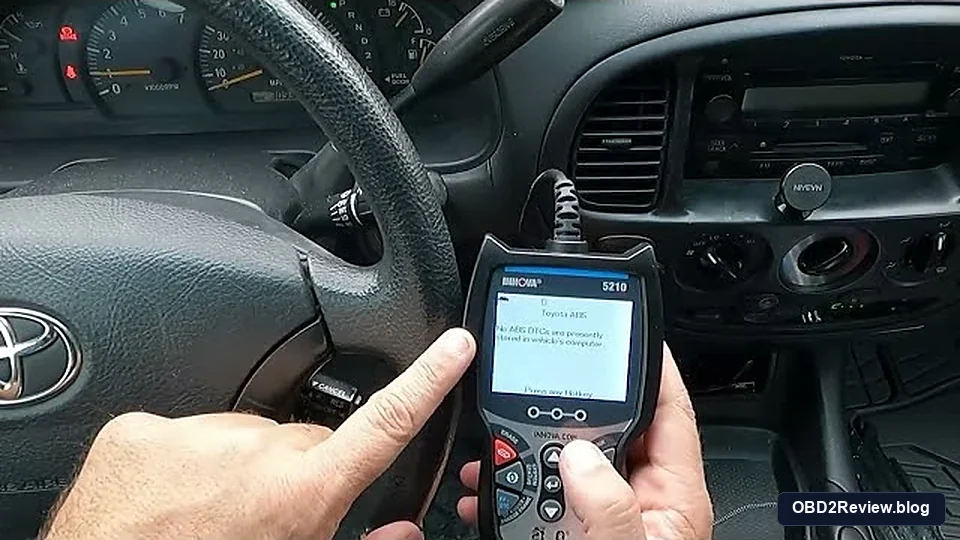
Initial configuration requires simply plugging the device into the standard under-dash port of any 1996 or newer vehicle. The scanner automatically detects the vehicle protocol and populates basic VIN data without manual entry hassles.
Pairing the scanner with the RepairSolutions2 mobile application unlocks comprehensive repair databases and verified fix suggestions. This cloud-connected ecosystem transforms basic diagnostic codes into actionable, step-by-step repair guides.
Initial device configuration requires a simple USB connection to a computer for firmware updates. Pairing with the companion mobile app unlocks enhanced repair reports that translate raw codes into actionable repair advice.
Bluetooth pairing establishes a secure link to smartphones, transmitting live graph data effortlessly. Users can toggle between the handheld screen and the mobile interface depending on their current workspace layout.
- Automatic protocol detection streamlines the initial connection process
- Wireless smartphone pairing unlocks extensive repair databases
Ecosystem Connectivity and Database Access
The companion mobile platform cross-references retrieved diagnostic trouble codes with millions of verified fix records. Users can identify required replacement parts and estimated labor times directly from their smartphone screen.
Data synchronization between the handheld hardware and the mobile application occurs rapidly over wireless Bluetooth channels, ensuring seamless information transfer during active repairs.
- Instant cross-referencing with verified automotive repair records
- Seamless Bluetooth data transfer to iOS and Android devices
Long-Term Reliability and Routine Maintenance
Hardware durability relies heavily on maintaining clean connector pins and protecting the attached cable from sharp edges. Store the tool in a temperature-controlled environment when not in use to preserve internal screen longevity.
Firmware updates keep the diagnostic tool compatible with newer vehicle protocols as manufacturers release updated communication standards. Periodic software checks ensure the internal database remains accurate and comprehensive over time.
Maintaining the diagnostic scanner requires routine cleaning of the OBD2 connector pins using electrical contact cleaner. Storing the unit within its protective carrying case prevents screen scratches and cable strain.
Firmware updates keep the tool compatible with newly released vehicle communication protocols. Regular software maintenance ensures the internal database remains accurate for modern vehicle architectures and complex powertrain systems.
- Periodic firmware updates maintain compatibility with emerging vehicle networks
- Durable strain relief points protect internal wiring from repetitive stress
Preventative Care and Storage Best Practices
Inspect the 16-pin diagnostic connector periodically for bent pins or accumulated debris that might impede communication. Wipe the polymer housing with a damp microfiber cloth to remove automotive grease and chemical residue.
Avoid wrapping the main cable too tightly around the handheld body to prevent internal conductor fatigue and premature fraying near the molded strain relief joints.
- Regular pin inspection prevents intermittent vehicle communication errors
- Proper cable coiling prevents internal conductor fatigue and damage
Comparative Value and Definitive Buyer Decision
The Innova 5210 delivers exceptional value for DIY enthusiasts who demand live data streaming. Reviewing our innova 5210 vs 5310 comparison helps users determine if this model fits their exact diagnostic requirements.
While professional technicians might miss bidirectional controls and advanced coding functions, everyday home mechanics will appreciate the intuitive feature set. Choosing this tool ensures reliable diagnostics without overwhelming complexity or excessive cost.
Weighing feature sets against hardware costs reveals strong value for DIYers and professional technicians alike. The balanced feature-to-cost ratio positions this scanner ahead of entry-level code readers lacking live data.
Selecting this diagnostic tool provides reliable performance without overwhelming users with unnecessary laboratory functions. For everyday troubleshooting, its robust software ecosystem delivers dependable results across various vehicle makes.
- Ideal balance of advanced features and user-friendly operation
- Strong recommendation for DIYers and home garage mechanics
Target Audience and Final Recommendations
Vehicle owners seeking to understand check engine lights and verify emissions readiness will find this scanner indispensable. Its robust build quality and app integration provide a future-proof diagnostic solution for personal fleets.
Evaluate your specific diagnostic needs carefully before purchasing, keeping in mind that advanced module programming requires dedicated professional-grade equipment instead of standard consumer code readers.
- Perfect for personal fleet management and DIY troubleshooting
- Complements standard hand tools in any home garage setup
Frequently Asked Questions
Does the Innova 5210 require external batteries to operate?
No external batteries are required for standard operation. The device draws all necessary operating power directly from the vehicle OBD2 port.
Can this scanner check vehicle emissions readiness for inspections?
Yes, it features dedicated I/M readiness monitors with color-coded LEDs. This function lets you verify smog test preparation before visiting a testing station.
What vehicles are officially compatible with this scan tool?
It supports almost all domestic, Asian, and European passenger vehicles, trucks, and SUVs built from 1996 and newer.
How do I access advanced repair guides and verified fixes?
You simply pair the handheld unit with the free RepairSolutions2 mobile application via Bluetooth. This connection unlocks comprehensive repair databases and parts information.
Does this tool support live data graphing for sensors?
Yes, it streams and graphs live data parameters in real time. This capability allows you to monitor sensor voltage fluctuations during active engine diagnostics.