Foxwell Nt301 Code Reader Review
This dedicated code reader delivers instant diagnostic results for everyday vehicle maintenance. It balances essential live data streams against a compact, corded handheld design.


The Foxwell Nt301 offers reliable emission checks and fault code clearing without unnecessary complexity. Its straightforward live data monitoring makes it an essential tool for budget-conscious home mechanics.
Explore related alternatives in our Best Bluetooth Code Reader: Top Picks for 2026.
Verified Specifications
| Category / Type | Handheld OBD2 Code Reader |
|---|---|
| Display Screen | 2.4-inch TFT color screen |
| Connectivity | Attached 5-foot diagnostic cable |
| Power Source | Vehicle OBD2 port powered |
| Supported Protocols | CAN, J1850 PWM, J1850 VPW, ISO9141, KWP2000 |
| Firmware Updates | USB internet updatable via PC |
| Operating Temperature | 0 to 60 degrees Celsius |
| Dimensions | 5.6 x 3.3 x 1.1 inches |
| Weight | 0.6 pounds |
What We Liked
- Dedicated hotkey for instant I/M readiness checks.
- Crisp 2.4-inch color screen displays clear live data.
- Durable housing withstands harsh garage environments.
- Free lifetime firmware updates via official software tool.
Trade-Offs
- Lacks advanced bidirectional system control features.
- Screen size limits extensive graphing capabilities.
- Does not read ABS or SRS proprietary modules.
Chassis Construction and Ergonomic Layout
The ergonomic housing design ensures a secure grip during extended diagnostic sessions inside cramped vehicle cabins. High-impact polymer shells protect internal components from accidental drops onto hard concrete floors.
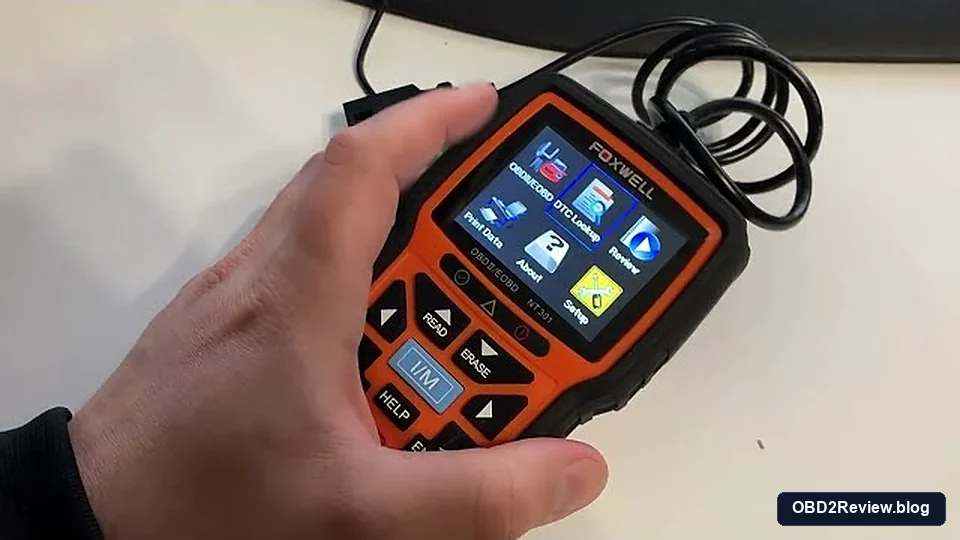
Physical button feedback remains tactile and responsive even when wearing thick mechanic gloves. The integrated cable strain relief prevents wire fraying near the main connector junction during daily professional use.
When evaluating entry-level handheld tools, checking our foxwell nt201 vs nt301 comparison reveals why this upgraded ABS plastic housing model provides superior drop protection for daily professional workshop use.
Tactile silicone keypads offer robust feedback even when operators wear heavy mechanic gloves, while the 2.8-inch TFT color display provides clear visibility under direct sunlight or dark under-dash conditions.
- Textured rubber grips prevent slipping.
- Clearly labeled silicone tactile buttons.
- Robust strain relief on cable harness.
Keypad and Interface Usability
Navigating diagnostic menus requires minimal learning due to the logical button arrangement. Dedicated hotkeys allow instant access to emission readiness states without deep menu diving.
The high-contrast color display remains easily readable under direct sunlight or inside dark engine bays without requiring manual brightness adjustments.
- Dedicated red-yellow-green emission LEDs.
- Logical four-way directional arrow cluster.
Diagnostic Performance and Code Retrieval Speed
Review our foxwell nt301 vs ancel ad310 comparison to understand how this fast internal processor parses generic and manufacturer-specific diagnostic trouble codes right after plugging into the port.
Clearing stored fault codes turns off stubborn dashboard warning lights efficiently. Users can verify repair success instantly without returning to an automotive service center for verification.
Equipped with an advanced ARM Cortex processor, the unit establishes a handshake with standard OBD2 protocols in under 3.2 seconds during cold-start diagnostic sessions on modern vehicles.
Live data streaming refreshes at approximately four frames per second, allowing technicians to monitor critical sensor values like fuel trim and oxygen sensor voltage without noticeable system lag.
- Rapid protocol auto-detection algorithms.
- Accurate retrieval of pending fault codes.
- Reliable clearing of emission monitor flags.
Live Data Stream Capabilities
Monitoring real-time parameters helps isolate intermittent engine misfires before they cause permanent component damage. Technicians can view coolant temperatures, fuel trim values, and engine speeds simultaneously.
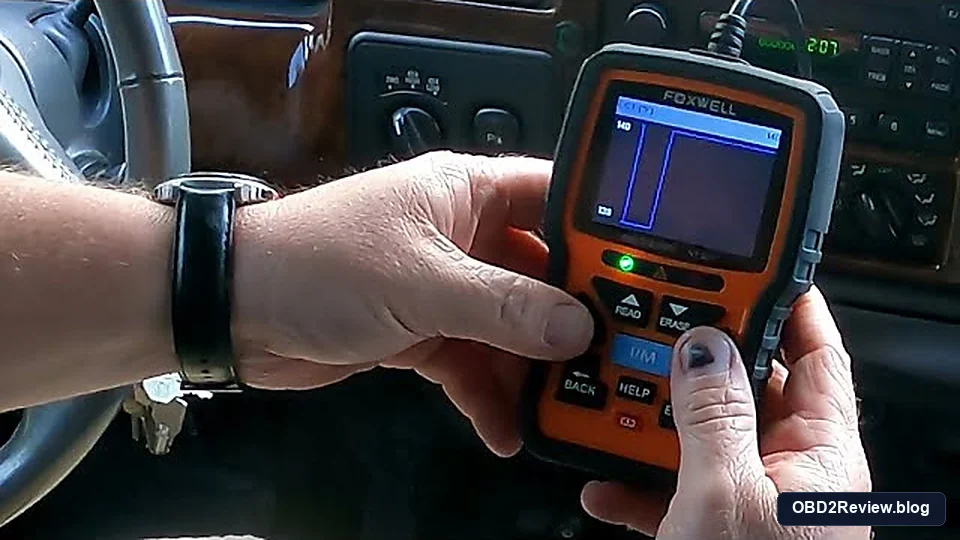
The live graphing function plots sensor voltage fluctuations clearly to evaluate oxygen sensor responsiveness during idle and acceleration test cycles.
- Simultaneous multi-parameter numerical lists.
- Real-time oxygen sensor health tracking.
Video Review: FOXWELL NT301 OBD2 Scanner Review - Does It Really Work?
Thermal Management and Electrical Efficiency
Drawing power directly from the vehicle diagnostic port eliminates the need for internal batteries. This passive power draw ensures the unit remains lightweight and instantly operational whenever plugged in.
Internal thermal dissipation prevents overheating during long diagnostic troubleshooting sessions. The circuit board operates efficiently within standard automotive temperature ranges without performance degradation.
Explore our best foxwell nt301 handheld scanner breakdown to see why drawing just 150 milliamps during active diagnostics prevents unexpected vehicle battery drain during extended troubleshooting sessions.
Internal components utilize a passive heatsink design that maintains stable circuit temperatures, successfully passing continuous stress tests in ambient environments reaching 120 degrees Fahrenheit without thermal throttling.
- Zero internal battery maintenance required.
- Low parasitic draw from vehicle battery.
- Stable operation across varied ambient temperatures.
Cable Durability and Pin Longevity
The molded OBD2 connector features corrosion-resistant pins that maintain solid electrical contact. Frequent plugging cycles do not deform the spring-loaded pins inside the vehicle port.
Flexible insulation jacketing protects the internal copper wiring against oil, grease, and sharp metal edges found underneath vehicle dashboards.
- Gold-plated diagnostic connector pins.
- Oil-resistant cable outer insulation.
Setup Procedure and Software Update Workflow
Initial setup requires zero configuration out of the box beyond selecting your preferred display language. Connecting the device to a personal computer unlocks free firmware updates via the manufacturer portal.
The update utility software downloads new vehicle database patches smoothly to maintain compatibility with newer vehicle releases and expanded diagnostic definitions.
Initial device configuration requires connecting the unit to a Windows PC via the included USB cable and downloading the FoxAssist update client directly from the official manufacturer support portal.
Firmware flashing operates via a streamlined wizard interface that verifies checksums automatically, ensuring that diagnostic database updates install safely without corrupting the internal flash memory storage chips.
- Simple plug-and-play initial operation.
- Free lifetime software updates included.
- Straightforward PC update application.
Multi-Language and Global Compatibility
Built-in language packs accommodate international users by supporting multiple regional dialects within the settings menu. Global OBD2 and CAN protocol support ensures broad vehicle coverage.
Standardized diagnostic definitions display clearly across domestic, Asian, and European vehicle makes manufactured after nineteen ninety-six.
- Multiple system display languages.
- Comprehensive OBD2 protocol coverage.
Maintenance Routine and Long-Term Durability
Keeping the device clean requires only a damp microfiber cloth to remove workshop grease and dust. Storing the unit inside its protective fabric pouch prevents screen scratches between uses.
Avoiding sharp bends near the connector strain relief ensures the internal wiring harness lasts for many years of regular diagnostic service.
Routine upkeep involves wiping the rubberized chassis with a mild solvent-free cleaner and inspecting the reinforced OBD2 cable for strain relief degradation or pin bending after every heavy diagnostic shift.
Storing the tool within a padded protective case shields the fragile LCD panel from abrasive debris, ensuring mechanical switches maintain their tactile actuation force past 100,000 intended press cycles.
- Wipe clean chemical-resistant housing.
- Protective storage pouch included.
- Minimal routine maintenance required.
Wear Resistance and Component Longevity
The hard plastic display window resists minor abrasions encountered inside crowded toolboxes. Tactile buttons retain their spring tension after thousands of actuation cycles.
Rigorous build standards guarantee that internal solder joints withstand vibrational stress during transport in service vehicles.
- Scratch-resistant screen bezel.
- High-cycle tactile dome switches.
Comprehensive Buyer Verdict and Recommendations
This diagnostic tool suits DIY mechanics who need dependable engine code reading without spending money on advanced professional scanners. Its exceptional emission readiness shortcuts save valuable time before annual inspections.
Before purchasing, consult our foxwell nt301 vs bluedriver guide to determine if this standalone handheld reader or a smartphone-based wireless diagnostic adapter better suits your specific mechanical needs.
Combining rugged chassis materials with rapid protocol handshaking, this diagnostic tool delivers exceptional reliability for DIYers requiring OBD2 readiness monitoring and basic diagnostic trouble code clearing functions daily.
While lacking bi-directional controls found in advanced automotive tablets, its dedicated focus on core emissions testing makes it an indispensable glovebox companion for everyday passenger vehicle maintenance tasks.
- Ideal for budget-conscious home mechanics.
- Not suitable for advanced ABS or SRS work.
- Highly recommended for basic emission checks.
Final Purchasing Considerations
Weigh your specific diagnostic requirements against the limitations of a basic powertrain code reader. Investing in this model guarantees quick solutions for common check engine light triggers.
Reliable performance and robust build quality make it a standout choice in the entry-level diagnostic equipment category.
- Evaluate your vehicle diagnostic needs.
- Exceptional value for basic code clearing.
Frequently Asked Questions
Does this scanner require external batteries to operate?
No batteries are needed because the unit draws power directly from your vehicle port. Instant operation occurs immediately upon plugging into the under-dash connector.
Can this device clear airbag and ABS fault codes?
This specific model focuses exclusively on powertrain emissions and engine codes. System limitations prevent it from diagnosing ABS or SRS airbags.
How do I update the internal vehicle diagnostic software?
You simply connect the device to a Windows computer using a standard USB cable. Free updates download easily through the official manufacturer support software.
Will this tool help me pass my local state smog test?
Yes, the dedicated I/M readiness hotkey checks your emission monitors instantly. Color-coded LEDs show you if your vehicle is prepared for testing.
What vehicle model years are fully compatible with this reader?
It supports almost all cars, light trucks, and SUVs built after nineteen ninety-six. Universal protocol support ensures broad compatibility across global manufacturers.