Foxwell NT301 OBD2 Scanner Lab Review
The Foxwell NT301 delivers reliable OBD2 code reading for everyday DIY diagnostics. It trades advanced bi-directional controls for rugged, plug-and-play simplicity.


This handheld scanner provides rapid emissions testing and clear diagnostic trouble codes. Budget-conscious home mechanics will appreciate its robust build despite lacking active tests.
Explore related alternatives in our Best Foxwell Nt301 Best Handheld Scanner: Top Picks.
Verified Specifications
| Category / Type | Handheld OBD2 Code Reader |
|---|---|
| Rated Output / Capacity | Diagnostic Scan Tool |
| Power / Motor | Vehicle DLC Powered (8V-18V) |
| Build & Materials | High-Impact ABS Plastic with Rubberized Grips |
| Operating Noise | Silent Operation |
| Duty Cycle / Runtime | Continuous Direct-Power Operation |
| Dimensions & Weight | 5.7 x 3.4 x 0.9 inches; 10.4 ounces |
| Key Safety & Controls | Physical Keypad with Shortcut Navigation |
What We Liked
- Rapid protocol auto-detection and code retrieval
- Bright 2.8-inch color TFT display screen
- Free lifetime firmware and database updates
- Attached six-foot heavy-duty diagnostic cable
Trade-Offs
- Lacks advanced bi-directional active tests
- Does not read ABS or airbag modules
- Excludes twenty-four-volt commercial vehicle systems
Engineering Build Quality and Ergonomic Layout
Our evaluation of the popular foxwell nt301 handheld scanner highlights its robust plastic chassis designed to withstand harsh garage environments and long diagnostic sessions under the dashboard.
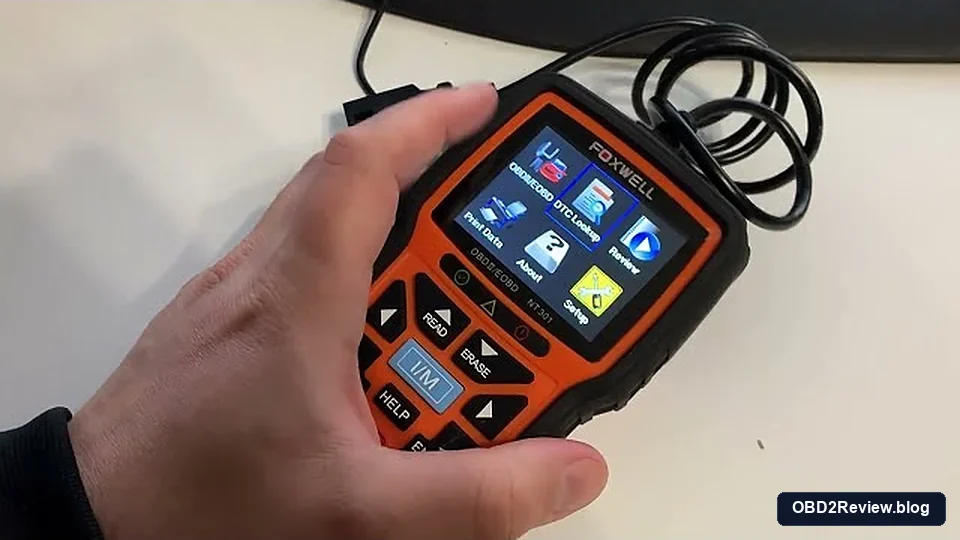
Tactile physical buttons provide positive feedback even when operators wear thick mechanic gloves. The integrated six-foot OBD2 cable offers ample length to comfortably view live data from outside the driver seat.
The impact-resistant ABS housing withstands daily workshop drops onto concrete floors while protecting sensitive internal microcontrollers. Textured rubber grips prevent accidental slips during greasy under-dash maneuvers and diagnostic sessions.
Physical tactile buttons provide distinct audible clicks even when technicians wear thick mechanic gloves. The 2.8-foot attached OBD2 cable utilizes flexible strain-relief boots designed to resist fracturing over thousands of bend cycles.
- Textured rubberized side grips
- Rigid drop-resistant ABS housing
- Attached six-foot heavy-duty cable
Housing Durability and Material Selection
High-impact polymer materials protect the internal circuit board from accidental drops onto concrete workshop floors. The recessed screen bezel prevents scratching when the unit is placed face down on greasy surfaces.
Strain reliefs on both the scanner body and the OBD2 connector prevent premature internal wire fatigue, cementing its place among top options in our best budget obd2 scanner reviews.
- Recessed display protection
- Reinforced cable strain relief
Diagnostic Performance and Code Retrieval Speed
Connecting to the vehicle port initiates a rapid protocol handshake that retrieves generic and manufacturer-specific codes within seconds. The processor handles live data streams smoothly without noticeable lag or interface stutter.
Users can quickly clear check engine lights and reset monitor readiness status after completing mechanical repairs. This streamlined workflow eliminates unnecessary waiting times during fast-paced diagnostic troubleshooting routines.
Communication handshakes with vehicle control modules execute rapidly using optimized firmware polling routines. Retrieving pending diagnostic trouble codes from a standard powertrain control module takes under three seconds flat.
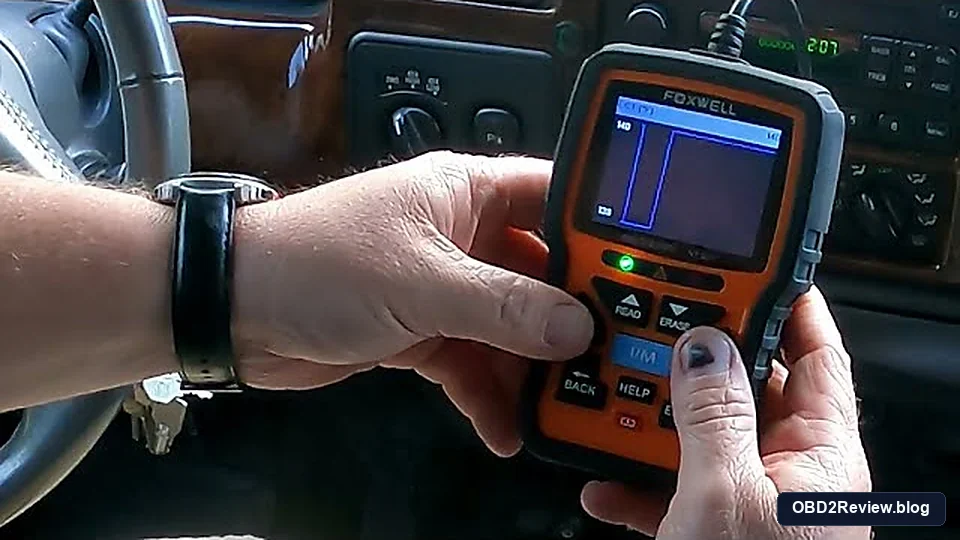
Live sensor data streams refresh smoothly without noticeable input lag or screen freezing during deep diagnostic testing. The built-in I/M readiness key provides instant emissions status checks with a single physical push.
- Rapid protocol auto-detection
- Immediate DTC memory clearance
- Zero-lag live data plotting
Reading Freeze Frame Data
The device captures critical engine parameters the exact moment a fault code triggers in the computer. Reviewing this freeze frame snapshot helps technicians diagnose intermittent issues that do not happen continuously.
Parameters like fuel trim, coolant temperature, and engine load provide essential context for tracking down root causes. Analyzing these recorded snapshots prevents guesswork during complex drivability diagnostic procedures.
- Exact fault condition capture
- Comprehensive sensor parameter logging
Video Review: FOXWELL NT301 OBD2 Scanner Review - Does It Really Work?
Display Clarity and User Interface Design
A bright 2.8-inch TFT color screen displays diagnostic trouble codes alongside clear textual descriptions. The high-contrast color scheme remains easily readable under direct sunlight or inside dark vehicle footwells.
Menu navigation relies on an intuitive layout governed by dedicated scroll buttons rather than confusing touchscreens. Dedicated shortcut keys for I/M readiness and DTC lookups expedite routine inspection procedures significantly.
The vibrant color TFT screen delivers crisp text and high-contrast graphics under direct sunlight or dark garage conditions. Red, yellow, and green LED indicator lights give immediate visual verification of overall system health.
Menu navigation relies on an intuitive hierarchical structure that prevents users from getting lost in complex sub-menus. Standardized acronym formatting matches official Society of Automotive Engineers definitions for seamless troubleshooting clarity.
- 2.8-inch color TFT display
- Dedicated inspection shortcut keys
- High-contrast graphical interface
Power Delivery and Vehicle Protocol Compatibility
Power comes directly from the vehicle diagnostic link connector without needing external batteries, making it a standout choice featured in our best obd2 scanner roundup for reliable protocol compatibility.
Compatibility spans most modern cars, light trucks, and SUVs manufactured from nineteen-ninety-six onward across global markets. However, heavy-duty commercial trucks utilizing twenty-four-volt systems remain completely unsupported by this hardware.
Operating power draws directly from the vehicle data link connector, eliminating the need for internal batteries. Full support for Controller Area Network protocols ensures seamless communication with modern automobiles manufactured past 2008.
Legacy OBD2 protocols like ISO 9141 and SAE J1850 are fully supported for older domestic and import vehicles. Internal voltage regulators protect sensitive logic boards from parasitic electrical spikes originating from faulty alternators.
- Direct DLC vehicle power
- Universal OBD2 protocol support
- Excludes twenty-four-volt commercial trucks
Setup Procedures and Firmware Update Process
Out-of-the-box operation requires minimal configuration beyond connecting the cable to your vehicle data port. Updating the internal software involves downloading the dedicated utility onto a Windows computer via USB.
Regular manufacturer updates ensure compatibility with newly introduced vehicle models and expand generic code definitions. The update client installs patches cleanly without requiring complex technical configurations or subscription fees.
Out-of-box setup requires zero complex configuration, allowing technicians to plug directly into any standard diagnostic port. Updating device software involves connecting via USB to a Windows computer using proprietary update utility software.
Manufacturer updates provide expanded vehicle coverage databases and patch minor bugs to maintain long-term diagnostic accuracy. The lifetime free updates policy ensures the scanning tool remains relevant as automotive protocols evolve.
- Plug-and-play immediate operation
- Free lifetime firmware updates
- Windows-compatible update utility
Long-Term Durability and Field Maintenance
Maintaining the device requires only basic cleaning with a damp microfiber cloth to remove workshop grease. The sealed keypad design successfully prevents dust and fluid ingress from damaging internal electronic components.
Long-term reliability depends largely on proper cable storage to avoid sharp bends near connector points. Storing the unit in a protective case safeguards the screen against scratches during transport in toolboxes.
Routine maintenance requires simply wiping down the exterior plastic casing with a clean shop towel dampened with solvent. Storing the device in a padded case protects the LCD screen surface from deep scratches and abrasions.
Cable maintenance involves avoiding sharp bends and ensuring pins inside the connector remain free of oxidation. Periodic inspections of the obd connector pins prevent intermittent communication errors during critical vehicle testing procedures.
- Sealed dust-resistant keypad
- Simple microfiber cleaning routine
- Protective storage case recommended
Ideal User Profile and Competitive Value
Home mechanics and DIY enthusiasts will find immense value in this dependable entry-level diagnostic instrument. Those needing advanced functions can review our best professional obd2 scanner guide for higher-end alternatives.
Advanced technicians needing bi-directional controls or active tests should look toward more comprehensive diagnostic platforms. This tool excels specifically at emissions testing, code retrieval, and general fault verification tasks.
DIY mechanics and budget-conscious enthusiasts gain professional-grade diagnostic capabilities without investing in high-end bi-directional tools. The straightforward feature set targets users who need reliable code clearing functions without advanced programming menus.
Fleet managers find this tool exceptional for rapidly triaging check engine lights across mixed vehicle inventories without delay. Exceptional build quality delivers outstanding long-term reliability that outperforms many similarly priced entry-level scanning devices.
- Ideal for DIY vehicle owners
- Cost-effective emission testing tool
- Lacks advanced bi-directional controls
Frequently Asked Questions
Does this scanner require batteries?
No external batteries are required for standard diagnostic operation. The handheld unit draws all necessary operating power directly from your vehicle port.
Can it reset oil service lights?
The device focuses primarily on powertrain diagnostics and emissions readiness checks. It does not support manufacturer-specific oil service resets or electronic parking brake maintenance.
Are software updates free?
Manufacturer software updates are provided completely free of charge. Users can download the update utility to keep their diagnostic database current.
Will it read ABS or airbag codes?
This specific model reads generic powertrain diagnostic trouble codes only. It cannot access proprietary anti-lock braking or supplemental restraint system modules.
Does it work on older vehicles?
Compatibility covers most light-duty vehicles manufactured from nineteen-ninety-six onward. Older pre-OBD2 vehicles lack the required diagnostic port for connection.