Thinkobd 100 vs. Thinkobd 500: Which Fits Your Setup Better?
Evaluating the Thinkobd 100 and Thinkobd 500 reveals stark differences in diagnostic depth and interface layout. This technical comparison weighs their core capabilities for everyday shop environments.


Choose the Thinkobd 100 for basic code pulling and budget-conscious emergency kits. Select the Thinkobd 500 for advanced live data graphing and complete enhanced powertrain diagnostics.
Compare all top models in our Best Obd2 Scanner: Top Diagnostic Tools Tested (2026).
Side-by-Side Breakdown
| Criteria | Thinkobd 100 | Thinkobd 500 | Edge |
|---|---|---|---|
| Peak Performance & Output | Basic OBD2 code reading | Advanced OBD2 plus live graphing | Thinkobd 500 |
| Duty Cycle & Consistency | Reliable for quick spot checks | Optimized for extended diagnostic sessions | Thinkobd 500 |
| Operating Noise & Vibration | Silent handheld operation | Silent operation with audible buzzer alerts | Thinkobd 500 |
| Portability & Footprint | Ultra-compact pocket form factor | Slightly larger ergonomic chassis | Thinkobd 100 |
| Maintenance & Service Life | Minimalist design with few failure points | Robust multi-layer protective casing | Thinkobd 500 |
| Power Requirements | Vehicle-powered via OBD port | Vehicle-powered with low quiescent draw | Tie |
| Best Ideal Use-Case | DIY trunk emergency tool | Professional bay diagnostic starter | Thinkobd 500 |
Architectural Design and Physical Interface Layout
The Thinkobd 100 utilizes a compact, handheld form factor designed for single-handed operation in tight engine bays. Its ruggedized plastic housing protects internal circuits from minor workbench drops.
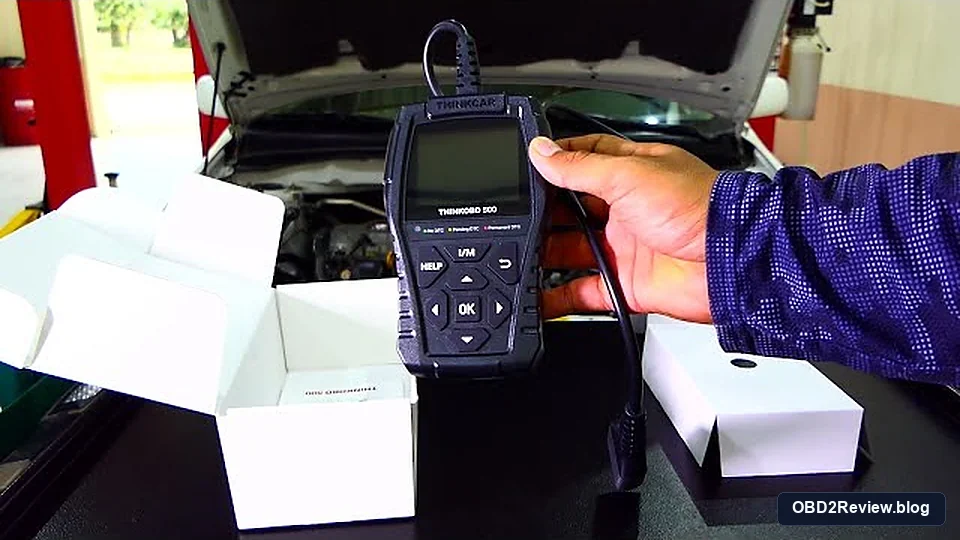
Conversely, the Thinkobd 500 introduces a slightly larger chassis with dedicated hotkeys for quick access to I/M readiness. This physical layout reduces menu navigation time during busy shop hours.
The ThinkOBD 100 features a minimalist architecture housed inside a durable ABS enclosure. Highlighted in our best obd scanner under 100 guide, its tactile rubberized keypad withstands frequent daily shop usage.
Conversely, the ThinkOBD 500 expands its physical interface to incorporate dedicated shortcut keys for I/M readiness and DTC lookups. This dimensional increase accommodates a wider circuit board layout, improving thermal dissipation during extended diagnostic sessions.
- Compact handheld footprint for tight engine bay access.
- Dedicated physical hotkeys for rapid diagnostic execution.
- Impact-resistant polymer shells designed for harsh environments.
Ergonomic Grip and Button Feedback
Technicians evaluating grip comfort will notice the textured rubber side panels on the Thinkobd 500 framework. These panels prevent slipping when handling greasy tools during prolonged vehicle inspections.
Meanwhile, the lighter Thinkobd 100 relies on molded plastic contours to maintain a minimal weight profile. This design prioritizes pocket portability over heavy-duty rubberized shock absorption features.
- Textured rubber grips on the advanced 500 model chassis.
- Molded plastic contours on the streamlined 100 unit.
Diagnostic Protocol Support and Core Scanning Speed
Both scanners support standard OBD2 protocols including CAN, ISO9141, KWP2000, and J1850. However, processing speeds differ when querying complex vehicle control modules for historical fault codes.
The Thinkobd 500 handles multiple electronic control units simultaneously with minimal latency. This capability streamlines comprehensive health reports on modern multi-network passenger vehicles.
Protocol compatibility dictates how quickly a scanner handshakes with the ECM. When browsing our best obd2 scanner under 100 guide, the ThinkOBD 100 supports standard OBD2 protocols for basic code clearance.
Stepping up, the ThinkOBD 500 introduces broader vehicle coverage by integrating support for newer CAN protocols. Its upgraded processor handles multi-module queries much faster, significantly reducing the latency experienced when clearing persistent dashboard warning lights.
- Full support for standard OBD2 communication protocols.
- Faster module querying speeds on the upgraded 500 variant.
Clearing DTCs and Resetting Monitors
Executing clear commands on the Thinkobd 100 clears standard emission codes instantly. It provides straightforward functionality without overwhelming the operator with advanced subcommand menus.
The Thinkobd 500 adds deeper diagnostic context by displaying freeze frame data alongside cleared fault logs. This extra data assists in verifying successful component repairs.
- Instantaneous DTC clearing across both diagnostic units.
- Detailed freeze frame analysis available on the 500 model.
Display Technology and Screen Usability Under Shop Lighting
Screen clarity remains critical when working inside dimly lit vehicle cabins or under bright fluorescent garage lights. The Thinkobd 100 features a monochrome display optimized for high contrast.
Stepping up to the Thinkobd 500 grants users a vibrant color screen capable of rendering multiple data streams simultaneously. This colorization helps differentiate active faults from stored parameters.
Screen visibility under harsh garage fluorescent lighting remains a critical ergonomic factor. The ThinkOBD 100 utilizes a basic monochrome LCD screen with adjustable contrast, providing adequate readability for quick code checks inside dimly lit engine bays.
The ThinkOBD 500 upgrades this hardware interface with a larger TFT color display. Often recommended in our best obd2 scanner under 500 ranking, this panel renders live parameters with superior contrast.
- High-contrast monochrome screen on the entry-level 100.
- Full-color multi-line display equipped on the 500 unit.
Readability and Visual Data Hierarchy
Viewing text strings on the monochrome display requires scrolling through single-line diagnostic menus. The text remains sharp and legible despite the lack of full-color graphics.
The Thinkobd 500 organizes diagnostic trouble codes using a structured color-coded severity index. Technicians can instantly identify critical powertrain faults without reading lengthy descriptions.
- Sharp monochrome text rendering on the base model.
- Color-coded fault severity indicators on the 500 variant.
Power Delivery Mechanics and Vehicle Communication Stability
Neither diagnostic tool requires internal batteries, drawing necessary operating voltage directly from the vehicle OBD port. This bus-powered architecture ensures permanent readiness without charging downtime.
Voltage stability testing confirms both scanners maintain solid communication links during low-voltage cranking events. The internal voltage regulators protect sensitive microprocessors from alternator spikes.
Diagnostic scanners generally draw operating current directly from the vehicle DLC port. Featured in our best car scanner under 100 lineup, the ThinkOBD 100 relies entirely on this 12-volt battery feed for stable logic.
The ThinkOBD 500 utilizes the same parasitic draw protection while improving internal voltage regulation. This architectural tweak prevents unexpected reboots during low-voltage cranking tests, ensuring uninterrupted data logging across fluctuating automotive electrical systems.
- Zero internal battery requirements for hassle-free maintenance.
- Stable bus-powered operation across standard 12V architectures.
Link Loss Recovery and Reconnection Speed
If ignition power cycles during a scan, the Thinkobd 100 re-establishes communication handshake protocols within seconds. This rapid recovery prevents workflow interruptions during busy diagnostic checks.
The Thinkobd 500 features an auto-reconnect sequence that remembers previous menu states after momentary power losses. This intelligent caching preserves unsaved live data parameters efficiently.
- Rapid protocol handshakes after ignition power cycles.
- Intelligent session caching on the higher-tier model.
Live Data Stream Refresh Rates and Parameter Identification
Real-time sensor monitoring separates basic code readers from true diagnostic instruments. The Thinkobd 500 excels here by graphing engine parameters like RPM and coolant temperature.
While the Thinkobd 100 displays textual live data streams, it lacks the graphical plotting capabilities needed to spot intermittent sensor dropouts or slow-responding oxygen sensors.
Real-time sensor monitoring requires rapid data packet processing to catch intermittent faults. The ThinkOBD 100 streams basic parameter IDs at modest refresh intervals, making it suitable for static sensor checks rather than complex high-speed powertrain diagnosis.
Armed with a more capable processor, the ThinkOBD 500 accelerates live data graphing. Technicians can simultaneously track multiple sensor inputs like fuel trim and coolant temperature without experiencing noticeable interface lag or data packet dropouts.
- Graphical live data plotting exclusive to the 500 model.
- Text-only real-time parameter streaming on the 100 variant.
PID Selection and Customization Depth
Selecting specific Parameter IDs on the Thinkobd 500 lets technicians isolate erratic sensor behavior quickly. Users can merge multiple data graphs for direct correlation analysis.
The Thinkobd 100 lists essential engine data sequentially without customization options. It suits users who only need a quick verification of basic operational metrics.
- Parameter merging and custom PID selection on the 500.
- Sequential baseline parameter listing on the basic 100.
Firmware Update Protocols and PC Software Integration
Keeping diagnostic tools updated ensures compatibility with newly released vehicle model years. Both scanners connect to Windows computers via standard USB cables for firmware upgrades.
The manufacturer update utility for the Thinkobd 500 automatically detects outdated software versions and downloads patches. This streamlined process minimizes configuration errors during updates.
Maintaining up-to-date vehicle database coverage requires reliable flashing procedures. The ThinkOBD 100 connects to host computers via a standard USB interface, allowing technicians to execute manual firmware updates using proprietary manufacturer update utilities.
The ThinkOBD 500 refines this software integration by supporting automatic device recognition and streamlined update workflows. Its larger internal memory accommodates expansive diagnostic libraries without requiring manual file deletions or complex directory formatting.
- Standard USB connection for PC-based firmware updates.
- Automated update utility support for the 500 device.
Driver Installation and Operating System Support
Connecting the Thinkobd 100 requires basic driver installation procedures on Windows operating systems. The software footprint remains small and installs within minutes on older workshop laptops.
The updated software suite for the Thinkobd 500 features plug-and-play drivers that integrate smoothly with modern Windows environments. This eliminates common device recognition hurdles.
- Minimalist driver footprint for legacy laptop compatibility.
- Streamlined plug-and-play architecture on the 500 suite.
Ergonomic Durability and Environmental Protection Ratings
Shop floors present constant hazards including oil spills, dropped tools, and accidental liquid splashes. The Thinkobd 500 features reinforced corner bumpers to absorb heavy impact forces.
The Thinkobd 100 adopts a sleeker profile that easily slides into tool pouches without snagging. Its sealed keypad prevents dust and grease accumulation inside the button contacts.
Shop environments expose diagnostic tools to grease, impacts, and temperature extremes. The ThinkOBD 100 incorporates a ruggedized exterior shell designed to survive accidental workbench drops while resisting common automotive workshop fluids and chemical solvents.
The ThinkOBD 500 enhances physical survivability by utilizing reinforced strain reliefs on its tethered OBD2 cable. This design choice prevents internal wire fatigue at the connector junction, extending the tool operational lifespan under daily professional use.
- Reinforced corner bumpers on the heavy-duty 500 unit.
- Sealed tactile keypads preventing dust and fluid ingress.
Cable Strain Relief and Connector Longevity
Integrated OBD cable assemblies on both scanners feature flexible rubber strain relief boots. These boots prevent internal copper wire fatigue during repeated plugging cycles.
The reinforced collar on the Thinkobd 500 cable withstands sharp bending angles common when reaching under low dashboard panels. This design enhancement extends overall equipment lifespan.
- Flexible rubber strain relief boots on tethered cables.
- Reinforced connector collars on the advanced 500 model.
Frequently Asked Questions
Can either scanner perform bi-directional actuator tests?
Neither scanner supports advanced bi-directional active testing or ECU coding functions. Both units focus exclusively on reading diagnostic trouble codes and streaming live sensor data.
Do these OBD2 scanners require internal batteries to operate?
Both diagnostic tools draw operating power directly from the vehicle data link connector. No internal batteries are needed for routine code reading or menu navigation tasks.
Which model should DIY vehicle owners choose for home use?
The Thinkobd 100 serves basic code clearing needs for budget-conscious DIYers. Select the Thinkobd 500 if you require live graphing capabilities for deeper troubleshooting.
Are software updates free for both diagnostic devices?
Manufacturer firmware updates are provided at no additional cost for both scanner models. Users simply connect the device to a Windows PC via USB.
Do these scanners support heavy-duty commercial trucks?
These tools are engineered strictly for standard twelve-volt passenger vehicle architectures. Commercial twenty-four-volt systems require specialized heavy-duty diagnostic equipment instead.