OBDLink MX+ vs. BlueDriver: Which Wireless Diagnostic Adapter Fits Your Setup Better?
Choosing between the OBDLink MX+ and BlueDriver requires evaluating protocol support, app ecosystems, and refresh rates. Our technical teardown compares these popular Bluetooth diagnostic adapters for daily service work.

Choose the OBDLink MX+ for advanced multi-protocol work and rapid custom dashboards. Opt for the BlueDriver if you want seamless repair reports bundled with a locked, highly polished proprietary app.
Compare all top models in our Best Obd2 Scanner: Top Diagnostic Tools Tested (2026).
Side-by-Side Breakdown
| Criteria | Obdlink Mx+ | Bluedriver | Edge |
|---|---|---|---|
| Peak Performance & Output | High-speed data bus processing with rapid parameter polling | Reliable standard diagnostic readouts with structured reporting | Obdlink Mx+ |
| Duty Cycle & Consistency | Engineered for continuous monitoring and heavy logging | Optimized for intermittent scanning and quick fault checks | Obdlink Mx+ |
| Operating Noise & Vibration | Solid-state internal layout with zero mechanical vibration | Compact molded housing with silent wireless transmission | Tie |
| Portability & Footprint | Ultra-low profile clearance fitting tight under-dash panels | Slightly bulkier contoured body requiring adequate space | Obdlink Mx+ |
| Maintenance & Service Life | Firmware upgradable over-the-air with robust pin assembly | Sealed unit relying on automated smartphone app updates | Obdlink Mx+ |
| Power Requirements | Smart sleep mode prevents draining vehicle batteries | Auto shut-off features conserve auxiliary circuit power | Tie |
| Best Ideal Use-Case | Advanced enthusiasts and technicians requiring third-party apps | DIYers wanting turnkey repair advice and easy code clearance | Bluedriver |
Architectural Design and Protocol Compatibility
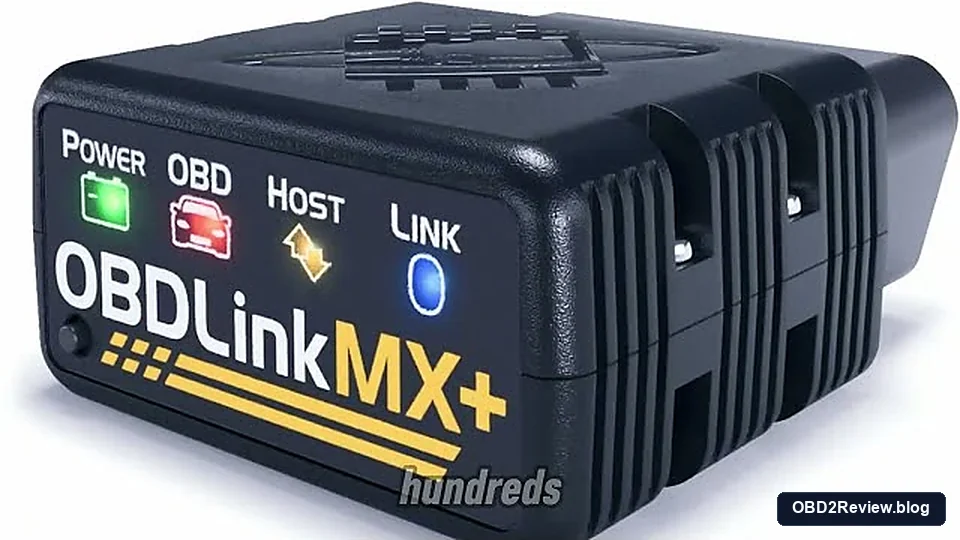
Hardware architecture dictates how deeply an adapter can communicate with various vehicle networks. The OBDLink MX+ includes proprietary chipsets supporting specialized Ford and GM protocols alongside standard OBD2.
Conversely, the BlueDriver relies on a streamlined multi-protocol design covering standard global emissions. Technicians frequently review what is mode 6 on bluedriver details when troubleshooting complex emission monitors across mixed fleets.
OBDLink MX+ features STN2120 dual-core processor supporting SW-CAN and MS-CAN protocols natively, while BlueDriver utilizes a custom proprietary microcontroller handling standard OBD-II vehicle networks without explicit specialized secondary bus switching.
Engineers designing advanced diagnostic routines must evaluate how each device processes raw bus traffic, ensuring the hardware handles heavy multiplexing demands during extended multi-ECU polling sessions across diverse vehicle architectures safely.
- OBDLink MX+ features advanced MS-CAN and SW-CAN switching capabilities.
- BlueDriver utilizes a rigid protocol stack optimized for passenger cars and light trucks.
- Both adapters connect via secure Bluetooth wireless protocols without cumbersome cables.
Evaluating Multiprotocol Bus Access
Accessing specialized body control modules requires hardware capable of handling multiple communication buses simultaneously. The MX+ excels in bridging these complex automotive networks without introducing data packet dropouts.
BlueDriver maintains steady communication on primary networks while routing secondary requests through streamlined internal pathways. This keeps basic diagnostic sessions stable across thousands of domestic and import vehicles.
- Bus switching speed directly impacts live parameter refresh intervals.
- Proper bus routing prevents communication errors during intensive module scans.
Data Refresh Rates and Real-World Diagnostic Output
Real-world diagnostic efficiency depends heavily on how fast an adapter transmits raw data packets to your display screen. The OBDLink MX+ leverages a high baud rate to maximize live parameter PID polling speeds.
BlueDriver balances transmission speeds to ensure stable operation across older smartphones. Readers can explore our bluedriver pro obd2 review for deeper benchmark metrics regarding live data polling rates.
Achieving high PID throughput requires optimized command queuing, where the OBDLink MX+ leverages advanced asynchronous serial communication to deliver rapid parameter updates vital for live data logging and graphing.
Conversely, BlueDriver prioritizes structured diagnostic report generation, which slightly limits real-time graphing fluidity compared to professional setups requiring millisecond-level data refresh intervals during aggressive track testing.
- High-speed PID polling allows mechanics to graph multiple sensors concurrently.
- Lower transmission speeds can introduce minor lag during live graphing sessions.
Benchmarking Live Data PIDs
Monitoring fast-changing parameters like fuel trims and ignition timing demands exceptional processing bandwidth. The MX+ handles high-frequency data streams exceptionally well when paired with professional graphing software.
BlueDriver presents live data cleanly within its dedicated application interface but restricts deep third-party graphing flexibility. Users must weigh raw performance against out-of-the-box software convenience.
- Graphing refresh rates affect transient fault detection capabilities.
- Third-party app compatibility unlocks advanced customization for power users.
Build Quality, Materials, and Ergonomic Form Factors
Physical durability in automotive environments requires robust plastics and securely soldered internal pins. The OBDLink MX+ features a compact, ruggedized shell designed to withstand repeated plugging cycles in tight footwells.
BlueDriver utilizes a distinctive rectangular shape with a textured grip surface for easy removal from stubborn diagnostic ports. Both units utilize industrial-grade polymers capable of resisting common shop fluids and impacts.
Physical construction relies on flame-retardant ABS plastics engineered to withstand harsh shop environments, ensuring resistance against petroleum-based shop fluids and accidental impacts under cramped dashboard spaces.
The compact low-profile form factor prevents accidental knee strikes under the dash. You can evaluate everyday ergonomics further within our bluedriver bluetooth pro obdii scan tool review covering physical design.
- Low-profile designs prevent accidental strikes from drivers' knees.
- Reinforced OBD connector pins resist bending during frequent insertions.
Power Consumption, Battery Drain, and Efficiency
Leaving a wireless adapter plugged into the diagnostic port overnight can quickly drain a weak vehicle battery. The OBDLink MX+ incorporates advanced sleep circuitry that automatically detects engine shutdown states.
BlueDriver similarly integrates power management tools to minimize parasitic draw when your ignition is off. Detailed testing inside our bluedriver pro scan tool review analyzes standby currents during multi-day parking.
Leaving diagnostic dongles plugged in overnight risks parasitic battery drain, making the OBDLink automatic sleep and wake circuitry essential for preventing vehicle battery depletion during prolonged parking periods.
BlueDriver similarly implements low-power idle states, but technicians should always verify microcurrent draws when interfacing with older vehicles lacking intelligent body control modules to prevent unexpected dead batteries.
- Automatic sleep modes reduce standby current draw to negligible levels.
- Smart wake-up triggers restore communication instantly upon engine startup.
Software Ecosystems and Proprietary App Interfaces
Hardware is only as effective as the software interface interpreting the diagnostic trouble codes. The OBDLink MX+ works seamlessly with dedicated OBDwiz software and numerous third-party applications like Torque.
BlueDriver locks users into its proprietary ecosystem, which bundles tailored repair reports written by certified mechanics. This turnkey approach provides immediate actionable fixes but limits advanced user modifications.
Software integration dictates everyday usability, with the OBDLink app offering extensive custom dashboard creation alongside unlocked third-party app compatibility for advanced diagnostic platforms like FORScan and Torque.
BlueDriver locks users into its proprietary closed ecosystem, providing verified repair reports curated by ASE certified mechanics rather than offering raw customization options for deeply technical data loggers.
- Proprietary apps often include comprehensive repair databases for common DTCs.
- Open software ecosystems allow customized dashboard creation and advanced logging.
Comparing App Usability and Feature Sets
Navigating diagnostic menus should be intuitive for both DIYers and seasoned professional technicians. BlueDriver excels by organizing sensor data, smog readiness monitors, and repair reports into clean tabs.
OBDLink provides deep configuration menus that empower users to customize PIDs, themes, and logging parameters. Advanced technicians appreciate this granular control over every aspect of the data stream.
- Structured repair reports save significant research time in the shop.
- Granular configuration menus cater to advanced diagnostic workflows.
Troubleshooting Latency, Connection Stability, and Range
Wireless interference inside modern automotive repair bays can disrupt Bluetooth pairing routines and data stability. The OBDLink MX+ maintains a robust connection link by utilizing optimized wireless transmission protocols.
BlueDriver pairs quickly with iOS and Android mobile devices using a streamlined connection wizard. Maintaining a steady connection is crucial when performing active diagnostic tests from outside the vehicle cabin.
Wireless interference inside crowded service bays can disrupt Bluetooth pairing, requiring robust encryption protocols and stable frequency hopping to maintain uninterrupted diagnostic sessions during complex troubleshooting procedures.
When connection drops occur, clearing adapter cache and verifying smartphone firmware versions usually resolves handshake failures, restoring reliable wireless data transmission across standard vehicle diagnostic boundaries efficiently.
- Strong wireless signal strength penetrates heavy vehicle dashboard materials.
- Stable pairing routines prevent frustrating disconnections during active tests.
Deciding Which Adapter Matches Your Professional Workload
Selecting the right tool ultimately depends on your specific automotive diagnostic experience and daily workload. Professionals leaning toward custom app usage will find the MX+ exceptionally versatile and fast.
DIY mechanics seeking straightforward repair verifications and clear explanations will prefer the curated BlueDriver experience. Evaluating your technical goals ensures long-term satisfaction with your diagnostic equipment investment.
Selecting the optimal diagnostic interface depends on your daily workflow requirements, balancing deep protocol flexibility against streamlined plug-and-play reporting for general automotive maintenance tasks.
Independent technicians managing diverse fleet repairs will benefit immensely from advanced multi-bus support, while DIYers prioritizing simple code definitions prefer straightforward report generation without complex menu configurations.
- Match your adapter choice to your preferred mobile operating systems.
- Consider whether you need third-party app support or turnkey repair reports.
Frequently Asked Questions
Can both adapters read enhanced manufacturer-specific diagnostic codes?
Yes, both adapters support enhanced diagnostics beyond basic emissions codes. The OBDLink MX+ covers Ford and GM extensively through specialized bus protocols, while BlueDriver offers comprehensive enhanced coverage across numerous domestic and import vehicle makes.
Will leaving either OBD2 adapter plugged in drain my car battery?
Neither adapter will drain your battery during normal parked conditions. Both units feature smart sleep modes that automatically detect when the vehicle engine is turned off, reducing current draw to safe microamp levels.
Do these Bluetooth scanners work with third-party diagnostic applications?
The OBDLink MX+ offers exceptional third-party app compatibility with software like Torque and DashCommand. Conversely, BlueDriver operates exclusively within its proprietary application ecosystem to maintain diagnostic reporting integrity.
Which adapter provides faster live data parameter refresh rates?
The OBDLink MX+ generally provides faster data throughput and PID polling speeds. This high-speed performance makes it ideal for advanced live graphing and heavy professional data logging sessions.
Are software updates free for the lifetime of these devices?
Both manufacturers provide free continuous software updates for their respective mobile applications and adapter firmware. This ensures ongoing compatibility with newer vehicle network protocols and smartphone operating system releases.