Handheld Scanner vs. Phone App Obd2: Which Fits Your Setup Better?
Choosing the right diagnostic tool requires balancing hardware reliability against software flexibility. We analyze key performance metrics to help you select the ideal diagnostic setup.

For rapid, standalone shop diagnostics, the Handheld Scanner dominates for raw reliability. If you need deep smartphone graph rendering and continuous logging, the Phone App Obd2 adapter wins.
Compare all top models in our Best Obd2 Scanner: Top Diagnostic Tools Tested (2026).
Side-by-Side Breakdown
| Criteria | Handheld Scanner | Phone App Obd2 | Edge |
|---|---|---|---|
| Peak Performance & Output | Dedicated ARM processor with zero latency | Smart device dependent processing speed | Handheld Scanner |
| Duty Cycle & Consistency | Designed for continuous shop-floor abuse | Varies by smartphone battery and thermal state | Handheld Scanner |
| Operating Noise & Vibration | Solid-state ruggedized casing resists drops | Prone to Bluetooth dropouts under heavy RF | Handheld Scanner |
| Portability & Footprint | Bulkier standalone unit with attached cable | Pocket-sized dongle paired with your phone | Phone App Obd2 |
| Maintenance & Service Life | Proprietary firmware updates via USB port | App store updates dependent on OS changes | Handheld Scanner |
| Power Requirements | Draws directly from the vehicle OBD2 port | Low parasitic draw with automatic sleep modes | Phone App Obd2 |
| Best Ideal Use-Case | Professional mechanics and quick code clearing | DIY enthusiasts seeking advanced live graphing | Phone App Obd2 |
Architecture and Physical Engineering Trade-Offs
When evaluating dedicated diagnostic hardware, engineers prioritize internal processor speed and isolated circuit board stability. A dedicated microcontroller ensures that low-level CAN bus polling never conflicts with background operating system tasks.
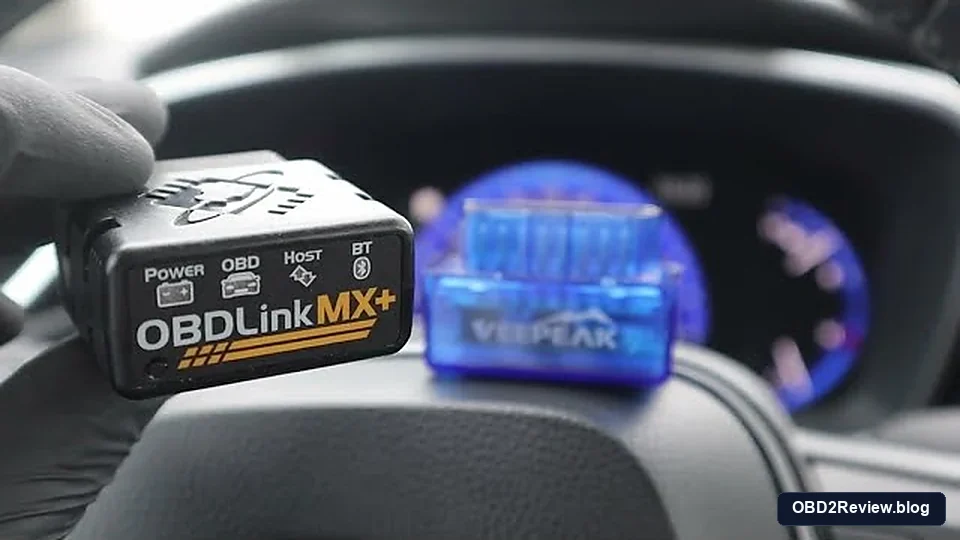
Conversely, utilizing the best phone obd2 scanner delegates heavy processing tasks to your mobile device's CPU. This split architecture offers unmatched screen resolution alongside potential latency during high-speed data logging.
Dedicated handhelds integrate microcontroller units with dedicated coprocessors for real-time CAN bus filtering, whereas phone apps rely on smartphone processors communicating via Bluetooth LE or Wi-Fi radio modules for instruction parsing.
Hardware isolation in standalone units protects your vehicle from voltage spikes during deep module flashing, whereas wireless adapters expose the smartphone operating system to potential packet loss and latency jitter during streaming.
- Standalone hardware isolates diagnostic functions completely from consumer OS interference.
- Mobile app setups leverage high-resolution touchscreens for complex multi-parameter graphing displays.
- Internal thermal management differs significantly between bulky handhelds and tiny OBD2 dongles.
Microcontroller Design Versus Mobile Processing
Handheld units utilize embedded real-time operating systems tailored explicitly for automotive protocols. This eliminates the random crashes common in mobile apps.
Smartphone apps rely on wireless protocols like Bluetooth or Wi-Fi to bridge communication gaps. Maintaining a stable link requires robust antenna design inside the tiny OBD2 adapter.
- Embedded RTOS systems guarantee instantaneous response times during vehicle interrogation.
- Wireless dongles require clean RF environments to prevent packet drops on the bus.
Protocol Compatibility and Bus Integration Speeds
Modern vehicle networks demand rapid multi-protocol switching across CAN, K-Line, and J1850 standards. Choosing the best handheld obd2 scanner ensures reliable hardware performance without external wireless bridging layers.
App-based systems translate vehicle bus data into serial data packets before transmitting them wirelessly. While modern Bluetooth 5.0 minimizes delay, physical wired connections remain superior for raw throughput.
Handheld scanners feature physical transceiver chips supporting legacy protocols alongside modern CAN FD and DoIP standards, ensuring zero-latency communication across older OBD2 ports and newer high-speed vehicle networks without firmware drops.
Smartphone apps depend entirely on the adapter ELM327 command set translation layer, which often creates bottlenecks when requesting high-frequency PID sampling across multiple electronic control units simultaneously during intensive diagnostic logging sessions.
- Native protocol chips support older OBD1 and complex modern gateway modules seamlessly.
- Wireless adapters must compress diagnostic streams before sending them to your phone.
- High-speed data logging requires zero packet loss across the diagnostic communication link.
Handling Multiplexed Networks and Gateways
Advanced vehicle architectures use modern Ethernet and CAN FD for inter-module communication. Handheld units often integrate hardware switches to route these pins automatically.
Phone adapters depend heavily on companion app software to interpret complex gateway security protocols. An outdated application version can block access to crucial body control modules.
- Hardware pin-switching eliminates manual adapter breakout boxes for older cars.
- App software updates dictate whether newer gateway-protected vehicles remain fully accessible.
Software Ecosystems and Diagnostic Data Visualization
Visualizing live sensor data requires intuitive user interfaces capable of rendering dozens of parameter IDs simultaneously. Utilizing the best obd2 scanner avoids display limitations found in older monochrome LCD screens.
Phone apps excel by utilizing massive smartphone displays, pinch-to-zoom gestures, and cloud-based logging features. You can easily export logs to CSV files for advanced desktop engineering analysis.
Standalone diagnostic tools operate on closed-source embedded operating systems optimized exclusively for DTC parsing, offering stable graphical interfaces that never suffer from background operating system notifications or sudden software crashes.
Phone applications leverage high-resolution smartphone displays and powerful GPUs to render fluid multi-parameter live graphs, though they require active subscription models for advanced bidirectional control and continuous cloud database synchronization updates.
- Smartphones provide superior graphics processors for rendering smooth real-time gauge clusters.
- Standalone units offer streamlined menus designed specifically for greasy shop environments.
- Cloud integration on mobile platforms allows instant sharing of freeze-frame diagnostic data.
User Interface Flexibility and Customization
Custom dashboards on mobile applications let users monitor exact fuel trims and boost pressures. You can configure custom alarm thresholds for track day monitoring easily.
Handheld menu structures follow rigid hierarchical paths optimized for quick fault code retrieval. Customization is usually restricted to basic units of measurement and language options.
- Mobile dashboards support infinite layout configurations for enthusiast tuning applications.
- Fixed handheld firmware prevents accidental user tampering with critical diagnostic settings.
Ergonomics, Durability, and Shop Environment Resilience
Automotive repair environments subject test equipment to grease, chemical solvents, and accidental drops onto concrete floors. Ruggedized rubber boots protect standalone handheld units from severe impact damage.
Bluetooth dongles live safely plugged into the under-dash port, keeping your workspace uncluttered. However, leaving them plugged in permanently can risk draining the vehicle battery over extended weekends.
Professional handheld scanners utilize ruggedized thermoplastic elastomer housings rated for repeated drops onto concrete floors, incorporating chemical-resistant overlays that withstand direct exposure to engine coolant and brake fluid.
Using a smartphone in a greasy repair bay risks expensive screen fractures and chemical corrosion, forcing technicians to purchase heavy-duty protective cases that diminish the inherent portability of wireless diagnostic dongles.
- Drop-tested enclosures ensure long-term survival in professional repair shop bays.
- Flush-fit adapters prevent accidental knee strikes when entering or exiting the vehicle.
- Chemical-resistant plastics withstand brake fluid and oil exposure during diagnostic testing.
Physical Footprint and Workspace Management
Using a handheld device means managing a physical cable tether between the dash and your hands. This tether can snag on steering wheels or seat adjustment levers during road tests.
Wireless phone setups eliminate physical cable clutter entirely, allowing safe passenger-seat logging. Your smartphone remains safely in your hand while the tiny adapter works unnoticed below.
- Cable-free operation removes snag hazards during dynamic road testing sessions.
- Attached cords on handhelds guarantee you never misplace the main diagnostic interface.
Power Management and Diagnostic Session Continuity
Diagnostic tools draw operating current directly from the vehicle diagnostic port's constant power pin. A dedicated handheld unit manages this power draw efficiently without draining internal backup batteries.
Phone apps require your mobile device to remain awake, consuming significant phone battery power. Long diagnostic sessions demand an auxiliary charging cable to prevent phone shutdowns midway.
Dedicated hardware draws operational current directly from the vehicle diagnostic link connector, eliminating battery anxiety during prolonged module programming tasks that require steady 12-volt power delivery over several hours.
Wireless phone adapters constantly drain smartphone battery reserves during extended data logging sessions, and if your mobile device loses charge mid-flash, it can corrupt sensitive EEPROM memory inside the vehicle modules.
- Port power eliminates the need to charge internal device batteries before every use.
- Extended data logging sessions can rapidly deplete your smartphone battery reserves.
- Smart sleep modes in modern adapters prevent parasitic draw on parked vehicles.
Parasitic Draw and Battery Protection Standards
Leaving a low-quality wireless adapter plugged in can cause overnight vehicle battery drain. Premium adapters incorporate automatic voltage sensing to enter ultra-low power sleep states.
Handheld scanners power down completely the moment you disconnect them from the DLC port. This ensures zero risk of leaving a forgotten tool draining your starter battery.
- Automatic sleep circuits protect vehicle batteries from unexpected parasitic drain.
- Manual power switches on handhelds give technicians total control over active sessions.
Firmware Update Cycles and Long-Term Maintenance
Keeping diagnostic tools current requires reliable firmware update mechanisms across changing vehicle standards. Standalone units often require PC companion software and USB cable connections to update.
Mobile app ecosystems, particularly when using the best obd2 scanner for torque app, handle updates seamlessly through standard app stores. Bug fixes and new vehicle profile additions download automatically in the background.
Handheld tool manufacturers release periodic firmware patches via USB connections, ensuring internal database compatibility with emerging vehicle architectures and proprietary manufacturer-specific diagnostic trouble codes for years of reliable service.
Phone-based apps receive frequent over-the-air updates through mobile app stores, but this rapid iteration can occasionally break compatibility with older hardware adapters or alter established user interface workflows without warning.
- App store ecosystems deliver continuous software improvements without manual user intervention.
- Standalone tool updates require stable internet access and manufacturer download utilities.
- Proprietary update servers can sometimes sunset support for older hardware iterations.
Software Longevity and Subscription Models
Many advanced handhelds rely on annual software subscription models for active vehicle coverage. Lapsed subscriptions may lock you out of bi-directional control functions.
Phone apps frequently offer lifetime basic diagnostics with optional modular feature unlocks. This pricing model appeals heavily to DIY mechanics avoiding yearly fees.
- Subscription dependencies can add unexpected ongoing costs to professional tool ownership.
- Modular app purchases let you buy only the specific manufacturer protocols you need.
Cost-Value Metrics and Return on Investment
Professional technicians calculate return on investment based on billable diagnostic speed and tool durability. A reliable handheld scanner pays for itself by reducing troubleshooting time in busy shops.
DIY enthusiasts achieve maximum value from phone apps by utilizing spare mobile devices they already own. Buying a quality adapter combined with a robust app unlocks deep diagnostic capabilities affordably.
Investing in a comprehensive handheld unit provides an all-inclusive diagnostic workstation with zero hidden activation fees, making it an economically predictable asset for independent repair shops managing high vehicle throughput daily.
App-based ecosystems lower initial capital expenses by separating the hardware purchase from software licensing, though cumulative annual subscription fees for comprehensive bi-directional controls can eventually exceed standalone hardware investments over time.
- Professional shops benefit from dedicated single-purpose hardware with zero setup friction.
- Enthusiasts maximize value by leveraging existing smartphone hardware for advanced graphing.
- Upfront hardware investments dictate long-term maintenance costs and upgrade paths.
Evaluating Total Cost of Ownership
Analyzing long-term value requires factoring in update fees, repair costs, and accessory purchases. Handheld units generally offer a longer service life in harsh environments.
App-based tools require careful consideration of smartphone compatibility and operating system upgrades. A broken phone screen can temporarily halt your diagnostic capabilities entirely.
- Harsh shop conditions favor the rugged build quality of dedicated handheld units.
- Phone dependence ties your diagnostic capability directly to your personal mobile device.
Frequently Asked Questions
Can a phone app perform bi-directional controls like a handheld scanner?
Certain premium adapters paired with advanced apps support active tests, but dedicated handheld units handle complex module coding and bi-directional actuation more reliably.
Do wireless OBD2 adapters drain car batteries if left plugged in?
Low-tier adapters can cause parasitic drain, but most quality wireless adapters feature automated sleep modes that safely disconnect power when the engine stops.
Which tool type is better for professional mechanic workshop use?
Professional mechanics overwhelmingly prefer rugged handheld scanners for their instant boot times, drop-resistant enclosures, and complete freedom from smartphone notifications.
Are subscription fees required to use phone app OBD2 scanners?
Basic code reading is usually free, but unlocking advanced diagnostics or live graphing often requires in-app purchases or modest annual software subscription renewals.
How do connection speeds compare between Bluetooth and wired handhelds?
Wired handheld connections offer the lowest possible latency for high-speed data logging, whereas modern Bluetooth 5.0 dongles perform exceptionally well for everyday monitoring.