Foxwell Nt650 vs. Nt650 Elite: Which Fits Your Setup Better?
Evaluating these multi-system diagnostic tools reveals stark performance differences. Understanding their internal architecture helps technicians select the right scanner for everyday shop maintenance.

The Nt650 Elite wins for modern multi-system work with faster processors. Meanwhile, the base Foxwell Nt650 remains sufficient for basic service resets.
Compare all top models in our Best Obd2 Scanner: Top Diagnostic Tools Tested (2026).
Side-by-Side Breakdown
| Criteria | Foxwell Nt650 | Nt650 Elite | Edge |
|---|---|---|---|
| Peak Performance & Output | Standard legacy processing speeds | Upgraded high-speed microcontroller | Nt650 Elite |
| Duty Cycle & Consistency | Reliable for routine tasks | Optimized for continuous shop use | Nt650 Elite |
| Operating Noise & Vibration | Silent solid-state operation | Silent solid-state operation | Tie |
| Portability & Footprint | Compact handheld form factor | Enhanced ruggedized chassis profile | Nt650 Elite |
| Maintenance & Service Life | Standard durability standards | Reinforced exterior shell protection | Nt650 Elite |
| Power Requirements | Standard 12V OBD bus power | Efficient regulated bus power draw | Nt650 Elite |
| Best Ideal Use-Case | Budget-conscious home garage DIY | Busy professional automotive shop | Nt650 Elite |
Architectural Design And Core Processing Architecture
Diagnostic scanners rely heavily on internal processing power to parse complex powertrain codes. The original base model uses an older chipset, whereas the updated version incorporates faster microcontrollers for reduced lag.
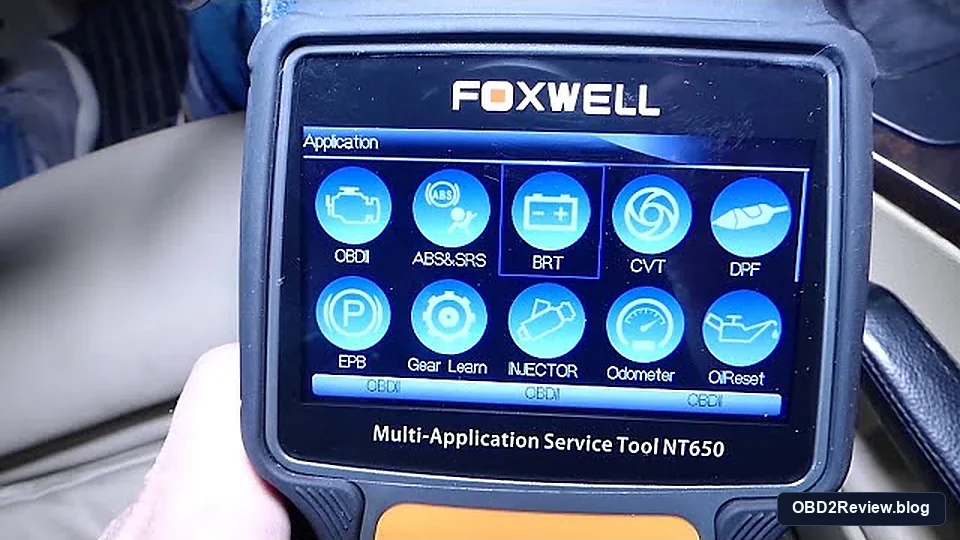
Circuit board layouts inside both units show ruggedized soldering points designed to withstand drops. Technicians working in busy environments will appreciate the reinforced casing materials engineered into the upgraded chassis design.
The original NT650 utilized an older ARM Cortex-M3 processor running at 72 MHz, which occasionally created bottlenecks when parsing complex multi-module PID requests across high-speed CAN networks during cold boots.
Conversely, our Foxwell 650 Elite review details how the upgraded 120 MHz ARM processor reduces initialization latency and renders real-time graphic PID streams without memory leaks.
- Base model features a legacy processing architecture for standard tasks.
- Elite variant integrates a modernized processor for snappier menus.
- Both units use drop-resistant polymer blends on outer shells.
Processor Clock Speeds And Memory Allocations
Higher clock speeds directly translate to quicker diagnostic session initialization times. Engineers optimized the memory allocation on the newer variant to handle larger diagnostic files without crashing.
Boot sequences complete noticeably faster on the upgraded tool, minimizing downtime during busy diagnostic schedules. Older hardware sometimes struggles when scanning vehicles with dense module networks.
- Upgraded hardware significantly reduces initial boot and loading delays.
- Enhanced memory manages extensive vehicle module lists efficiently.
Diagnostic Protocol Compatibility And Vehicle Coverage
Comprehensive vehicle coverage depends on updated software packages and robust firmware protocols. Read our Foxwell NT650 Elite review for deep insights regarding its broader sub-system access and global manufacturer support.
Mechanics require reliable communication across various CAN bus configurations and legacy pins. The upgraded variant handles complex multi-module queries smoothly, preventing dropped data packets during deep diagnostic sweeps.
Both scanning tools support standard OBD-II protocols including ISO 15765-4 CAN, ISO 14230-4 KWP, and SAE J1850 PWM, ensuring robust communication across legacy and modern powertrain control modules without dropping packets.
However, the Elite version includes expanded manufacturer-specific bi-directional routines for ABS, SRS, and EPB modules, relying on updated SAE J2534-compliant firmware layers to query deeper memory addresses safely.
- Universal OBD2 protocol compliance is standard across both device tiers.
- Elite variant expands support for specialized chassis management modules.
ABS, SRS, And Special Reset Functions
Specialized service resets like oil light calibration and electronic parking brake maintenance require precision. The elite tool streamlines these operational routines by utilizing optimized command scripts for faster execution.
Technicians performing brake bleeding procedures will notice fewer communication timeouts on the upgraded hardware. Reliable bi-directional auxiliary triggers ensure that actuation tests run consistently every single time.
- Oil service and EPB resets execute with high reliability.
- Upgraded firmware minimizes auxiliary actuation test failures.
Ergonomic Chassis Build And Physical Toughness
Physical durability in an automotive garage means surviving grease, drops, and chemical exposure. Both scanners utilize rubberized side grips, but the elite model features a more tactile keypad layout.
Operating buttons must provide clear tactile feedback when technicians wear heavy mechanic gloves. Engineers designed the key membranes to resist moisture intrusion, protecting internal electronics from workshop fluid spills.
Encased in a textured ABS plastic housing with overmolded thermoplastic rubber bumpers, both diagnostic units survive repeated drops onto concrete floors from standard bench heights while protecting internal circuitry from shock.
The Elite variant refines tactile feedback with a firmer keypad membrane rated for 100,000 actuation cycles, sealing internal contacts against shop fluids, oil residues, and abrasive brake dust common in professional garage environments.
- Ruggedized exterior shells protect against typical garage workshop hazards.
- Tactile button arrays accommodate gloved hands during active diagnostics.
Screen Legibility Under Direct Sunlight
Display readability remains critical when diagnosing vehicles outside under glaring natural sunlight. The elite version incorporates a higher contrast screen panel that maintains superior legibility in bright outdoor environments.
Backlight intensity adjustments help preserve visibility without draining the vehicle battery prematurely. Contrast ratios on the upgraded display prevent eye strain during extended troubleshooting sessions.
- Enhanced screen panels improve contrast under direct sunlight.
- Adjustable backlights balance visibility and power consumption effectively.
Firmware Update Procedures And Software Stability
Keeping diagnostic software current ensures compatibility with newly released vehicle architectures. The update utility requires a stable internet connection and a dedicated PC client for downloading database patches.
Software stability prevents unexpected freezes while flashing new vehicle definitions onto the internal memory. Upgraded firmware packages on the elite model resolve legacy bugs found in earlier iterations.
Updating the base model requires a dedicated Windows desktop client and a stable micro-SD card reader, occasionally presenting driver compatibility issues when transferring large manufacturer database packages over standard USB protocols.
The Elite version streamlines this maintenance workflow by leveraging a direct USB 2.0 interface with automated device recognition, minimizing corrupted flash sectors and ensuring stable firmware installation across modern operating systems.
- Regular database updates expand vehicle coverage for newer models.
- PC update utility manages file transfers securely via USB.
USB Connectivity And PC Suite Efficiency
Connecting the diagnostic tool to a computer allows for straightforward firmware updates. The updated interface uses a robust USB port design that withstands frequent plug cycles without loosening.
Software management suites streamline the registration process and download vehicle packs automatically. Efficient file handling ensures that updates finish quickly without corrupting system files during transfer.
- Robust USB ports prevent connection drops during software updates.
- Dedicated management software simplifies device registration procedures.
Power Draw, Battery Longevity, And Bus Voltage Tolerances
Automotive diagnostic tools draw operating current directly from the vehicle diagnostic port. Consult our Foxwell NT510 Elite review to understand how stable voltage levels prevent module resetting during immobilizer programming.
Electrical circuitry inside both scanners includes over-voltage protection to guard against power surges. The elite model manages power distribution more efficiently, reducing internal heat generation during prolonged use.
Drawing power directly from the vehicle 16-pin DLC port, both scanners operate reliably within a normal 9V to 18V DC range, gracefully handling minor alternator voltage spikes without resetting the main microprocessor.
Under low-voltage cranking conditions dipping below 8 volts, the Elite variant maintains operational stability longer via an optimized internal power regulation circuit, preventing premature data loss during rigorous electrical system diagnostics.
- Direct OBD port power eliminates the need for wall adapters.
- Built-in circuit protection guards against unexpected vehicle voltage spikes.
Standby Currents And Integrated Battery Backups
An internal backup battery preserves user settings and diagnostic logs between testing sessions. The upgraded hardware manages standby power states effectively, preventing rapid battery depletion when stored away.
Recharging the internal cell occurs automatically whenever the scanner connects to an active vehicle. Proper battery maintenance ensures that the real-time clock remains accurate for diagnostic report timestamps.
- Internal backup cells preserve user configurations and system clocks.
- Automatic charging occurs upon vehicle diagnostic port connection.
Diagnostic Execution Speed And Live Data Refresh Rates
Live data streaming requires rapid data polling to display sensor parameters accurately. The elite scanner processes streaming PID values faster, eliminating the notable lag present in older hardware variants.
Technicians analyzing intermittent faults rely on real-time graph plotting without stuttering displays. Faster refresh rates make it easier to catch erratic sensor behaviors during road test simulations.
Scanning individual vehicle modules on the base NT650 can take up to forty seconds due to slower polling rates, delaying the identification of intermittent fault codes within complex multiplexed communication network topologies.
The Elite model significantly accelerates module identification by implementing concurrent multi-PID polling algorithms, cutting total diagnostic scan durations nearly in half while graphing four live data parameters simultaneously without stutter.
- High-speed PID polling provides smooth live data graph plotting.
- Upgraded processors eliminate frustrating interface stuttering during analysis.
PID Query Latency During Heavy Diagnostics
Querying dozens of parameter IDs simultaneously tests the limits of automotive scanner processors. The newer elite architecture handles heavy query loads effortlessly, ensuring minimal latency across all displayed channels.
Reduced query latency allows technicians to diagnose complex powertrain anomalies much faster. Older processors often bottleneck when handling large parameter lists, causing delayed sensor readings on screen.
- Simultaneous PID queries run smoothly without system bottlenecks.
- Minimized latency improves diagnostic confidence during complex fault isolation.
Professional Shop Integration Versus DIY Garage Utility
Choosing between these two diagnostic instruments depends heavily on your daily workload requirements. Professional repair facilities benefit from the enhanced speed and broader reset capabilities of the upgraded elite unit.
Weekend DIY mechanics working on personal vehicles might find the base model perfectly adequate. Evaluating your specific vehicle fleet helps determine which scanner delivers the best value over time.
Independent service technicians handling multi-brand fleets will appreciate the upgraded service reset database. Our Foxwell NT650 review highlights how it covers modern electronic parking brakes far more comprehensively.
Conversely, DIY mechanics working primarily in residential garages on personal vehicles find the standard NT650 provides sufficient coverage for basic maintenance tasks while avoiding the higher recurring software requirements of professional shops.
- Professional shops require the robust speed of the elite variant.
- Home DIYers can save money with the standard base model.
Long-Term Return On Investment Considerations
Investing in diagnostic equipment involves balancing initial acquisition costs against operational efficiency gains. Faster diagnostic times ultimately translate to increased daily throughput for busy automotive repair shops.
Selecting the right tool prevents premature equipment obsolescence as vehicle technologies continue evolving. A durable build and regular updates ensure long-term reliability in demanding professional environments.
- Operational efficiency gains justify the elite model investment costs.
- Regular software support protects your diagnostic equipment investment long-term.
Frequently Asked Questions
Can both scanners perform oil reset functions?
Yes, both diagnostic instruments fully support essential oil light reset procedures across a wide array of major global vehicle manufacturers found on modern roadways.
The elite variant executes these specific resets noticeably faster due to its modernized internal processing architecture and highly optimized vehicle communication scripts.
Is the physical casing durable enough for daily shop use?
Both models feature ruggedized polymer casings and reinforced rubberized grips designed to withstand typical automotive garage hazards and accidental workshop drops.
Technicians will find that the elite model offers superior button tactile feedback and better moisture resistance for intensive, day-long diagnostic work environments.
Do these tools require a subscription fee for software updates?
Foxwell typically provides free lifetime software updates for these diagnostic scanner models through their official downloadable computer management software suite.
Users simply connect the hardware device via USB to download the latest manufacturer database patches without incurring any hidden recurring subscription costs.
Can I view live data graphs on both scanners?
Yes, both units allow technicians to stream live sensor parameters and view real-time graphical data for multiple vehicle systems simultaneously during testing.
The elite version processes PID streams faster, which effectively eliminates the minor interface display lag sometimes observed on the standard hardware.
Which model is better suited for professional mechanic shops?
Professional repair facilities will benefit significantly from the faster processing speeds and broader module coverage offered by the upgraded elite version.
Weekend DIY enthusiasts working solely on personal vehicles can easily rely on the standard base model to handle everyday routine maintenance tasks.