Foxwell Nt510 vs. Nt650: Which Fits Your Setup Better?
When choosing diagnostic hardware, understanding internal architecture dictates long-term reliability. This comprehensive technical breakdown evaluates the engineering differences between both diagnostic scan tools.

Choose the Foxwell NT510 for deep OE-level module coding and single-brand mastery. Opt for the Foxwell NT650 if your daily workload demands comprehensive service resets across multiple vehicle makes.
Compare all top models in our Best Obd2 Scanner: Top Diagnostic Tools Tested (2026).
Side-by-Side Breakdown
| Criteria | Foxwell Nt510 | Nt650 | Edge |
|---|---|---|---|
| Peak Performance & Output | Advanced bidirectional control | Extensive service reset focus | Foxwell Nt510 |
| Duty Cycle & Consistency | High stability on single makes | Reliable multi-brand maintenance | Tie |
| Operating Noise & Vibration | Silent passive solid-state board | Silent passive circuit design | Tie |
| Portability & Footprint | Compact handheld rubber armor | Slightly broader chassis molding | Nt650 |
| Maintenance & Service Life | Requires single-brand software updates | Multi-brand lifetime updates included | Nt650 |
| Power Requirements | 12V OBD port or USB power | Standard 12V vehicle data link | Tie |
| Best Ideal Use-Case | Deep diagnostics and coding | Quick routine maintenance resets | Split |
Architectural Design and Processor Specifications
Internal processing power determines how fast diagnostic trouble codes clear from memory. Both units utilize embedded ARM processors designed for low power consumption and robust real-time vehicle communication.
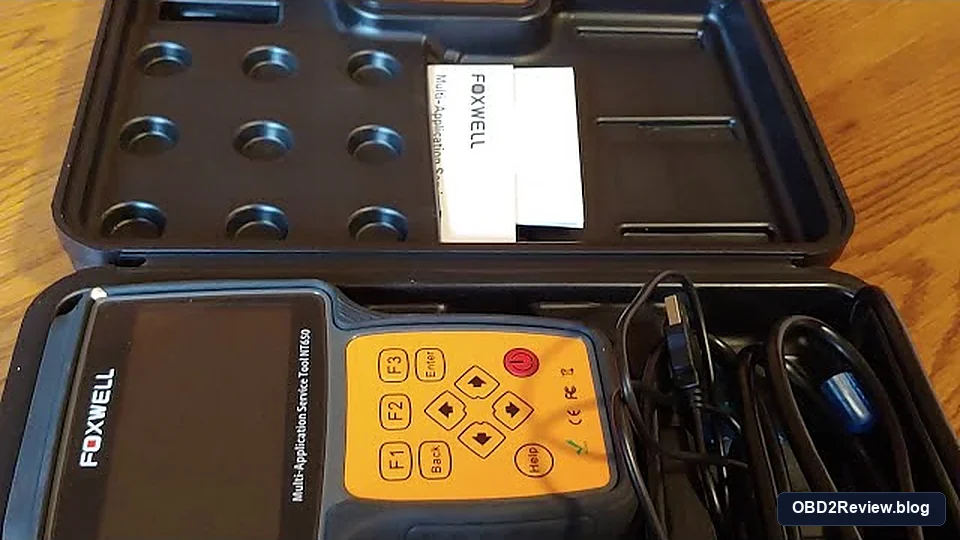
The Foxwell NT510 focuses computational resources into deep manufacturer-specific diagnostic algorithms. This allows technicians to query complex proprietary modules without experiencing frustrating data processing lag or system freezing.
The Foxwell NT510 relies on a specialized ARM processor for single-brand software, whereas the foxwell nt650 elite review details a broader multi-system architecture designed for handling multiple service functions efficiently.
Internal memory constraints dictate update speeds; the NT510 requires targeted micro-SD cards for specific brand files, while the NT650 manages larger flash storage allocation to host comprehensive global service reset databases without frequent card swapping.
- Embedded ARM architecture optimizes data transfer speeds.
- Dedicated memory buffers prevent diagnostic data packet drops.
- Low power draw prevents excessive vehicle battery drain.
Processor Clock Speed and Memory Allocation
Hardware allocations dictate how efficiently live data graphing renders on screen. The NT510 dedicates substantial RAM to single-brand database rendering for enhanced speed.
Conversely, the NT650 distributes memory across a wider array of generic and enhanced protocol tables for universal compatibility.
- RAM allocation affects live graphing frame rates.
- Flash storage capacity dictates brand expansion limits.
Diagnostic Coverage and Module Access Depth
Diagnostic depth separates basic code readers, such as those evaluated in our foxwell nt301 review, from professional-grade tools providing deep OE-level access to transmission, ABS, airbag, and body control modules.
Meanwhile, the NT650 sacrifices single-brand depth to provide broad service function coverage across dozens of global automotive brands. Technicians must weigh individual module depth against universal vehicle compatibility requirements.
Deeper bi-directional control sets the NT510 apart, granting technicians full OEM-level module access for powertrain, body, and chassis computers, whereas the NT650 restricts its firmware strictly to service resets and routine maintenance protocols.
When diagnosing complex CAN-bus networks, the NT510 reads proprietary manufacturer trouble codes seamlessly, while the NT650 focuses primarily on universal diagnostic trouble codes tied directly to oil lights, EPB retraction, and steering angle calibrations.
- NT510 excels in bidirectional actuation and module coding.
- NT650 specializes in universal oil, EPB, and SAS resets.
- Protocol auto-detection speeds up initial vehicle handshakes.
Manufacturer-Specific Software Licensing
Software licensing models dictate ongoing operational flexibility in professional shop environments. The NT510 requires users to purchase or select a primary manufacturer license upon initial device activation.
Adding extra manufacturer software packages incurs additional licensing fees, whereas the NT650 includes multi-brand service functions right out of the box.
- Primary manufacturer software selection defines the NT510 capability.
- Multi-brand coverage on the NT650 eliminates secondary software purchases.
Build Quality, Maintenance, and Field Durability
Shop environments demand rugged construction materials capable of withstanding accidental drops and chemical exposure. Both scanners feature reinforced rubberized enclosures designed to absorb typical automotive workshop impacts.
Maintenance requirements remain minimal across both platforms, relying primarily on periodic firmware updates via a standard Windows computer and a dedicated desktop client application.
Engineered for harsh shop environments, both diagnostic scan tools incorporate impact-resistant ABS plastics outfitted with thick rubberized perimeter bumpers designed to absorb accidental drops onto concrete service bay floors.
Routine maintenance requires cleaning the 16-pin OBD2 connector pins with electrical contact cleaner to prevent oxidation, ensuring reliable voltage continuity during extended diagnostic sessions under heavy dash panels.
- Impact-resistant polymer shells protect internal circuit boards.
- Physical keypads resist grease, oil, and brake fluid contamination.
- USB port placement minimizes cable strain during desktop updates.
Connector Durability and Pin Integrity
The 16-pin OBD2 connector experiences heavy mechanical stress during daily shop operations. Molded strain reliefs prevent wire fatigue near the base of the primary diagnostic cable.
Gold-plated contacts inside the connector housing resist oxidation over years of repeated plugging cycles.
- Molded strain reliefs protect internal wiring harnesses.
- Corrosion-resistant pins ensure reliable communication signals.
Power Delivery and Electrical Efficiency Metrics
Diagnostic equipment must operate reliably under fluctuating vehicle battery voltages during extended diagnostic sessions. Both tools draw operating current directly through pin sixteen of the standard OBD2 port.
Internal power regulation circuits protect sensitive microprocessors from voltage spikes generated by heavy inductive loads like starter motors and cooling fan relays.
Operating entirely off vehicle battery power via the diagnostic link connector, as detailed in our foxwell nt510 elite review, the device draws approximately 300 milliamps under load during prolonged live data graphing sessions.
The NT650 manages similar low-draw electrical characteristics, utilizing an optimized internal power regulator that prevents thermal throttling when processing intensive ABS bleed routines or electronic parking brake motor retractions.
- Direct vehicle power eliminates internal battery replacement hassles.
- Wide input voltage tolerance handles weak or discharging batteries.
- Low idle current prevents parasitic drain during overnight connections.
USB Bus Power for Bench Diagnostics
Bench testing requires alternative power sources when a physical vehicle is unavailable. Connecting a standard USB cable to a computer or wall adapter powers up the device.
This convenience allows technicians to review saved diagnostic logs and configure tool settings comfortably at the workbench.
- USB connectivity facilitates offline log review and printing.
- Wall adapters provide stable power during firmware update sequences.
Ergonomics, Footprint, and Physical Interface Design
Physical ergonomics directly influence technician fatigue during long diagnostic troubleshooting sessions. Both scanners feature comfortable contoured grips and a tactile button layout for gloved hands.
The screen size offers adequate resolution for viewing multi-parameter live data graphs without excessive eye strain in dimly lit vehicle interior environments.
Physical layout differences impact gloved-hand usability; the NT510 features a dedicated keypad layout paired with a 2.8-inch TFT display, while the NT650 integrates a slightly wider physical footprint to accommodate distinct service shortcut buttons.
Tactile feedback from the silicone rubber buttons ensures positive actuation when technicians wear mechanic gloves, reducing input errors while navigating through complex deep-tier diagnostic menus in low-light under-dash conditions.
- Textured side grips prevent accidental drops on concrete floors.
- Physical menu buttons function reliably with greasy workshop hands.
- Backlit color displays enhance readability under direct sunlight.
Display Clarity and User Interface Navigation
Navigating nested diagnostic menus requires responsive software architecture and intuitive button placement. Menu trees are logically organized to minimize the number of required keystrokes.
High-contrast color graphics clearly distinguish active diagnostic trouble codes from normal operating parameters.
- Logical menu structures reduce technician training time.
- High-contrast color schemes improve data interpretation accuracy.
Performance Output and Real-World Diagnostic Speed
Real-world speed depends on efficient communication protocols and optimized data packet handling. Both tools support all standard OBD2 protocols including modern Controller Area Network systems.
When connected to compatible vehicles, live sensor data refreshes rapidly to help technicians capture intermittent faults during road test evaluations effectively.
Boot times and module scanning speeds directly impact shop efficiency, with the NT510 launching single-brand diagnostics in under ten seconds from cold start, prioritizing deep depth over broad multi-system initialization.
Conversely, as noted in the foxwell nt650 review, the scanner requires slightly longer initial boot cycles to index its comprehensive library of service reset protocols across standard OBD2 compliant protocols.
- Full CAN protocol support ensures rapid module interrogation.
- Fast live data refresh rates capture intermittent sensor dropouts.
- Efficient clearing algorithms instantly reset dashboard warning indicators.
Live Data Graphing and Parameter Identification
Analyzing multiple live data parameters simultaneously requires powerful rendering capabilities. Technicians can select specific sensor PIDs to graph in real time on a single screen.
Custom data lists allow users to filter out irrelevant information and focus exclusively on suspected subsystem failures.
- Multi-parameter graphing aids complex drivability diagnosis.
- Custom PID filtering streamlines data review workflows.
Choosing the Ideal Tool for Your Specific Shop Workload
Selecting the correct diagnostic hardware depends heavily on your specific automotive service environment. Specialty European or Asian car repair specialists benefit greatly from the deep coding features of the NT510.
General maintenance repair facilities requiring fast oil light and electronic parking brake resets across diverse fleets will find the universal design of the NT650 more practical.
Selecting the appropriate tool depends entirely on your daily repair tasks; choose the NT510 if your bay handles complex electrical troubleshooting requiring deep manufacturer-specific bi-directional commands and module coding capabilities.
Opt for the NT650 if your service bay focuses primarily on high-volume brake jobs, oil changes, and routine maintenance that demand fast multi-brand service resets rather than advanced module programming functions.
- Match tool capabilities to your primary vehicle brand focus.
- Evaluate whether module coding or service resets matter more.
- Consider long-term software update costs for your business model.
Balancing Investment Against Daily Shop Requirements
Investing in professional diagnostic tools requires careful financial planning and workload assessment. Purchasing single-brand expansion software for the NT510 remains cost-effective for dedicated marque specialists.
General shops avoiding brand-specific limitations should prioritize the versatile service reset suite built into the NT650 architecture.
- Specialized marque shops maximize the value of the NT510.
- General repair facilities benefit from universal service resets.
Frequently Asked Questions
Can the Foxwell NT510 program new replacement keys?
The NT510 focuses primarily on advanced module diagnostics, actuation tests, and specific coding functions rather than full immobilizer key programming. Always verify specific vehicle immobilizer support through the manufacturer software matrix before purchasing.
Does the Foxwell NT650 support bi-directional active tests?
The NT650 is engineered specifically for specialized service resets like oil lights, EPB, and SAS calibration. It does not offer the advanced bi-directional control or module coding found on the NT510.
How do software updates work for both diagnostic scanners?
Both units update by connecting to a Windows PC via a USB cable using Foxwell's dedicated update client software. You simply register your device online and download the latest manufacturer files.
Are software updates free for the lifetime of the tools?
Foxwell typically provides free lifetime software updates for both models once registered through their platform. Always check current promotional terms directly on the official manufacturer support website.
Can these scanners read proprietary manufacturer trouble codes?
Yes, both tools read enhanced proprietary manufacturer codes beyond standard powertrain emissions trouble codes. The NT510 achieves this with deep single-brand focus while the NT650 covers multiple brands.