Foxwell Nt201 vs. Nt301: Which Fits Your Setup Better?
Selecting between these entry-level diagnostic tools requires evaluating your exact troubleshooting scope. We analyze core differences to optimize your garage toolkit.

The Foxwell NT301 wins for comprehensive live data graphing and faster processing speeds. Choose the NT201 only if you need basic code clearing on a tight budget.
Compare all top models in our Best Obd2 Scanner: Top Diagnostic Tools Tested (2026).
Side-by-Side Breakdown
| Criteria | Foxwell Nt201 | Nt301 | Edge |
|---|---|---|---|
| Peak Performance & Output | Standard MCU speed | Enhanced processor chip | Nt301 |
| Duty Cycle & Consistency | Moderate diagnostic sessions | Extended multi-car usage | Nt301 |
| Operating Noise & Vibration | Silent handheld operation | Silent tactile button feedback | Tie |
| Portability & Footprint | Compact lightweight chassis | Ergonomic rubberized grip | Nt301 |
| Maintenance & Service Life | Standard strain relief | Reinforced cable harness | Nt301 |
| Power Requirements | Vehicle OBD port powered | Vehicle OBD port powered | Tie |
| Best Ideal Use-Case | Basic DIY code reading | Advanced live sensor analysis | Nt301 |
Diagnostic Processing Architecture and Speed
Internal hardware dictates how fast a diagnostic tool boots up and clears trouble codes. The NT301 processor handles data streams slightly faster than its entry-level counterpart.
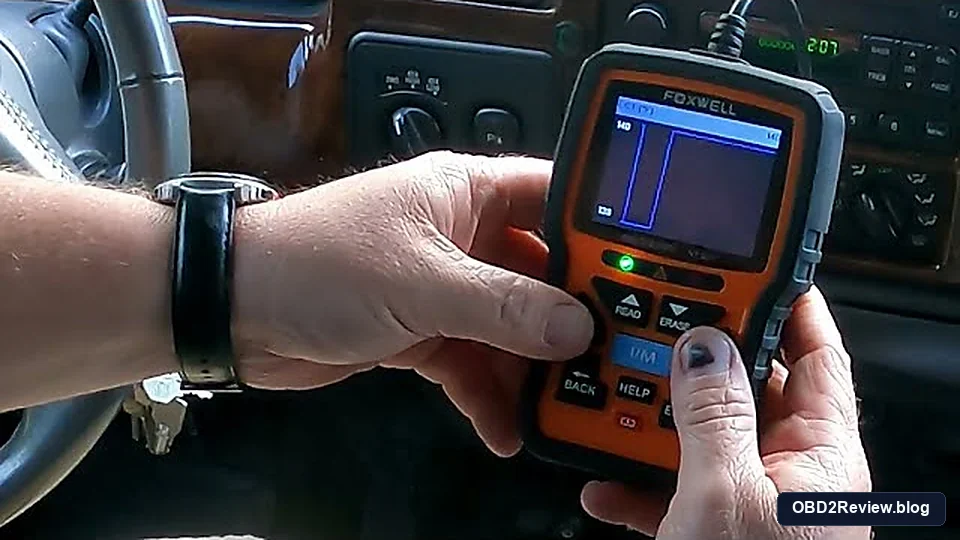
Boot times directly impact daily shop efficiency when switching between different vehicles. Technicians notice a measurable lag reduction during cold boots on the upgraded hardware variant.
Memory allocation also determines how many parameter IDs can be requested simultaneously. Slower microcontrollers might drop frames when polling multiple high-frequency engine sensors at once.
- Faster microcontrollers reduce scan wait times.
- Improved memory handling prevents data packet drops.
- Quick boot sequences streamline multi-car diagnostics.
Processor Load Management
Heavy diagnostic queries push internal chips to their thermal and processing limits. As detailed in our Foxwell NT301 OBD2 scanner lab review, optimized firmware helps prevent freezing during complex communication sequences.
Older architectures may struggle when requesting extensive freeze frame snapshots concurrently. Modernized boards maintain stable communication protocols without triggering unexpected device resets.
- Firmware optimization ensures stable protocol handshakes.
- Thermal management prevents mid-scan processing crashes.
Cold Boot Efficiency
Plugging into an unpowered vehicle data link connector initiates the startup routine. Fast initialization saves valuable minutes during rapid pre-purchase inspections and triage.
Waiting for slow operating systems can disrupt workflow continuity in busy service bays. Snappy initialization sequences keep professional technicians moving quickly between repair bays.
- Rapid initialization aids quick vehicle triage.
- Efficient startup routines improve overall bay productivity.
Display Clarity and Ergonomic Layout
Screen real estate and panel resolution dictate how easily technicians read diagnostic trouble codes. A bright color display improves visibility inside dimly lit automotive service bays.
Viewing angles matter significantly when working under dark dashboards or tight footwells. Matte screen finishes help reduce annoying glare from overhead fluorescent shop lighting fixtures.
Physical button placement must allow comfortable one-handed operation during active road tests. Tactile rubber keys provide positive feedback even when operators wear greasy workshop gloves.
- Color screens enhance DTC readability in low light.
- Matte finishes minimize glare from overhead shop lights.
- Tactile buttons ensure reliable input with greasy gloves.
Screen Resolution Dynamics
High-resolution panels allow multiple data parameter graphs to fit cleanly onscreen. Cramped displays force users to scroll endlessly through truncated diagnostic text strings.
Sharp font rendering reduces eye strain during long troubleshooting sessions under dashboards. Clear graphical representations help spot erratic sensor voltage drops instantly.
- Crisp fonts prevent eye fatigue during lengthy scans.
- Higher resolution accommodates clearer data graphs.
Chassis Ergonomics
Handheld scan tools require secure grip contours to prevent accidental drops onto concrete. According to our best Foxwell NT301 handheld scanner guide, ergonomic indentations support natural hand positioning during prolonged diagnostic procedures.
Balanced weight distribution reduces wrist fatigue when holding the unit at awkward angles. Robust plastic housing materials protect internal components from typical garage impacts.
- Contoured grips prevent accidental drops on concrete.
- Balanced weight distribution minimizes operator wrist fatigue.
Live Data Graphing Capabilities
Real-time sensor monitoring separates basic code readers from true diagnostic instruments. For a closer look at capabilities, check out our Foxwell NT301 code reader review before buying.
Simultaneous parameter plotting helps correlate fuel trim adjustments with oxygen sensor voltage. Slow refresh rates can mask rapid transient spikes during aggressive throttle blips.
Data recording features let users capture intermittent faults during actual road tests. Reviewing recorded logs back at the workbench simplifies complex drivability diagnosis immensely.
- Graphing reveals intermittent faults and signal dropouts.
- Multi-parameter plots correlate fuel trim and O2 data.
- Data logging captures transient anomalies during road tests.
Refresh Rate Performance
High refresh frequencies capture fast mechanical changes in variable valve timing. Sluggish update rates miss critical microsecond anomalies in ignition waveform data.
Efficient OBD2 polling speeds ensure that live graphs update smoothly onscreen. Technicians rely on fluid visual feedback to pinpoint faulty throttle position sensors.
- Fast refresh rates capture microsecond sensor anomalies.
- Fluid visual feedback aids throttle sensor diagnosis.
Data Logging Depth
Sufficient internal memory buffer size is required to record lengthy drive cycles. Storing multiple parameter IDs simultaneously demands robust data handling architecture.
Reviewing captured frames frame-by-frame uncovers elusive intermittent fault triggers easily. Exporting logs for offline analysis enhances advanced shop documentation procedures.
- Large memory buffers store extended drive cycle logs.
- Frame-by-frame review uncovers elusive intermittent triggers.
Vehicle Coverage and Protocol Support
Universal OBD2 compliance ensures basic emissions readiness checks work across modern fleets. Proprietary protocols require deep software libraries to access enhanced body control modules.
CAN bus compatibility is mandatory for all vehicles manufactured after specific regulatory years. Comprehensive protocol decoding guarantees seamless communication with diverse import brands.
Regular firmware updates expand vehicle database coverage for newly released model years. Failing to update software libraries can result in communication failures on recent cars.
- CAN bus compatibility covers modern global vehicle fleets.
- Extensive software libraries decode enhanced module data.
- Regular updates ensure compatibility with recent model years.
Emissions Readiness Testing
I/M readiness hotkeys provide instant feedback on catalytic converter monitor status. Quick inspection checks help prevent failed state smog tests for local customers.
Interpreting readiness flags accurately saves countless hours of unnecessary diagnostic guesswork. Clear pass or fail indicators streamline pre-inspection garage workflow routines.
- Dedicated hotkeys verify state smog monitor status.
- Clear pass indicators streamline pre-inspection workflows.
Protocol Handshake Speed
Establishing communication with stubborn vehicle computers requires robust protocol translation chips. Fast handshaking reduces the frustration of dropped connection error messages.
Older vehicle architectures demand specialized ISO and PWM communication fallback modes. Reliable protocol switching ensures universal connectivity across legacy domestic trucks.
- Robust chips reduce dropped connection error messages.
- Reliable fallback modes ensure legacy vehicle connectivity.
Build Quality and Cable Durability
Automotive service environments subject testing equipment to severe mechanical and chemical abuse. Ruggedized rubber bumpers protect diagnostic casings from drops and fluid exposure.
Molded cable strain reliefs prevent internal copper wire fatigue near the connector plug. Constant bending under dashboards stresses weak solder joints without proper reinforcement.
Replaceable OBD2 cable assemblies extend the operational lifespan of the diagnostic unit. High-strand copper count wiring ensures minimal electrical resistance during communication.
- Ruggedized bumpers protect against harsh shop impacts.
- Strain reliefs prevent internal wire fatigue at plugs.
- Replaceable cables significantly extend tool operational lifespan.
Connector Pin Integrity
Gold-plated OBD pins resist oxidation and maintain solid electrical contact over time. Loose pins create intermittent connection dropouts that disrupt long diagnostic sessions.
Rigorous insertion testing guarantees thousands of smooth connect and disconnect cycles. Durable male pins withstand heavy-handed use in busy commercial repair facilities.
- Gold-plated pins resist oxidation and corrosion.
- Durable male pins withstand thousands of insertions.
Housing Impact Resistance
Polycarbonate enclosure plastics absorb kinetic shock during accidental workbench falls. Sealed button membranes prevent destructive shop fluids from seeping inside electronics.
Quality manufacturing tolerances eliminate rattling seams and loose internal circuit boards. Dependable physical construction is essential for tools stored in mobile service vans.
- Polycarbonate plastics absorb kinetic drop shock.
- Sealed membranes block destructive automotive fluid spills.
Firmware Update Process and Usability
Keeping diagnostic tools current requires straightforward PC update companion software applications. Clunky update utilities frustrate technicians attempting to download recent vehicle databases.
USB interface speeds dictate how quickly large firmware packages transfer to the tool. Cross-platform compatibility ensures that update software runs smoothly on various operating systems.
Clear on-screen version numbers help technicians verify current software patch levels easily. Automated update notifications prevent users from running outdated diagnostic databases.
- Simple software utilities streamline database update downloads.
- Fast USB transfer speeds reduce firmware update times.
- Version indicators help verify installed software patch levels.
Software Utility Design
Intuitive desktop applications guide users step-by-step through the flashing procedure. Poorly coded update tools frequently corrupt device memory during unexpected disconnections.
Reliable error recovery protocols restore factory firmware if an update fails mid-stream. Streamlined software interfaces save time for busy shop owners managing tools.
- Intuitive apps guide users through flashing steps.
- Error recovery protocols restore failed update procedures.
Update Frequency Policies
Manufacturers release regular patches to fix bugs and add new vehicle protocols. Lifetime free update policies provide exceptional long-term value for DIY mechanics.
Access to current diagnostic databases prevents compatibility issues with brand-new cars. Consistent software support protects your initial equipment investment for years.
- Regular patches resolve bugs and add protocols.
- Lifetime free updates maximize long-term equipment value.
Professional Workload and Diagnostic Scope
Determining the right scan tool depends heavily on your daily diagnostic workload. Weekend DIYers have vastly different expectations compared to flat-rate professional technicians.
Advanced troubleshooting requires deep data graphing rather than simple code reading. As highlighted in our Foxwell NT710 review, entry-level devices excel at quick emissions checks but lack advanced system testing.
Evaluating your future repair needs prevents outgrowing basic equipment too quickly. Investing in superior processing power pays dividends during complex drivability diagnostics.
- Workload requirements dictate optimal diagnostic feature sets.
- Advanced repairs demand deep graphing over basic codes.
- Forward-thinking purchases prevent outgrowing basic diagnostic tools.
DIY Versus Shop Demands
Home mechanics need straightforward code clearing for occasional garage repairs. Professional shops require rapid multi-vehicle turnaround and comprehensive live data graphing.
Balancing upfront equipment cost against performance features ensures optimal resource allocation. Choosing the correct model prevents frustration during difficult troubleshooting tasks.
- Home mechanics prioritize simple code clearing features.
- Shops demand rapid multi-vehicle diagnostic turnaround times.
Future-Proofing Your Toolkit
Automotive technology evolves rapidly with new electronic control modules and protocols. Selecting a slightly more capable scanner safeguards against upcoming industry diagnostic changes.
Robust hardware platforms accommodate future software expansions without lagging performance. Making the right initial choice saves money on premature tool replacements.
- Advanced hardware accommodates future protocol expansions.
- Smart initial choices prevent premature equipment replacement.
Frequently Asked Questions
What is the primary operational difference between these two scanners?
The NT301 offers faster processing speeds and superior live data graphing capabilities. The NT201 functions primarily as a basic code reader for quick diagnostics.
Do both models require external batteries to operate normally?
Neither scanner requires external batteries or charging cables for daily operation. Both units draw power directly through the vehicle OBD2 data link connector.
Can I update the diagnostic software on both devices for free?
Both models support lifetime free updates via a standard USB connection. You simply download the companion software application onto your Windows personal computer.
Will these tools clear ABS and airbag warning dash lights?
These specific entry-level models focus strictly on powertrain engine codes. They cannot access advanced modules like ABS, SRS body controllers, or transmission computers.
Which scanner is better suited for intermittent engine misfire diagnosis?
The NT301 is significantly better due to its enhanced graphing refresh rate. It visualizes live sensor data smoothly to capture transient fault triggers.