Bluedriver vs. Torque: Which Fits Your Setup Better?
Two distinct diagnostic philosophies clash in this hardware versus software analysis. We evaluate speed, data fidelity, and practical garage utility.

Choose Bluedriver for seamless proprietary hardware integration and manufacturer-level DTC sweeps. Select Torque Pro if you require highly customizable dashboards and deep PID monitoring.
Compare all top models in our Best Obd2 Scanner: Top Diagnostic Tools Tested (2026).
Side-by-Side Breakdown
| Criteria | Bluedriver | Torque | Edge |
|---|---|---|---|
| Peak Performance & Output | High diagnostic fidelity | Extensive custom PID support | Bluedriver |
| Duty Cycle & Consistency | Stable Bluetooth LE link | Dependent on ELM327 dongle | Bluedriver |
| Operating Noise & Vibration | Silent flush-mount design | Varies by adapter hardware | Bluedriver |
| Portability & Footprint | Compact single-unit sensor | Split software and generic hardware | Bluedriver |
| Maintenance & Service Life | Sealed proprietary module | Modular adapter replacement | Torque |
| Power Requirements | Low-draw sleep mode | Potential parasitic drain | Bluedriver |
| Best Ideal Use-Case | Quick repairs and reports | Real-time gauge monitoring | Split |
Diagnostic Architecture and Protocol Handling
Modern vehicle networks demand rapid communication across multiple buses. Bluedriver utilizes a matched Bluetooth adapter paired with an optimized mobile app.
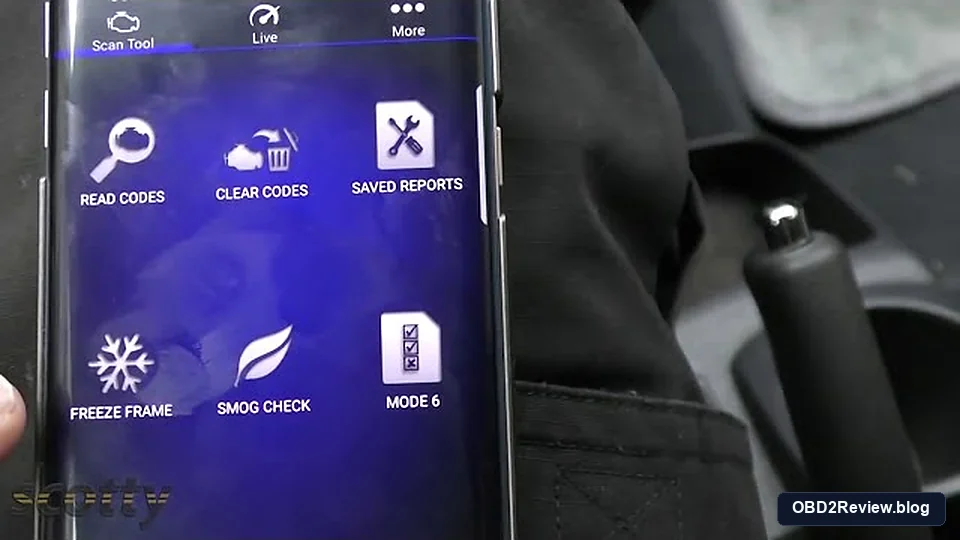
Conversely, Torque pairs a generic ELM327 OBD2 adapter with an endlessly configurable Android application. This foundational difference shapes your entire diagnostic workflow.
Understanding how each system processes standard and enhanced parameter IDs determines your diagnostic efficiency in professional or enthusiast garage settings.
BlueDriver utilizes a closed, dedicated hardware dongle coupled with a proprietary app architecture, ensuring seamless firmware updates and stable ISO 15765-4 CAN communication across modern domestic and import vehicles without manual configuration.
Conversely, Torque Pro relies on open-source ELM327 Bluetooth adapters paired with an Android application, demanding manual baud rate optimization and PID configurations to prevent packet drops during heavy multi-sensor logging sessions.
Technical engineers must evaluate protocol handling robustness when diagnosing intermittent bus errors, as proprietary dongles manage exception routines internally while generic adapters expose raw buffer overruns directly to the user interface.
- Matched hardware ensures reliable protocol handshakes.
- Generic adapters introduce variable latency issues.
- Proprietary databases streamline trouble code lookups.
Bus Communication Speeds
CAN bus speed directly impacts live data refresh rates during diagnostics. Bluedriver maintains steady packet delivery by utilizing advanced what is mode 6 guide routines for precise fault isolation.
Using Torque with budget adapters often results in dropped frames and lagging sensor updates across complex vehicle networks.
- Optimized firmware reduces packet loss.
- Budget ELM327 clones limit baud rates.
Performance and Real-World Output
Evaluating diagnostic tools requires testing actual data output under load. Bluedriver excels at delivering verified repair reports directly from ASE technicians.
Meanwhile, Torque provides unmatched raw telemetry for custom dashboards. Users can monitor boost pressure, air-fuel ratios, and transmission temperatures simultaneously.
Both approaches serve different diagnostic goals effectively depending on whether you need quick fault isolation or deep performance tracking.
Real-world data refresh rates dictate how effectively a diagnostic tool captures transient faults, with BlueDriver delivering consistent updates via our comprehensive bluedriver bluetooth pro review for standard parameter IDs.
Torque Pro compensates for hardware variability by offering adjustable communication speeds, allowing advanced users to push high-speed polling through quality adapters for near-real-time live graphing and customizable dashboard visualization.
Diagnostic latency directly impacts technician efficiency during road tests, making it crucial to select a platform whose output pipeline minimizes display lag when monitoring live fuel trims and oxygen sensor voltages.
- Verified repairs streamline DIY troubleshooting steps.
- Raw telemetry empowers advanced performance tuning.
- Data export formats differ significantly between platforms.
Live Data Refresh Rates
Real-time sensor monitoring depends heavily on adapter processing power. Bluedriver balances refresh speeds to prevent buffer overflows during extended logging sessions.
Configuring high-frequency PID polling in Torque requires selecting quality adapters to avoid freezing the data stream.
- Balanced polling prevents buffer overflows.
- High-frequency logging demands robust hardware.
Build Quality, Maintenance and Durability
Garage environments subject diagnostic tools to drops, grease, and extreme temperatures. Bluedriver features a robust, impact-resistant plastic housing built for daily shop use.
The Torque ecosystem relies on your choice of Bluetooth adapter, meaning durability varies wildly depending on the specific hardware evaluated in our best obd2 scanner for torque app analysis.
Proper maintenance involves keeping connector pins clean and storing modules away from direct sunlight when not diagnosing vehicles.
Physical construction standards dictate long-term reliability in greasy shop environments, featuring polycarbonate enclosures designed to resist impact damage, solvent exposure, and continuous insertion cycles inside tight under-dash OBD2 ports.
Maintenance requirements for diagnostic hardware primarily involve keeping the connector pins free of oxidation and debris, ensuring uninterrupted electrical continuity across the primary power and ground circuits of the vehicle.
When utilizing generic Bluetooth adapters with Torque, build quality varies wildly across manufacturers, necessitating careful inspection of solder joints to prevent intermittent connectivity caused by thermal expansion inside hot cabins.
- Impact-resistant enclosures protect internal circuitry.
- Dongle build quality varies across third-party manufacturers.
- Regular pin cleaning prevents intermittent connection faults.
Physical Enclosure Standards
Ergonomic fitment under the dashboard prevents accidental impacts from driver knees. Bluedriver sits flush in most standard OBD2 ports.
Larger generic adapters used with Torque can protrude dangerously and risk snagging during vehicle entry or exit.
- Flush-mount designs prevent accidental damage.
- Protruding dongles create ergonomic hazards.
Operating Noise, Efficiency and Footprint
Diagnostic equipment should operate silently without drawing excessive electrical current. Bluedriver maintains an extremely low standby draw to protect vehicle batteries.
Because Torque depends on external adapters, power efficiency fluctuates based on the internal circuitry of your chosen hardware, detailed within our best obd2 reader for torque pro guide.
Minimizing parasitic battery drain ensures your project car or daily driver starts reliably after long diagnostic evaluations.
Electrical efficiency is paramount for diagnostic dongles left plugged in permanently, utilizing low-power sleep modes to prevent parasitic battery drain during extended vehicle parking periods and standby operations.
The physical footprint of a scan tool dictates whether it obstructs driver leg movement or contacts lower dash trim panels during aggressive steering maneuvers and everyday urban commuting tasks.
Acoustic silence is naturally maintained by modern solid-state interface hardware, generating zero operational noise while continuously processing high-frequency data streams across the complex vehicle network communication architecture.
- Low standby current prevents dead batteries.
- Third-party adapters may have poor sleep modes.
- Compact footprints ensure seamless port integration.
Parasitic Draw Management
Leaving an OBD2 scanner plugged in overnight can drain weak batteries. Bluedriver enters a deep sleep mode automatically after engine shutdown.
Certain cheap ELM327 adapters lack proper power management and continue drawing current until manually unplugged.
- Automatic sleep modes protect vehicle batteries.
- Unmanaged adapters cause gradual power drains.
Customization and Data Logging Capabilities
Data enthusiasts crave deep customization options for tracking obscure engine parameters. Torque is the undisputed king of custom dashboards and PID creation.
In contrast, Bluedriver focuses on a streamlined, user-friendly interface designed for rapid code reading and clear report generation.
Choosing between these systems depends entirely on whether you prefer deep tinkering or straightforward diagnostic answers.
Advanced data logging requires robust internal buffering and export functions, allowing technicians to record CSV files containing custom PID parameters for deep powertrain analysis and post-processing in spreadsheet software.
Torque Pro excels in raw UI customization, enabling users to build bespoke virtual dashboards, write custom formulas, and integrate external GPS plugins for comprehensive track-day performance telemetry tracking.
BlueDriver approaches customization through curated diagnostic reports and built-in verified repair database matching, prioritizing straightforward troubleshooting workflows over highly user-programmable telemetry displays and customized gauge clusters.
- Endless gauge layouts appeal to tuners.
- Streamlined reports help novice DIYers.
- CSV export options facilitate offline data analysis.
Dashboard Configuration Flexibility
Building custom gauges gives you precise visual feedback during dyno runs or track days. Torque lets you arrange dials, graphs, and digital readouts freely.
Bluedriver offers standard live data views that prioritize readability over aesthetic customization.
- Visual dials enhance track-day monitoring.
- Standard layouts prioritize clear readability.
Power Requirements and Hardware Compatibility
System compatibility dictates how easily a tool integrates with your mobile devices. Bluedriver supports both iOS and Android platforms seamlessly out of the box.
The Torque application is strictly tailored for Android operating systems, limiting iOS users who want advanced gauge customization.
Verifying device OS compatibility before purchasing prevents frustrating pairing issues in the garage.
Operating voltage parameters for OBD2 interfaces typically draw directly from the vehicle 16-pin diagnostic link connector, requiring stable circuit protection against transient load dumps and alternator spikes.
Hardware compatibility splits heavily along operating system lines, with BlueDriver supporting both iOS and Android platforms natively, while Torque Pro remains strictly confined to Android devices due to application architecture constraints.
Professional technicians must verify that mobile device Bluetooth stacks fully support the chosen adapter protocols, preventing frustrating pairing failures during time-sensitive vehicle diagnostics within busy commercial automotive repair shop environments.
- Cross-platform support ensures broad device usability.
- Android-exclusive software limits Apple ecosystem users.
- Bluetooth pairing stability dictates overall user satisfaction.
Operating System Limitations
App store availability shapes long-term software updates and feature rollouts. Bluedriver provides synchronized updates across mobile platforms.
Torque relies heavily on Android openness, which allows for powerful third-party plugin integrations.
- Synchronized updates maintain feature parity.
- Third-party plugins expand core functionality.
Which Option Fits Your Workload Best
Matching diagnostic tools to your daily tasks prevents wasted investment and frustration. Bluedriver suits general maintenance, family fleet upkeep, and quick repairs.
Advanced tuners and motorsport enthusiasts will find Torque far better suited for tracking custom engine metrics and tuning parameters.
Assess your technical expertise and vehicle monitoring needs carefully before committing to either diagnostic platform.
Selecting the ideal diagnostic setup depends entirely on your daily troubleshooting requirements, balancing the plug-and-play reliability of proprietary hardware against the deep configurability of open-source Android mobile applications.
Mechanics seeking fast repair verifications, comprehensive manufacturer-specific code definitions, and seamless multi-platform support will find BlueDriver suits standard vehicle maintenance and general fault isolation tasks exceptionally well.
Conversely, enthusiasts and performance tuners prioritizing advanced real-time telemetry dashboards and custom parameter mapping will leverage Torque Pro alongside a robust Bluetooth adapter to maximize diagnostic data visibility.
- General maintenance favors streamlined diagnostic software.
- Performance tuning requires deep gauge customization.
- Budget considerations influence hardware selection.
Matching Tools to Skill Levels
Beginner mechanics benefit from guided troubleshooting steps and verified fixes. Bluedriver removes guesswork from standard fault code diagnosis.
Experienced tuners leverage Torque to analyze complex log files and fine-tune engine performance.
- Guided fixes help novice mechanics succeed.
- Log file analysis aids professional tuners.
Frequently Asked Questions
Can Bluedriver clear ABS and airbag codes?
Yes, Bluedriver reads and clears enhanced codes including ABS, airbag, and transmission faults across supported vehicle makes.
Does Torque Pro work on Apple iOS devices?
No, Torque Pro is strictly Android-based, meaning iOS users must look for alternative apps like OBD Fusion.
Which tool offers better live data graphing?
Torque Pro provides superior gauge customization and graphing tools for advanced enthusiast telemetry tracking.
Do I need a subscription for Bluedriver updates?
No, Bluedriver includes lifetime free software updates and continuous database expansions without hidden subscription fees.
Will leaving Torque plugged in kill my battery?
Poor quality adapters can cause drain, so users should unplug generic ELM327 dongles when parked long-term.