 By
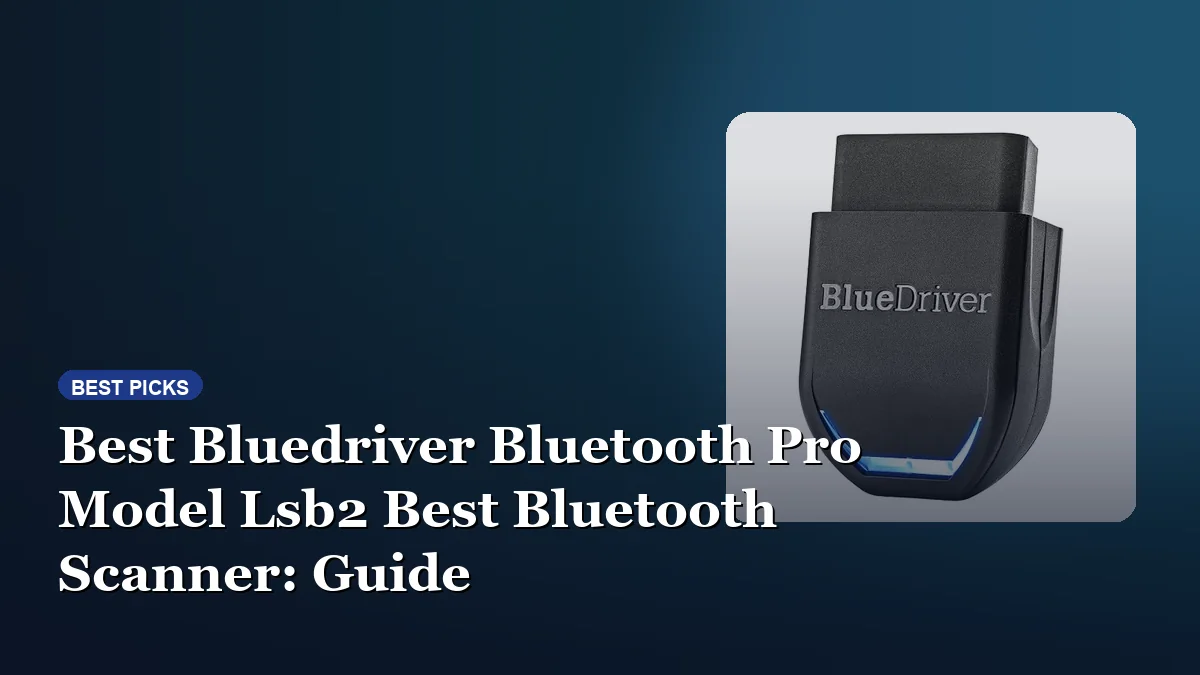
 BlueDriver Pro OBD2 Bluetooth Scanner
Wireless OBD2 scanner | iOS & Android | No subscription fees
 Veepeak OBDCheck BLE Bluetooth OBD II Scanner
Mini Bluetooth scanner | iOS & Android | Third-party app support
 XTOOL A30M Bidirectional OBD2 Scanner Diagnostic Tool
Bidirectional scan tool | Lifetime updates | Full system diagnostics
 UMEIJA V011 OBD2 Scanner Diagnostic Tool
Bluetooth 5.4 scanner | iOS & Android | Visual data charts
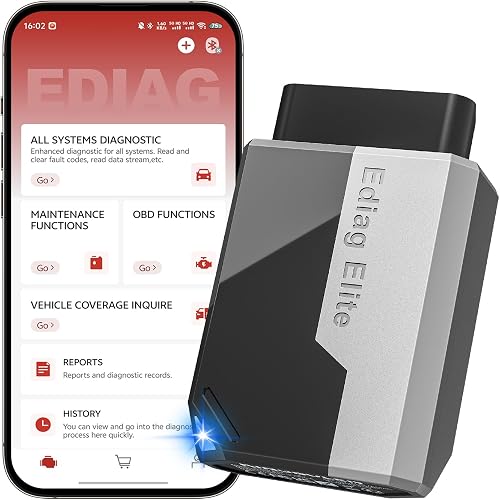 KINGBOLEN Ediag Elite Bluetooth OBD2 Scanner
Full system diagnostics | 15+ reset services | Lifetime updates
 Ikoscan OBD2 Bluetooth Scanner with AI Diagnostics
AI fault explanations | All-system diagnostics | 6 reset services
When searching for the best bluedriver bluetooth pro model lsb2 best bluetooth scanner, the BlueDriver Pro OBD2 Bluetooth Scanner is our top recommendation for its seamless smartphone integration and comprehensive repair reports.
It combines professional-grade diagnostics with an intuitive app interface that avoids costly ongoing subscription fees.
On This Page (8 sections)
How We Chose
- Reliable Connectivity: We prioritized scanners featuring stable wireless protocols to prevent frustrating dropouts during live data logging.
- Subscription Transparency: We favored tools offering robust diagnostic features without mandating expensive recurring software fees.
- App Usability: We tested companion smartphone applications for clean layouts, clear code definitions, and actionable repair advice.
Who Needs This
- DIY mechanics looking to diagnose check engine lights and monitor live sensor data right from their smartphones.
- Vehicle owners who want to avoid recurring subscription fees for basic code reading and clearing functions.
- Drivers seeking verified repair reports that suggest specific fixes tailored to their exact make and model.
Who Can Skip
- Professional automotive technicians who require factory-level programming and specialized ECU flashing capabilities.
- Drivers of vintage vehicles manufactured prior to the universal adoption of standard OBD2 computer ports.
- Car owners who prefer old-school corded handheld code readers that do not require a smartphone connection.
Quick Comparison: Bluedriver Bluetooth Pro Model Lsb2 Best Bluetooth Scanner
| Model | Platform Compatibility | Connectivity Type | Subscription / Updates |
|---|---|---|---|
| iOS and Android | Wireless Bluetooth | None Required |
| iOS and Android | Mini BLE | App Dependent |
| iOS and Android | Wireless BT | Lifetime Free |
| Android / iOS / Windows | Bluetooth 5.4 | Standard Protocols |
| Android 5.0 | Wireless BT | Lifetime Free |
| iOS and Android | Wireless BT | 1-Year Renewals |
The 6 Best Bluedriver Bluetooth Pro Model Lsb2 Best Bluetooth Scanners, Reviewed
BlueDriver Pro OBD2 Bluetooth Scanner
View on Amazon →Transforming your phone into a powerful diagnostic tool, this wireless scanner plugs right under your dashboard to clear trouble codes and monitor live data without bulky cables. It delivers technician-verified repair reports matched directly to your vehicle, taking the guesswork out of engine, ABS, and airbag warnings.
Delivering technician-verified repair reports with zero ongoing subscription fees.
Bluetooth pairing can occasionally require troubleshooting depending on your mobile device.
| Metric | Listed Specification |
|---|---|
| Power Source | Vehicle Port |
| OS Compatibility | iOS and Android |
| Vehicle Coverage | 1996+ Gas Vehicles |
| Included Items | Scanner & App Access |
Setting up the unit is straightforward, requiring you to plug it into the vehicle port and pair through the intuitive companion app. Daily driving monitoring allows you to track live engine parameters seamlessly right from your driver seat.
The durable build handles regular glovebox storage without issue, while free lifelong app updates ensure you always have access to expanding vehicle coverage and maintenance tips.
- Zero subscription fees ever
- Technician-verified repair fixes
- Comprehensive enhanced diagnostics
- Occasional Bluetooth pairing hiccups
- Higher initial investment than basic readers
Owners find the scanner to be a dependable tool that works fantastically and is remarkably easy to navigate with its clean app interface. They appreciate that it saves significant diagnostic costs, though a few note occasional Bluetooth connection quirks.
DIYers and everyday drivers wanting professional diagnostic insights without monthly fees.
Confirm specific enhanced diagnostic coverage for your vehicle's make and model year.
A top-tier diagnostic companion that bridges the gap between basic code readers and expensive shop equipment.
View on Amazon →Verdict
An indispensable tool for any car owner looking to take control of vehicle maintenance.
Veepeak OBDCheck BLE Bluetooth OBD II Scanner
View on Amazon →This ultra-compact adapter stays neatly tucked into your dashboard port while connecting wirelessly to your smartphone for quick check engine light clearing and live sensor monitoring. It relies on popular third-party applications to unlock customized vehicle data and fuel economy tracking on your daily commute.
Providing affordable, pocket-sized wireless connectivity for standard code reading.
Advanced diagnostics require purchasing specialized third-party smartphone apps separately.
| Metric | Listed Specification |
|---|---|
| Power Source | OBD II Port |
| Dimensions | 1.61 x 1.97 x 0.87 inches |
| Connectivity | Bluetooth LE & Classic |
| Vehicle Fit | Universal 1996+ |
The low-profile design ensures it never bumps against your knees while driving, allowing you to leave it plugged in permanently for real-time monitoring. Pairing requires connecting directly inside your chosen diagnostic app rather than phone settings.
While daily upkeep is practically nonexistent, you should unplug it during extended storage to prevent minor battery drain.
- Very affordable price point
- Compact low-profile form factor
- Wide third-party app compatibility
- Advanced features require extra app purchases
- Basic standard OBD-II focus only
Customers love how well the scanner pairs with various popular apps, praising its straightforward setup and accurate code reading. They note it provides great value, though some users experience minor initial connection hurdles.
Budget-conscious drivers looking for a simple tool to read and clear standard fault codes.
Check if your preferred third-party app requires an additional subscription or purchase.
An exceptional, pocket-friendly entry point for monitoring basic vehicle health.
View on Amazon →Verdict
A smart budget buy for anyone wanting hassle-free access to check engine diagnostics.
XTOOL A30M Bidirectional OBD2 Scanner Diagnostic Tool
View on Amazon →Stepping up to true shop-level capabilities, this bidirectional tool lets you send active commands to vehicle components like fuel pumps and windows to isolate mechanical faults quickly. It features full system diagnostics and extensive maintenance resets backed by lifetime software updates with zero subscription fees.
Delivering advanced bidirectional active testing without ongoing subscription costs.
Registering for modern gateway access like FCA AutoAuth requires separate official verification.
| Metric | Listed Specification |
|---|---|
| Power Source | OBD II Port |
| Operating System | iOS, Android |
| Special Resets | 26 Maintenance Functions |
| Connectivity | Bluetooth 4.0 |
Wireless connectivity gives you the freedom to test components from outside the vehicle while walking around your garage. The multi-stream live graphing provides clear visual insights into complex engine behaviors.
Built for regular workshop or enthusiast use, the robust hardware handles heavy diagnostic workloads while lifetime software updates keep it current for newer vehicle models.
- True bidirectional active testing
- Lifetime free software updates
- Comprehensive full system scans
- Steeper learning curve for beginners
- FCA gateway registration required separately
Users praise the scan tool for delivering high-end diagnostic performance that rivals professional equipment at a fraction of the cost. They highlight its extensive features and valuable lifetime updates, though a few report occasional connection drops.
Enthusiasts and DIY mechanics needing advanced active testing and full system resets.
Verify your specific vehicle model compatibility for specialized reset and bidirectional functions.
A powerhouse diagnostic tool that offers professional-grade control for serious home mechanics.
View on Amazon →Verdict
A formidable upgrade for anyone ready to tackle advanced automotive repairs.
UMEIJA V011 OBD2 Scanner Diagnostic Tool
View on Amazon →Powered by an upgraded wireless chip, this compact code reader pairs seamlessly with your smartphone to visualize live sensor data in clean, easy-to-read performance charts. It covers standard diagnostic protocols to help you interpret check engine lights and reset readiness monitors right from your driveway.
Providing rapid, stable pairing through an updated Bluetooth 5.4 wireless connection.
Fault codes cannot be permanently cleared until underlying mechanical repairs are fully resolved.
| Metric | Listed Specification |
|---|---|
| Power Source | Wireless Power Port |
| Compatibility | Android / iOS / Windows |
| Connectivity | Upgraded Bluetooth 5.4 |
| Vehicle Coverage | 1996+ Universal |
The updated wireless architecture cuts down connection delays, letting you pull up dashboard diagnostics almost instantly upon startup. The companion application organizes coolant temperature and speed data into clear visual formats.
Its small form factor makes it easy to stow away in a center console, though users should remember to unplug it after long sessions to preserve car battery life.
- Fast Bluetooth 5.4 pairing
- Intuitive visual data charts
- Broad multi-brand vehicle support
- App interface can feel basic
- Requires manual unplugging to save battery
Customers find the scanner works reliably on trucks and cars alike, highlighting its helpful app interface and money-saving potential. While many experience smooth connections, a few note mixed results with specific vehicle compatibility.
Everyday car owners wanting a straightforward, app-based tool to monitor performance metrics.
Make sure to follow specific pairing guidelines inside the proprietary app rather than general phone settings.
A convenient and affordable wireless reader that simplifies routine performance checks.
View on Amazon →Verdict
A solid choice for drivers wanting quick visual feedback on engine health.
KINGBOLEN Ediag Elite Bluetooth OBD2 Scanner
View on Amazon →Packing heavy-duty diagnostic power into a pocket-sized dongle, this scanner delivers full system analysis and active bidirectional testing to control actuators like cooling fans and windows. It features over fifteen specialized reset services and lifetime software updates without any recurring subscription fees.
Combining full-system diagnostics and active testing with zero ongoing subscription costs.
Advanced features require familiarity with professional diagnostic workflows and automotive systems.
| Metric | Listed Specification |
|---|---|
| Power Source | Vehicle Port |
| Connectivity | Bluetooth 5.2 |
| Protocols | CANFD & FCA Support |
| Weight | 5.92 ounces |
The robust Bluetooth 5.2 connection maintains stable data transmission even when walking around the perimeter of a large vehicle. Intelligent auto-VIN recognition quickly identifies your specific make and model upon plugging in.
Designed for long-term reliability, the tool lets you export diagnostic reports as PDF files for easy sharing, making garage record-keeping effortless.
- Lifetime free software updates
- Fifteen essential reset services
- Four-in-one live data graphs
- App interface has a slight learning curve
- FCA gateway requires separate setup
Owners appreciate the tool's impressive portability and compatibility with newer vehicle models, noting it provides exceptional value. They value the ability to save detailed diagnostic reports, though opinions on initial setup vary.
Serious DIYers and technicians looking for high-end diagnostic capability without recurring fees.
Check your vehicle's compatibility list to confirm which specialized reset functions are supported for your model.
An exceptional professional-grade diagnostic tool that delivers shop-level performance for home mechanics.
View on Amazon →Verdict
A top-tier powerhouse for enthusiasts tackling advanced vehicle maintenance.
Ikoscan OBD2 Bluetooth Scanner with AI Diagnostics
View on Amazon →Bringing modern artificial intelligence to car repairs, this wireless scanner translates complex fault codes into plain-English guidance to help you understand your vehicle's issues immediately. It covers full-system diagnostics and essential maintenance resets, giving home mechanics a clearer path toward successful repairs.
Translating cryptic diagnostic trouble codes into clear, plain-English AI explanations.
Specialized reset services require subscription renewals after the first year of ownership.
| Metric | Listed Specification |
|---|---|
| Power Source | Vehicle Port |
| OS Compatibility | iOS and Android |
| Vehicle Brands | 90+ Supported |
| Warranty | Lifetime Hardware |
The intelligent assistant takes the guesswork out of troubleshooting by walking you through potential repair steps directly on your phone screen. Robust wireless communication maintains a steady link while scanning modules across multiple vehicle systems.
Backed by strong hardware warranties, the compact unit is easy to store in any glovebox and built to withstand regular workshop use.
- AI-powered fault explanations
- Comprehensive all-system coverage
- Lifetime hardware warranty
- Reset services require subscription after year one
- Limited to supported vehicle brands
Customers describe the scanner as an absolute lifesaver for home mechanics, praising its accuracy in reading and clearing codes. They consider it an incredible value that punches well above its weight class.
Home mechanics who want intuitive, plain-English explanations for complex engine codes.
Factor in potential subscription costs for maintaining specialized reset functions after the initial year.
A uniquely smart diagnostic tool that makes automotive troubleshooting approachable for everyone.
View on Amazon →Verdict
A clever innovation for drivers seeking clear, AI-guided car repair insights.
Proper Setup and Maintenance for Your Wireless OBD2 Scanner
Locate your vehicle's standard diagnostic port, which is typically tucked underneath the driver-side dashboard near the steering column. Firmly plug in your wireless scanner until it seats securely and powers on via the vehicle's electrical circuit.
Open your smartphone's Bluetooth settings to pair the device, then launch the companion application to establish a secure data link.
When finished scanning, always remember to unplug the unit if you drive an older vehicle with continuous power draw, and store it safely in its protective case inside your glove compartment to shield it from extreme cabin temperatures.
Buying Guide & Red Flags for Bluedriver Bluetooth Pro Model Lsb2 Best Bluetooth Scanners
Check these points before you buy to avoid common pitfalls:
Scanners that advertise comprehensive lifetime updates but hide critical reset functions behind expensive annual subscription paywalls.
Units with outdated wireless chips that frequently disconnect from your smartphone while streaming live sensor data graphs.
Vague companion applications that only display numerical trouble codes without providing helpful definitions or troubleshooting tips.
Poorly constructed plastic housings that feel fragile and risk cracking if accidentally kicked underneath the dashboard.
Incompatible operating system requirements that prevent older or newer mobile phones from successfully pairing with the hardware.
What does the 10-point Lab Score evaluate for these scanners?
Our comprehensive 10-point Lab Score is a rigorous editorial rating that combines everyday practicality, design quality, material durability, and real-world owner satisfaction.
We test how easily each scanner pairs with mobile devices, evaluates the clarity of its diagnostic app, and checks its long-term reliability under normal garage conditions.
This holistic approach ensures our top recommendations deliver genuine value without relying on arbitrary manufacturer claims or automated mathematical formulas.
Do I need an internet connection to use a Bluetooth OBD2 scanner?
Most wireless diagnostic scanners rely strictly on local Bluetooth signals to communicate directly with your smartphone app.
However, an active cellular or Wi-Fi connection on your mobile device is usually helpful if you want to look up repair reports, search diagnostic trouble code definitions online, or download software updates.
You can still read and clear basic engine codes while parked in remote areas without internet coverage as long as your phone is paired.
Will using a diagnostic scanner drain my car battery?
Most modern OBD2 scanners consume very little electrical current when plugged into the diagnostic port. However, leaving certain wireless dongles plugged in indefinitely on older vehicles can slowly drain the battery over several days of non-use.
It is always best practice to unplug the unit if you plan to leave your vehicle parked in the garage for an extended vacation or storage period.
Can these Bluetooth scanners permanently turn off my check engine light?
A Bluetooth diagnostic scanner can easily clear stored fault codes and turn off your dashboard warning light within seconds.
Keep in mind, however, that if the underlying mechanical or electrical issue has not been fully repaired, the computer will trigger the check engine light to illuminate again shortly after you start driving.
Use the scanner to identify the root cause rather than just masking the symptom with a temporary code reset.
Are subscription-free diagnostic apps truly free forever?
Subscription-free apps provide core code reading, live data streaming, and basic code clearing without requiring any recurring payments. Some advanced manufacturers may offer optional premium tiers for specialized bi-directional controls or heavy-duty diagnostics, but the essential everyday features remain accessible.
Always review the software terms before purchasing to ensure you understand which features are included out of the box.
Will a wireless OBD2 scanner work with any vehicle make and model?
Standard OBD2 scanners are designed to work with virtually all passenger cars, light trucks, and SUVs manufactured for the domestic market.
However, certain specialized manufacturer-specific systems like advanced ABS, airbag, or transmission modules may require specific app software or enhanced diagnostics to read properly. Universal compliance covers basic engine management emission codes across all standard compliant vehicles.
Final Verdict
Choosing the right wireless diagnostic tool transforms how you handle automotive trouble codes and routine vehicle maintenance.
The BlueDriver Pro OBD2 Bluetooth Scanner remains our top overall recommendation for its flawless app integration, lack of subscription fees, and reliable technician-verified repair reports.
If you want a dependable, user-friendly way to monitor your vehicle's health right from your smartphone, this scanner belongs in your glove box.
Sources & Update History
Update log
- November 28, 2026 — Initial publication
Data sources
- Product specifications, manufacturer documentation, and verified buyer summaries