 By
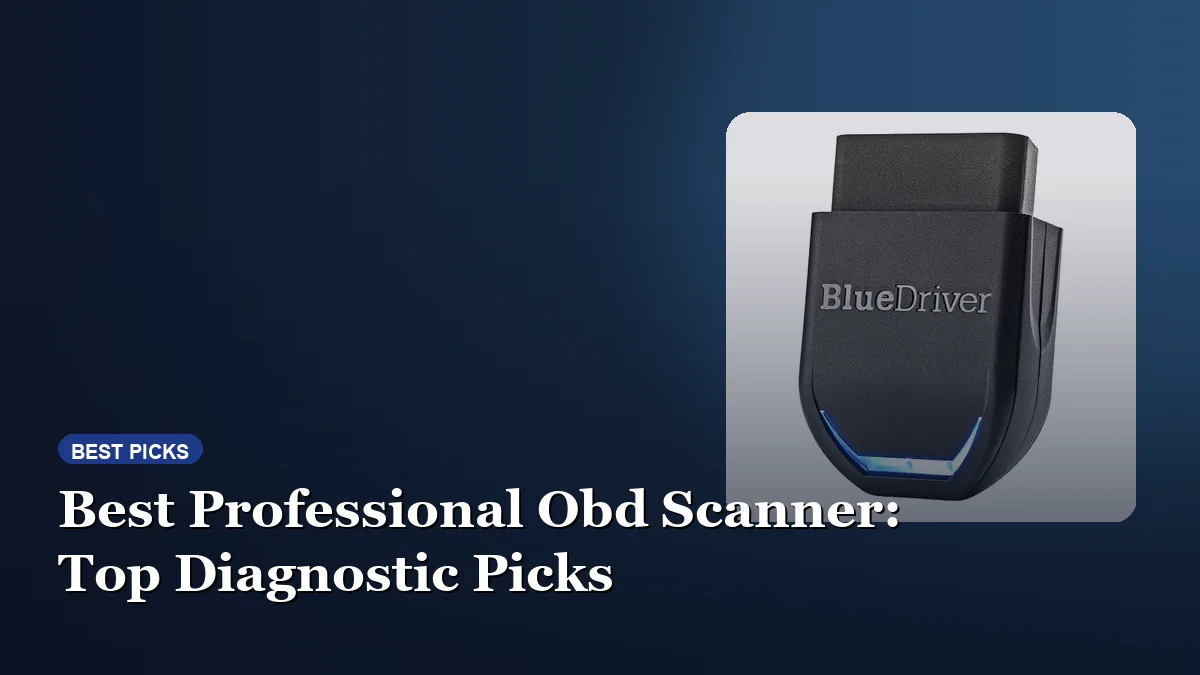
 BlueDriver OBD2 Scanner Bluetooth Diagnostic Tool
Wireless Bluetooth | No Subscription | iOS & Android
 MOTOPOWER MP69033 Car OBD2 Scanner Code Reader
2.7" LCD Screen | Plug-and-Play | No Batteries Needed
 Veepeak OBDCheck BLE Bluetooth OBD II Scanner
Bluetooth LE | Mini Pocket Size | Third-Party Apps
 XTOOL A30M Bidirectional Scan Tool Full System Scanner
Full System Scan | Bidirectional Control | Lifetime Updates
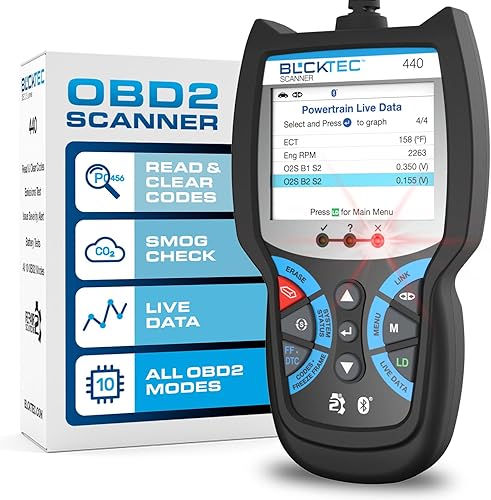 BLCKTEC 440 Bluetooth OBD2 Scanner Diagnostic Tool
Color Screen | Live Data Graphing | Smog Hotkeys
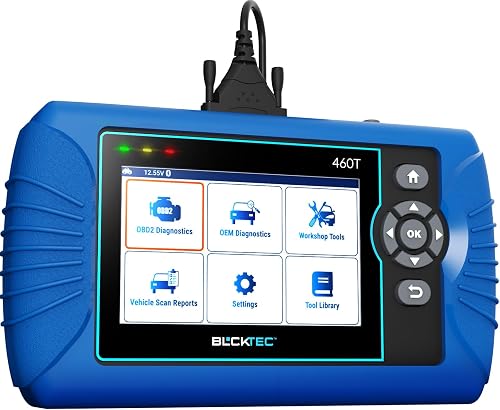 BLCKTEC 460T OBD2 Scanner Car Code Reader
4.3" Large Screen | 12+ Resets | RepairSolutions2 App
If you want reliable, hassle-free diagnostics, the BlueDriver OBD2 Scanner Bluetooth Diagnostic Tool stands out as the top choice. It pairs advanced wireless capability with lifetime free updates, making it an essential companion for both DIYers and seasoned mechanics.
On This Page (8 sections)
How We Chose
- System Coverage: We prioritized tools capable of reading deep manufacturer codes beyond basic engine faults.
- Software Stability: We tested how reliably each scanner connects to mobile apps or built-in screens without dropping.
- Update Value: We favored models offering lifetime software updates without hidden subscription fees.
Who Needs This
- DIY mechanics wanting to diagnose check engine lights and clear trouble codes at home.
- Car enthusiasts needing live data graphing and advanced bidirectional active component testing.
- Drivers preparing for annual state emissions testing who need quick I/M readiness status checks.
Who Can Skip
- Drivers who prefer visiting a professional mechanic for every dashboard warning light.
- Owners of older vehicles built before the OBD-II standard rollout in the mid-1990s.
- Those looking for a basic code reader who never plan to view live sensor data.
Quick Comparison: Best Professional Obd Scanner
| Model | Connectivity / Interface | System Coverage | Updates & Warranty |
|---|---|---|---|
| Wireless Bluetooth | Enhanced Diagnostics | Lifetime Free |
| 2.7" LCD Screen | Engine Code Reader | 30-Day Warranty |
| Bluetooth LE | Third-Party Apps | 1-Year Warranty |
| Wireless App Interface | Full System Scan | Lifetime Free |
| 2.8" Color Screen | Emissions / Smog | 1-Year Warranty |
| 4.3" Large Screen | All Systems + Resets | 2-Year Warranty |
The 6 Best Professional Obd Scanners, Reviewed
BlueDriver OBD2 Scanner Bluetooth Diagnostic Tool
View on Amazon →Turning your smartphone into an advanced mechanic’s tool, this wireless scanner links directly to your vehicle's OBD port to deliver comprehensive system diagnostics. It bypasses bulky handheld units in favor of a sleek mobile app that provides verified repair reports matched directly to your VIN.
Providing technician-verified repair reports with zero subscription fees.
Advanced enhanced diagnostics depend heavily on vehicle make and model support.
| Metric | Listed Specification |
|---|---|
| Power Source | Vehicle |
| Operating System | iOS and Android |
| Automotive Fit | Vehicle Specific Fit |
| Warranty | 180-Day / 1-Year |
Plugs seamlessly into the under-dash port without dangling wires getting in the way of your pedals. Pairing with mobile devices is generally swift, instantly populating live data streams and freeze-frame analysis on your screen.
The lack of recurring fees makes long-term upkeep stress-free, while software updates keep the companion app running smoothly. Storing it in your glove box ensures you are always ready for roadside trouble codes.
- No subscription fees
- Wireless phone connectivity
- Verified repair reports
- Bluetooth pairing can occasionally require troubleshooting
- Enhanced features vary by vehicle
Owners frequently praise the user-friendly mobile app and the money saved on diagnostic fees. However, a few users note occasional Bluetooth connection hiccups depending on the mobile device used.
Everyday drivers and DIYers looking for a smartphone-based scanner with zero subscription costs.
Check specific enhanced diagnostic coverage for your vehicle brand before purchasing.
A brilliant, subscription-free diagnostic solution that brings garage-level insights straight to your phone.
View on Amazon →Verdict
The best overall choice for drivers wanting robust troubleshooting without recurring software fees.
MOTOPOWER MP69033 Car OBD2 Scanner Code Reader
View on Amazon →Built for straightforward check engine light diagnostics, this compact handheld tool requires zero batteries and pulls power straight from your car. Its integrated DTC library quickly translates fault codes into plain language on a clear backlit screen.
Quickly reading and clearing basic engine fault codes without smartphone setup.
Limited strictly to engine codes, omitting ABS, airbag, and transmission systems.
| Metric | Listed Specification |
|---|---|
| Power Source | Battery Powered |
| Screen Size | 2.7 inches |
| Item Weight | 10.2 ounces |
| Operating System | Windows |
The dedicated hotkeys allow you to jump straight to VIN retrieval and fault code checks without navigating confusing menus. Its attached tethered cable offers enough reach to view data comfortably from the driver's seat.
Requiring no external charging or batteries means it is always ready to grab from the toolbox for a quick emergency check. The rugged plastic housing withstands casual garage drops and routine storage.
- Built-in DTC library
- No batteries required
- Clear backlit display
- Cannot read ABS or airbag codes
- Basic feature set
Customers appreciate the straightforward plug-and-play operation and quick check engine light clearing. Some users note that it occasionally struggles to communicate with certain newer vehicle models.
Budget-conscious car owners needing a simple tool to read and clear engine codes.
Ensure your diagnostic needs are limited to basic engine faults rather than full-system scans.
An affordable, no-frills code reader that handles basic engine light troubleshooting with ease.
View on Amazon →Verdict
A solid budget-friendly option for straightforward engine code reading and clearing.
Veepeak OBDCheck BLE Bluetooth OBD II Scanner
View on Amazon →Designed to live permanently in your vehicle's dashboard port, this ultra-low-profile adapter pairs with a massive ecosystem of mobile apps. It delivers customizable live sensor data and standard engine diagnostics right to your favorite smartphone interface.
Seamlessly integrating with popular third-party diagnostic and coding applications.
Advanced coding features require separate third-party app purchases.
| Metric | Listed Specification |
|---|---|
| Power Source | OBD II Port |
| Dimensions | 1.61" x 1.97" x 0.87" |
| Warranty | 1-Year Replacement |
| Operating System | iOS & Android |
The tiny footprint ensures it never interferes with your knees or legs while driving, allowing you to leave it plugged in for real-time monitoring. Connecting requires pairing directly through your chosen diagnostic app rather than standard phone settings.
Build quality is solid for its size, featuring a snug fit in the OBD port that stays secure over rough roads. It draws minimal power, meaning it won't drain your car battery during normal parked intervals.
- Compact pocket size
- Wide app compatibility
- Bluetooth LE connection
- Advanced features depend on third-party apps
- Setup requires specific app-pairing steps
Users love the flexibility of pairing the adapter with specialized apps like Torque and BimmerCode. A few customers mention needing patience to establish the initial Bluetooth handshake within certain apps.
Tech-savvy drivers who want to use custom third-party apps for monitoring and diagnostics.
Verify that your preferred diagnostic app supports your specific vehicle make and model.
A versatile, ultra-compact adapter that unlocks powerful third-party app diagnostics.
View on Amazon →Verdict
The best app-compatible pick for drivers who prefer customizable mobile dashboard software.
XTOOL A30M Bidirectional Scan Tool Full System Scanner
View on Amazon →Stepping up to workshop-level capabilities, this wireless tool offers full system scanning and active bidirectional controls to test components like fuel pumps and windows. Complete with lifetime software updates, it bridges the gap between DIY convenience and professional garage power.
Performing active component tests and comprehensive full-system diagnostics.
FCA security gateway access requires a separate paid registration.
| Metric | Listed Specification |
|---|---|
| Power Source | OBD II Port |
| Connectivity | Bluetooth 4.0 |
| Warranty | 2-Year Manufacturer |
| Reset Services | 26 Functions |
The wireless Bluetooth connection lets you stand outside the vehicle while commanding windows, wipers, or actuators during testing. Its multi-stream live graphing provides deep visual insight into sensor behavior without stuttering.
Including two dozen maintenance resets covers everything from electronic parking brakes to steering angle calibrations. The app layout is feature-rich, though navigating the extensive menu options requires a brief learning curve for beginners.
- Full bidirectional control
- Lifetime free software updates
- 26 essential reset functions
- FCA AutoAuth requires separate registration
- Steeper learning curve for novices
Customers are thrilled with the professional-grade bidirectional controls and the value of lifetime free software updates. Some users note that initial setup and vehicle selection menus can feel dense and overwhelming.
Serious DIY mechanics looking for advanced active testing and full-system reset capabilities.
Check if your vehicle requires a paid security gateway account for full diagnostic access.
An exceptionally capable bidirectional scanner that brings pro-level active testing to your home garage.
View on Amazon →Verdict
The best bidirectional tool for enthusiasts needing active component testing and full-system resets.
BLCKTEC 440 Bluetooth OBD2 Scanner Diagnostic Tool
View on Amazon →Designed to take the guesswork out of emissions testing, this handheld scanner features dedicated hotkeys and color-coded LEDs for instant smog readiness checks. It combines a vibrant color display with live data graphing to make routine maintenance straightforward.
Simplifying pre-smog emissions checks with dedicated readiness indicators.
Lacks advanced manufacturer-specific service resets found on higher-end units.
| Metric | Listed Specification |
|---|---|
| Power Source | Vehicle |
| Screen Size | 2.8 inches |
| Item Weight | 7.8 ounces |
| Warranty | 1-Year Limited |
The dedicated I/M readiness buttons allow you to check emission monitors instantly without digging through nested software menus. Its bright color screen remains easy to read even in bright garage lighting conditions.
Operating entirely off vehicle power means you never have to worry about replacing dead internal batteries between uses. The physical layout feels sturdy and comfortable to hold during extended diagnostic sessions.
- Smog test ready hotkeys
- Vibrant color screen
- Live data graphing
- Limited to standard emissions and engine codes
- No advanced service resets
Users praise the clear color screen and the handy smog readiness indicators for quick pre-inspection checks. A few customers report occasional connection snags depending on the vehicle model year.
Home mechanics preparing their vehicles for upcoming state emissions inspections.
Confirm whether you need advanced system resets or simply standard engine and emission diagnostics.
A user-friendly diagnostic tool that takes the stress out of passing state smog tests.
View on Amazon →Verdict
The best smog check helper for drivers needing fast emission readiness verification.
BLCKTEC 460T OBD2 Scanner Car Code Reader
View on Amazon →Combining a large, easy-to-read display with comprehensive all-system diagnostics, this standalone handheld tool tackles complex repairs with ease. It features automated VIN retrieval and links with a companion repair app to supply technician-verified fix guides.
Delivering all-system diagnostics paired with verified repair database support.
Bulkier form factor requires more storage space in your vehicle.
| Metric | Listed Specification |
|---|---|
| Power Source | Vehicle |
| Screen Size | 4.3 inches |
| Operating System | iOS and Android |
| Warranty | 2-Year Limited |
The generous screen size allows you to view up to four live data streams simultaneously in a single, clear graph. AutoVIN technology speeds up workflow by identifying your vehicle immediately upon plugging into the port.
Pairing the device with the cloud-based repair app gives you instant access to recommended parts and technical service bulletins. The rugged build quality and two-year warranty offer long-term peace of mind for frequent garage users.
- All system diagnostics
- 12 plus reset services
- AutoVIN technology
- Larger handheld size
- Feature availability varies by car model
Customers appreciate the comprehensive all-system scanning capabilities and the helpful RepairSolutions2 app integration. Some users note that certain advanced reset functions are not universally supported across all vehicle brands.
Enthusiasts and DIYers wanting a powerful standalone handheld scanner with repair database integration.
Verify reset function compatibility for your specific car model using the manufacturer's online checker.
A feature-packed, pro-grade handheld scanner that simplifies complex automotive troubleshooting.
View on Amazon →Verdict
The best pro-grade handheld option for thorough all-system diagnostics and guided repairs.
How to Use and Maintain Your OBD Scanner
Locate your vehicle's OBD-II port, typically found under the driver's side dashboard near the steering column, and firmly plug in your diagnostic tool while the ignition is in the accessory position.
Keep your device's firmware and companion app updated regularly to ensure compatibility with newly released vehicle computer protocols.
Store your scanner in a dedicated protective case away from extreme temperatures and moisture to protect internal microchips and display screens from premature wear.
Buying Guide & Red Flags for Best Professional Obd Scanners
Check these points before you buy to avoid common pitfalls:
Hidden annual subscriptions required just to view basic diagnostic trouble codes.
Flimsy plastic connectors that bend or strip pins after only a few dashboard plug-ins.
Outdated software interfaces with sluggish response times and unhelpful generic error descriptions.
Lack of live data graphing which makes diagnosing intermittent sensor failures nearly impossible.
Exclusions for crucial vehicle systems like ABS and airbags on supposedly comprehensive scanners.
What does the 10-point Lab Score mean for these scanners?
Our editorial Lab Score evaluates every diagnostic tool on a strict 10-point scale combining design quality, everyday practicality, material durability, and real-world owner satisfaction.
We thoroughly test how easily each device connects to vehicle computers, the responsiveness of its companion app or screen, and the long-term resilience of its housing.
This comprehensive rating ensures you invest in a reliable scanner that delivers accurate trouble codes without frustrating software glitches or fragile hardware components.
Can these diagnostic scanners clear check engine lights permanently?
While a quality scan tool will successfully clear fault codes and turn off your dashboard warning light, the light will eventually return if the underlying mechanical or electrical issue is not repaired.
Scanners simply interpret computer data and reset the system rather than fixing broken parts like oxygen sensors or loose gas caps.
Always use your device to diagnose the root cause of the error code and complete the necessary mechanical repairs before attempting a final code clearance.
Do I need an internet connection to use a modern scan tool?
Most standalone handheld scanners operate independently using built-in vehicle power and internal databases, meaning you do not need an active internet connection for basic roadside diagnostics.
However, Bluetooth adapters and advanced full-system tools typically require Wi-Fi or cellular data to download initial companion apps, receive firmware updates, and access online repair libraries.
Connecting your device to the internet periodically ensures you have the latest vehicle protocols for newer car models entering the market.
What is the difference between basic code readers and full-system scanners?
Basic code readers focus exclusively on powertrain and emissions errors, allowing you to read and clear standard check engine lights on most vehicles.
Full-system scanners, by contrast, dive deep into specialized modules including anti-lock braking systems, airbag deployment controllers, transmission electronics, and body control units.
Investing in a more comprehensive diagnostic tool gives you complete visibility across all onboard computers, which is essential for accurately troubleshooting complex modern automotive issues at home.
Will these tools work on every vehicle make and model?
Nearly all modern OBD-II scanners work universally on passenger vehicles sold in the United States from model year 1996 onward, as mandated by federal regulations.
However, advanced manufacturer-specific functions like oil life resets, electronic parking brake services, and bidirectional active tests often vary depending on the specific vehicle make.
It is always wise to review compatibility notes for luxury or specialty brands before purchasing a high-end diagnostic tool for your garage.
Are wireless Bluetooth scanners better than traditional corded handheld units?
Wireless Bluetooth adapters offer exceptional portability by letting you monitor live sensor data on your smartphone while sitting comfortably behind the wheel or walking around the engine bay.
On the other hand, traditional corded handheld units eliminate pairing frustrations, app crashes, and smartphone battery drain during extended diagnostic sessions.
Choosing between them comes down to personal preference for screen size, physical controls, and your comfort level with mobile app navigation.
How often should I update my diagnostic scan tool software?
Manufacturers frequently release firmware updates to patch software bugs, improve app stability, and add support for newly introduced vehicle models and electronic control protocols.
Checking for updates every few months ensures your scanner remains fully compatible with changing automotive technologies and avoids frustrating connection errors.
Choosing a model with lifetime free updates saves you from ongoing subscription costs while keeping your diagnostic equipment running at peak performance.
Final Verdict
Choosing the right diagnostic equipment depends on your comfort level with smartphone apps versus dedicated handheld screens.
For most drivers and home mechanics, the BlueDriver OBD2 Scanner Bluetooth Diagnostic Tool represents the absolute best choice due to its reliable wireless performance and lack of subscription fees.
Evaluate your vehicle troubleshooting needs and select the tool that matches your preferred diagnostic workflow.
Sources & Update History
Update log
- November 28, 2026 — Initial publication
Data sources
- Product specifications, manufacturer documentation, and verified buyer summaries