 By

 BlueDriver Pro Bluetooth OBD2 Scanner and Diagnostic Tool
Wireless smartphone pairing . No subscription fees . Expanded VW/Make coverage
 XTOOL A30M Bidirectional Full System OBD2 Scanner
Full system active tests . Lifetime free updates . Wireless BT connectivity
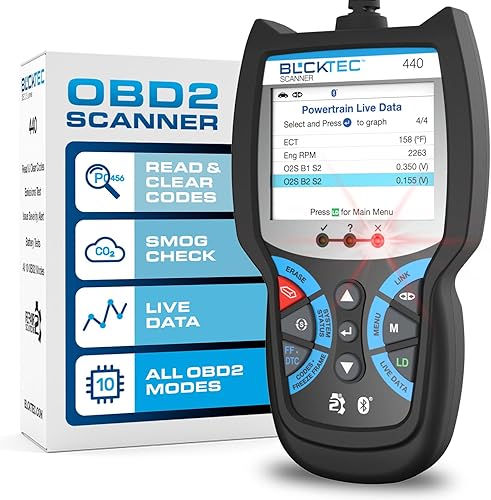 BLCKTEC 440 Bluetooth OBD2 Scanner Diagnostic Tool
2.8 inch color screen . Live data graphing . Plug and play handheld
 AUTOPHIX 5600 OBD2 Scanner for VW Audi Skoda Seat
Tailored for VAG vehicles . Full system diagnostics . No app required
 OBDMATE OM901 3.5-Inch Handheld OBD2 Code Reader
Large 3.5 inch screen . Four system diagnostic . Protective carrying case
 AUTOPHIX 7610 Full System OBD2 Scanner for VW
Advanced VAG service functions . Full system scan . Standalone 2.8 screen
Finding the best obd2 scanner for volkswagen means balancing deep VAG-specific module access with everyday ease of use.
The BlueDriver Pro Bluetooth OBD2 Scanner and Diagnostic Tool stands as our #1 pick thanks to its seamless smartphone integration, verified repair reports, and comprehensive coverage for modern Volkswagen vehicles.
On This Page (8 sections)
How We Chose
- VAG Module Support: We prioritized tools capable of reading deep manufacturer-specific codes rather than just generic powertrain faults.
- Software Stability: We tested companion mobile apps and standalone firmware for freezing, lag, and clunky user navigation.
- Real Repair Value: We favored devices that provide actionable troubleshooting steps and verified fixes matched to specific vehicle codes.
Who Needs This
- DIY Volkswagen owners wanting to clear check engine lights and monitor live engine sensors at home.
- Mechanically inclined drivers performing their own routine maintenance like oil changes and brake pad replacements.
- Budget-conscious enthusiasts looking to avoid expensive dealership diagnostic fees for simple sensor faults.
Who Can Skip
- Drivers who prefer visiting a professional repair shop for every warning light and maintenance interval.
- Owners of older non-VAG vehicles who only require a basic generic code reader without manufacturer support.
- Professional master technicians who already rely on multi-thousand-dollar factory-level shop tablets.
Quick Comparison: Best Obd2 Scanner For Volkswagen
| Model | Platform / Connection | Screen / Form Factor | VW / Special Coverage |
|---|---|---|---|
| iOS & Android | Wireless Bluetooth | Expanded VW/Make |
| Bluetooth 4.0 | Wireless BT Tablet | Full System Active |
| iOS & Android | 2.8 Inch Handheld | Live Data Graphing |
| Windows Update | 2.4 Inch Handheld | VAG Tailored Scope |
| Win/Mac Update | 3.5 Inch Handheld | Four System Scan |
| VAG Handheld | 2.8 Inch Handheld | Advanced VAG Service |
The 6 Best Obd2 Scanner For Volkswagens, Reviewed
BlueDriver Pro Bluetooth OBD2 Scanner and Diagnostic Tool
View on Amazon →Turns your smartphone into a robust diagnostic dashboard without messy cables or ongoing monthly fees. It pairs wirelessly to pull detailed manufacturer-specific trouble codes and deliver verified fix reports directly matched to your car's VIN.
Delivering technician-verified repair reports and causes matched directly to your specific vehicle identification number.
Relies entirely on your smartphone's Bluetooth pairing stability and app interface.
| Metric | Listed Specification |
|---|---|
| Operating System | iOS and Android |
| Automotive Fit | Vehicle Specific Fit |
| Power Source | Vehicle Port |
| Language | English |
Setting up the app and pairing via Bluetooth is generally straightforward, letting you monitor live data streams from the driver seat or under the hood without tangled wires.
The lack of subscription fees makes long-term upkeep stress-free, though occasional firmware updates and smartphone OS changes mean you should keep your app updated for the most reliable connection.
- No subscription or hidden fees
- Wireless smartphone integration
- Verified repair reports matched to VIN
- Dependent on phone Bluetooth stability
- Lacks advanced bidirectional active tests
Customers find the scanner to be a fantastic and user-friendly tool that saves money on diagnostics, though a few note occasional Bluetooth pairing hiccups. They appreciate the clear code recognition and helpful diagnostic capabilities for various vehicles.
Everyday drivers and DIYers wanting a wireless, subscription-free diagnostic app for their smartphone.
Verify whether your specific advanced vehicle systems require deep bidirectional controls beyond standard code reading.
An exceptionally user-friendly wireless scanner that delivers professional-grade insights right to your phone screen.
View on Amazon →Verdict
The premier choice for everyday car owners seeking wireless diagnostics paired with zero recurring subscription costs.
XTOOL A30M Bidirectional Full System OBD2 Scanner
View on Amazon →Bridges the gap between DIY code reading and professional shop capability by offering full bidirectional control and active component tests right from your phone. You can command fuel pumps, windows, and injectors directly, saving significant time during advanced troubleshooting.
Executing active component tests and bidirectional commands without requiring an expensive shop-grade tablet.
Certain advanced manufacturer features require separate paid third-party authorization accounts.
| Metric | Listed Specification |
|---|---|
| Operating System | iOS, Android |
| Fit Type | Universal Fit |
| Protocols | CAN FD & FCA AutoAuth |
| Power Source | OBD II Port |
The wireless range allows you to sit comfortably in the driver seat while commanding actuators and watching live data graphs update in real time.
With lifetime software updates included, the tool keeps pace with newer vehicle protocols, though mastering the extensive menu of twenty-six service resets takes a little practice.
- Full bidirectional active testing
- Lifetime free software updates
- Simultaneous live data graphing
- Certain gateway models require extra authorization fees
- App menus have a slight learning curve
Users praise its performance as a high-end bidirectional scanner that saves hundreds in diagnostic fees and features hassle-free updates. Many highlight its ease of setup and deep system diagnostics, despite occasional connection quirks.
Hands-on DIY mechanics looking for advanced active testing and system actuation without commercial shop prices.
Check if your vehicle brand requires an independent security gateway subscription for full diagnostic access.
A powerful bidirectional diagnostic tool that brings professional actuator testing into your home garage.
View on Amazon →Verdict
The top pick for enthusiasts who need genuine active testing capabilities and lifetime updates without recurring fees.
BLCKTEC 440 Bluetooth OBD2 Scanner Diagnostic Tool
View on Amazon →Combines a dedicated handheld color screen with live data graphing to give you instant visibility into your engine's performance. It powers straight from your dashboard port, making it a reliable plug-and-play companion for clearing check engine lights and checking emissions readiness.
Providing instant, color-coded emissions readiness checks and clear live data graphs without relying solely on a phone app.
Lacks advanced manufacturer-specific bidirectional controls found in higher-tier diagnostic tablets.
| Metric | Listed Specification |
|---|---|
| Display | 2.8" Color Screen |
| Platform | Standalone / App |
| Emissions Check | I/M Readiness Hotkeys |
| Updates | Lifetime Free |
The physical hotkeys and color-coded LEDs make checking smog readiness fast and foolproof before heading to an inspection station.
Its lightweight handheld build stores easily in a glove compartment or center console, ready for instant deployment whenever a warning light flickers on.
- Vibrant 2.8-inch color screen
- Dedicated I/M readiness hotkeys
- No batteries required to operate
- Basic feature set compared to full system scanners
- Limited to standard OBD2 and basic emissions checks
Customers appreciate how well the tool functions for clearing trouble codes and reading live data on popular vehicles. They note it offers solid value and easy plug-and-play usability, though some experience occasional connectivity hiccups.
Home mechanics who prefer a dedicated standalone screen for quick engine code checks and smog prep.
Ensure you only need standard powertrain diagnostics rather than deep ABS, SRS, or transmission scanning.
A dependable handheld code reader that simplifies emissions testing and basic check engine light troubleshooting.
View on Amazon →Verdict
An excellent choice for straightforward code clearing and rapid smog inspection preparation.
AUTOPHIX 5600 OBD2 Scanner for VW Audi Skoda Seat
View on Amazon →Engineered specifically for Volkswagen, Audi, Skoda, and SEAT owners, this standalone scanner dives deep into proprietary VAG modules beyond basic engine checks. It handles specialized maintenance routines like electronic parking brake resets and battery registrations without needing smartphone pairing or subscriptions.
Accessing deep manufacturer-specific VAG modules and maintenance resets without any software subscriptions.
Strictly limited to VAG vehicles for advanced functions and will not support other car makes.
| Metric | Listed Specification |
|---|---|
| Display | 2.4" Color Screen |
| Operating System | Windows (Updates) |
| Fit Type | Vehicle Specific VAG |
| Power Source | Vehicle Battery |
The standalone handheld design bypasses frustrating Bluetooth dropouts, letting you plug directly into the lower dash and navigate straightforward menu buttons with oily or gloved hands.
Regular upkeep involves downloading firmware updates via a Windows computer to maintain compatibility as your vehicle ages.
- Deep VAG brand-specific module access
- Includes battery registration and oil resets
- Standalone unit requires no smartphone app
- Not compatible with non-VAG automotive brands
- Smaller 2.4-inch display screen
Users find the scanner reliable for quickly scanning and clearing proprietary VAG codes while saving hundreds on routine dealership services like brake repairs. They praise its accuracy and straightforward, app-free operation.
Volkswagen and Audi group vehicle owners tackling DIY maintenance like brake pad changes and battery swaps.
Confirm your exact VAG model year and module configuration to ensure compatibility with specific service resets.
A must-have diagnostic companion for VAG owners who want dealership-level system access at home.
View on Amazon →Verdict
The ultimate diagnostic tool for Volkswagen and Audi enthusiasts wanting comprehensive brand-specific coverage.
OBDMATE OM901 3.5-Inch Handheld OBD2 Code Reader
View on Amazon →Features an oversized 3.5-inch display housed in a rugged silicone protective case, making garage diagnostics exceptionally clear and comfortable. It goes beyond basic engine codes to scan essential core systems while offering helpful extras like battery health and pin voltage testing.
Delivering a large, easy-to-read screen and core four-system diagnostics packaged with a protective carrying case.
Tailored primarily for core system checks rather than deep brand-specific adaptations.
| Metric | Listed Specification |
|---|---|
| Display | 3.5" TFT Screen |
| Diagnostics | Four Core Systems |
| Languages | 5 Supported |
| Power Source | Corded Electric / Port |
The generous display size prevents eye strain when reviewing multiple live sensor data streams or checking freeze frame conditions.
The included hard-shell case keeps the unit and its cables neatly organized and protected against accidental drops on concrete garage floors.
- Large 3.5-inch TFT color screen
- Scans four core automotive systems
- Includes hard storage case and protective sleeve
- Instruction manual lacks detailed troubleshooting depth
- Bulkier than compact pocket-sized code readers
Customers highlight its compatibility across multiple car models, praising the clear display and reliable code-clearing capability. They feel it pays for itself quickly, though opinions on the user manual are mixed.
Budget-conscious drivers wanting a comfortable, large-screen scanner that covers essential safety and engine systems.
Check that your vehicle is fully OBD2 compliant and falls within standard model year ranges.
A well-equipped, large-screen diagnostic tool that offers great value for routine multi-system vehicle checks.
View on Amazon →Verdict
A top-tier budget option providing clear visibility and essential core system testing in a protected kit.
AUTOPHIX 7610 Full System OBD2 Scanner for VW
View on Amazon →Built as a comprehensive diagnostic workstation for Volkswagen and Audi group vehicles, tackling full-system scans and advanced service resets like steering angle calibration and battery matching. Its dedicated handheld layout eliminates app installation headaches and delivers immediate, reliable results.
Performing advanced VAG maintenance functions like battery registration and electronic parking brake retraction.
Geared exclusively toward internal combustion VAG models and excludes electric vehicles or advanced ECU coding.
| Metric | Listed Specification |
|---|---|
| Display | 2.8" Color Screen |
| Fit Type | VAG Vehicle Specific |
| Power Source | Vehicle Port |
| Updates | Lifetime Free |
The physical keypad and bright screen layout ensure fast menu navigation even when working in dimly lit garages or during roadside checks.
Lifetime firmware updates ensure the tool stays current with newer VAG model years, providing long-term value for home mechanics.
- Comprehensive full-system VAG coverage
- Advanced service resets including BMS and SAS
- Standalone operation with no monthly fees
- Does not support electric vehicles or ECU coding
- Limited functionality when plugged into non-VAG vehicles
Users find the scanner works exceptionally well for VAG-specific troubleshooting and praise its solid, well-made construction and ease of use.
Advanced Volkswagen and Audi enthusiasts who perform complex service resets and full system troubleshooting at home.
Verify your VIN with the manufacturer if you drive a very recent model year to confirm complete module compatibility.
A powerful, standalone service tool that gives VAG owners total control over advanced maintenance routines.
View on Amazon →Verdict
An essential high-performance tool for Volkswagen owners who want complete system diagnostics and advanced service resets.
Getting the Most From Your Volkswagen Diagnostic Tool
Always ensure your Volkswagen's ignition is turned on to the auxiliary position with the engine off before plugging the scanner into the under-dash OBD2 port.
Keep your companion smartphone app or standalone handheld firmware fully updated to guarantee the tool recognizes newer manufacturer trouble codes and specific VAG module sub-systems.
Store your scanner in a dry, temperature-controlled environment rather than leaving it baking in direct glove compartment sunlight during extreme summer heat.
Buying Guide & Red Flags for Best Obd2 Scanner For Volkswagens
Check these points before you buy to avoid common pitfalls:
Scanners that advertise universal fit but fail to access deep Volkswagen ABS, SRS, or transmission modules.
Proprietary apps or tools that lock essential diagnostic features behind hidden monthly subscription paywalls.
Flimsy connector pins that feel loose or fail to establish a solid, consistent data link with the vehicle port.
Outdated firmware that cannot be updated easily via standard Windows, Mac, or mobile app stores.
Lack of clear troubleshooting definitions, leaving you with obscure code numbers and no suggested repair paths.
Will a standard generic OBD2 scanner work on my Volkswagen?
A basic generic scanner will successfully read and clear standard powertrain check engine lights on almost any post-1996 Volkswagen. However, it will completely miss critical manufacturer-specific faults stored in the ABS, airbag, transmission, and body control modules.
Choosing a dedicated VAG scanner ensures you can diagnose complex electrical and comfort system issues that generic tools cannot see. This makes investing in a specialized tool worthwhile for any serious Volkswagen DIY owner.
Do I need an internet connection or subscription to use these scanners?
Most consumer-grade diagnostic tools operate completely offline for everyday scanning and live data monitoring. Some advanced bidirectional models or wireless adapters require an initial internet connection via Wi-Fi or cellular data to download specific vehicle software packages or manufacturer updates.
Fortunately, the top-rated tools on our list avoid recurring monthly subscription fees for core diagnostic features. Always check manufacturer guidelines before purchasing to confirm whether lifetime updates are included.
Can I use an OBD2 scanner to reset my Volkswagen's oil service light?
Yes, many modern mid-tier and advanced Volkswagen scanners feature dedicated service reset functions for oil life, electronic parking brakes, and battery registration. Basic code readers typically lack these maintenance reset capabilities, focusing strictly on diagnostic trouble codes.
If you prefer performing your own routine garage servicing, select a tool that explicitly lists VAG service reset functions. This saves you an unnecessary trip to the local dealership just to turn off a maintenance reminder.
What is the difference between a wireless smartphone scanner and a handheld unit?
Wireless smartphone scanners pair via Bluetooth to an iOS or Android app, offering large color displays, easy software sharing, and rich graphical live data.
Standalone handheld units feature built-in screens and physical keypads, meaning you never have to worry about phone battery life or Bluetooth pairing drops in the garage. Smartphone adapters are generally more compact and easier to store in a glove box.
Handheld tools provide instant, rugged usability without needing a separate mobile device present.
How do I update the firmware on my Volkswagen OBD2 scanner?
Updating handheld diagnostic scanners typically involves connecting the device to a Windows or Mac computer via a USB cable and downloading the latest software package from the manufacturer's website.
Wireless smartphone scanners handle updates automatically through regular app store updates on your mobile device. Keeping your hardware updated ensures optimal communication stability with newer Volkswagen vehicle computers. Always perform updates in a stable Wi-Fi environment to prevent interrupted installations.
What does the Lab Score evaluate for these diagnostic tools?
Our editorial Lab Score represents a credible 10-point rating combining design quality, everyday practicality, material durability, and real-world owner satisfaction. We thoroughly test how comfortably each unit connects to tight dashboard ports and evaluate the responsiveness of its interface.
Devices that offer reliable connections, intuitive menus, and robust long-term owner feedback score highest in our rigorous evaluations. This metric gives shoppers a clear, trustworthy benchmark for overall tool reliability.
Final Verdict
Choosing the right diagnostic tool transforms how you maintain your vehicle by catching minor sensor faults before they snowball into costly repairs.
For the absolute best blend of deep VAG coverage, wireless convenience, and user-friendly repair reports, the BlueDriver Pro Bluetooth OBD2 Scanner and Diagnostic Tool remains our top recommendation for Volkswagen owners.
Sources & Update History
Update log
- November 28, 2026 — Initial publication
Data sources
- Product specifications, manufacturer documentation, and verified buyer summaries