 By
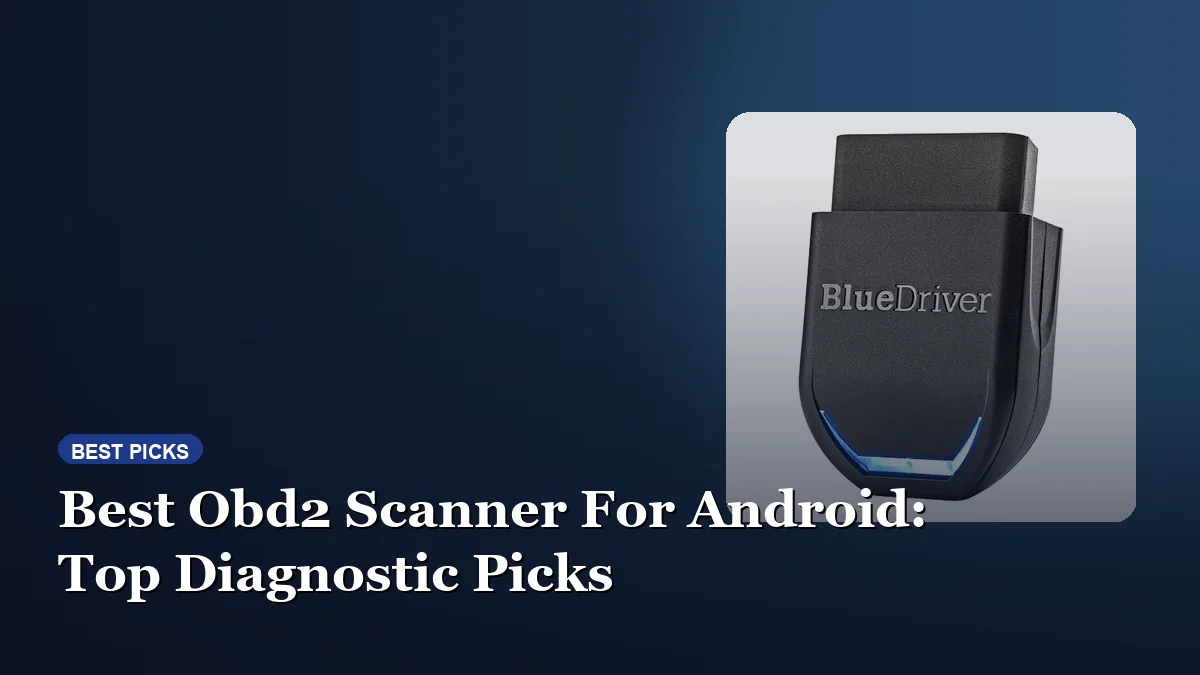
 BlueDriver Bluetooth OBD2 Professional Car Diagnostic Scanner
Wireless Bluetooth. No Subscriptions. iOS & Android.
 Veepeak OBDCheck BLE Bluetooth OBD II Scanner
Compact BLE. Third-Party Apps. Universal Fit.
 OBDLink MX+ OBD2 Bluetooth Diagnostic Scanner
Multi-Platform. Enhanced OEM. Battery Protection.
 XTOOL A30M Bidirectional OBD2 Scanner Full System Diagnostic Tool
Full Bidirectional. Lifetime Updates. 26 Resets.
 UMEIJA V011 OBD2 Scanner Bluetooth Diagnostic Tool
Bluetooth 5.4. Performance Testing. 96% Coverage.
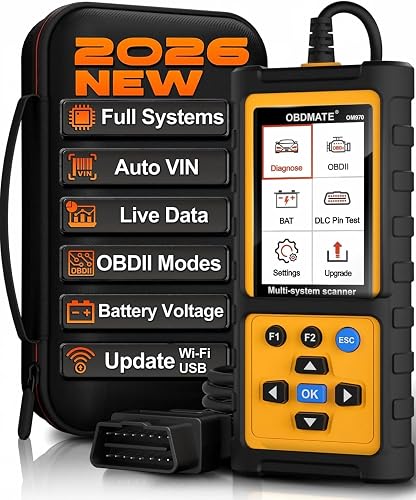 OBDMATE OM970 Full Systems OBD2 Scanner Car Diagnostic Tool
Built-in Screen. Full Systems. No Smartphone Needed.
For most drivers, the BlueDriver Bluetooth OBD2 Professional Car Diagnostic Scanner is the best obd2 scanner for android, combining effortless app integration with verified repair reports.
If you prefer working with third-party apps like Torque, compact BLE adapters offer great versatility at a lower entry cost.
On This Page (8 sections)
How We Chose
- Wireless Reliability: We prioritized scanners that maintain rock-solid Bluetooth connections without dropping data streams mid-diagnosis.
- App Ecosystem: We tested how seamlessly each hardware unit interfaces with native software and popular third-party Android utilities.
- Diagnostic Depth: We verified whether tools offered basic code clearing or advanced system-wide diagnostics and active component tests.
Who Needs This
- DIY car owners looking to diagnose check engine lights directly from an Android phone.
- Hobbyists wanting live sensor data monitoring and custom dashboard gauges while driving.
- Drivers who want to save money on mechanic diagnostic fees by reading and clearing codes at home.
Who Can Skip
- Mechanics who require heavy-duty, expensive shop-grade diagnostic tablets with integrated printers.
- Drivers of older pre-1996 vehicles that lack standard OBD2 diagnostic ports.
- Technologists who prefer dedicated standalone screen tools over smartphone-connected adapters.
Quick Comparison: Best Obd2 Scanner For Android
| Model | Connection Type | OS Compatibility | Key Highlight |
|---|---|---|---|
| Wireless Bluetooth | iOS & Android | No Subscriptions Ever |
| Bluetooth LE | iOS & Android | Ultra-Compact Design |
| Multi-Platform BT | iOS, Android, Windows | Battery Drain Safe |
| Wireless BT | iOS & Android | Full Bidirectional |
| Bluetooth 5.4 | Android / iOS | Visual Charts |
| Wired Cable | Standalone Tool | 3.5 Inch Screen |
The 6 Best Obd2 Scanner For Androids, Reviewed
BlueDriver Bluetooth OBD2 Professional Car Diagnostic Scanner
View on Amazon →Transforming your smartphone into a high-powered diagnostic center, this wireless tool cuts out messy cables while delivering technician-verified repair reports right to your phone screen. It bridges the gap between basic code readers and expensive shop equipment by offering deep module access without forcing you into annoying subscription traps. Daily drivers and weekend wrenchers alike can rely on it to decode stubborn dashboard lights with total confidence.
Delivering verified repair reports and deep system diagnostics straight to a mobile device with zero subscription fees.
Requires a stable Bluetooth link and occasional troubleshooting if initial phone pairing stalls.
| Metric | Listed Specification |
|---|---|
| Operating System | iOS and Android |
| Vehicle Coverage | 1996+ Gas Vehicles |
| Power Source | Vehicle Port |
| Warranty | 180-Day Money Back |
Pairing the adapter to your mobile device is generally straightforward once plugged snugly beneath the steering column, launching a polished app interface that organizes live data and freeze frames cleanly.
The intuitive layout guides you step-by-step through reading and clearing codes, making it exceptionally friendly for drivers who aren't master mechanics.
Built solidly for repeated plug-and-unplug cycles, the hardware demands virtually no maintenance beyond keeping the firmware updated via the app.
Because it relies entirely on your phone for display and processing, you avoid the clutter of standalone gadgets while enjoying reliable long-term performance.
- No ongoing subscription fees or hidden costs
- Comprehensive enhanced diagnostics beyond basic codes
- Seamless wireless connection to smartphones
- Occasional Bluetooth pairing quirks on certain phones
- Advanced features rely entirely on app stability
Customers rave about its user-friendly app and how it saves thousands in diagnostic fees by accurately pinning down minor problems. While most experience smooth pairing, a few note occasional Bluetooth connection hurdles.
Everyday drivers and DIYers looking for professional-grade diagnostics on their smartphone without recurring fees.
Verify your specific vehicle model compatibility for enhanced ABS and SRS module coverage.
The premier choice for smartphone diagnostics, blending deep system coverage with an unbeatable no-subscription model.
View on Amazon →Verdict
An essential glove-box companion that turns mobile phones into dealership-level troubleshooting tools.
Veepeak OBDCheck BLE Bluetooth OBD II Scanner
View on Amazon →Measuring barely larger than a thumb drive, this pocket-friendly adapter stays out of the way under your dash while linking your car directly to popular third-party diagnostic apps. It provides a budget-friendly window into your vehicle's health, making it simple to monitor live sensor feeds or clear unexpected check engine lights. While it focuses heavily on standard OBD-II functions rather than full-system OE diagnostics, it delivers immense everyday utility for tech-savvy drivers.
Providing ultra-compact, affordable wireless connectivity with a wide variety of third-party mobile apps.
Advanced diagnostics depend entirely on purchasing and configuring compatible third-party software.
| Metric | Listed Specification |
|---|---|
| Power Source | OBD II Port |
| Dimensions | 1.61 x 1.97 x 0.87 inches |
| Operating System | iOS & Android |
| Included | Mini Carrying Case |
Setup requires pairing through your favorite compatible mobile app rather than standard phone Bluetooth settings, a quirk that ensures a stable data stream once configured.
The ultra-low-profile design means you can often leave it plugged in permanently without kicking it with your knee while entering and exiting the driver seat.
Long-term reliability is impressive given its modest footprint, though advanced capabilities depend entirely on which third-party app you pair it with. Maintenance is non-existent, making it a grab-and-go tool that lives happily in your glove compartment until trouble strikes.
- Extremely compact, low-profile design
- Works seamlessly with popular third-party car apps
- Highly budget-friendly entry point
- Requires third-party apps for advanced features
- Initial connection must be made within app settings
Users love how well it pairs with apps like Torque and BimmerCode to deliver accurate real-time data while driving. A handful of buyers mention initial connection hiccups that require re-pairing within specific app settings.
Budget-conscious Android and iOS users who want to use custom third-party apps for monitoring and code clearing.
Check whether your preferred third-party app requires an in-app purchase to unlock specific vehicle features.
A remarkably small, inexpensive adapter that unlocks powerful third-party app capabilities for everyday motorists.
View on Amazon →Verdict
The best economical choice for pairing with favorite third-party mobile diagnostic applications.
OBDLink MX+ OBD2 Bluetooth Diagnostic Scanner
View on Amazon →Built for enthusiasts who demand deeper module access, this robust adapter unlocks specialized OEM diagnostics for major domestic and Asian automotive brands. It transforms your phone or laptop into a workshop-grade scanner, digging far beyond basic engine codes into ABS, SRS, and transmission parameters. Integrated battery drain protection lets you leave it plugged in safely without worrying about finding a dead battery the next morning.
Unlocking advanced manufacturer-specific module programming and diagnostics across multiple operating systems.
Carries a higher initial investment compared to basic generic adapters.
| Metric | Listed Specification |
|---|---|
| Item Weight | 28 g |
| Dimensions | 2.01 x 0.91 x 1.81 inches |
| Power Source | Vehicle Port |
| Included | Zipper Case & Guide |
The device establishes a rock-solid wireless link across multiple operating systems, seamlessly interfacing with premier tuning and diagnostic suites like FORScan and BimmerCode.
Its tactile build quality feels premium right out of the included zipper case, inspiring confidence during complex coding tasks.
Day-to-day living with the adapter is frictionless thanks to its smart sleep mode that prevents parasitic battery draw when your ignition is off.
Regular firmware updates delivered through the companion software ensure the hardware keeps pace with newer vehicle network protocols.
- Exceptional speed and multi-platform compatibility
- Built-in over-voltage and battery drain protection
- Deep enhanced OEM support for major car brands
- Premium price point for casual car owners
- Advanced software suites may have steep learning curves
Customers appreciate its comprehensive vehicle data access and effortless connectivity across multiple demanding software apps. A few users express mixed feelings regarding pricing and occasional app-specific setup hurdles.
Advanced DIYers and automotive enthusiasts running specialized software like FORScan or BimmerCode.
Confirm that your specific vehicle brand benefits from the enhanced OEM manufacturer protocols included.
A heavy-duty, lightning-fast adapter engineered for serious enthusiasts who demand professional-grade app compatibility.
View on Amazon →Verdict
The top-tier choice for power users seeking uncompromising speed and deep manufacturer-specific diagnostics.
XTOOL A30M Bidirectional OBD2 Scanner Full System Diagnostic Tool
View on Amazon →Punching well above its weight class, this professional-grade tool brings true bidirectional control and full system diagnostics straight to your mobile device. You can actively command vehicle components like fuel pumps, cooling fans, and window motors from up to thirty feet away, dramatically slashing troubleshooting time. Combined with lifetime free software updates and dozens of specialized reset functions, it serves as a garage-level powerhouse for serious DIY mechanics.
Executing active component tests and specialized maintenance reset procedures without visiting a dealership.
Requires separate gateway registration for certain modern vehicle security modules.
| Metric | Listed Specification |
|---|---|
| Power Source | OBD II Port |
| Operating System | iOS, Android |
| Wireless Range | Up to 33 Feet |
| Warranty | 2-Year Manufacturer |
Setup involves downloading the companion app and pairing via wireless technology, granting immediate access to deep-level module scanning and 8-channel live graphing.
The interface handles complex tasks smoothly, allowing you to cycle actuators and view real-time performance curves without being tethered to the driver seat.
Long-term value is exceptional due to the lack of recurring subscription fees for ongoing software patches, though newer vehicles may require separate gateway authentication setup.
The compact dongle design stores easily in a glove compartment while delivering capabilities typically reserved for high-end shop tablets.
- True bidirectional active testing capabilities
- Lifetime free software updates with no subscriptions
- Extensive library of 26 maintenance reset functions
- FCA secure gateway access requires separate registration
- App interface can feel dense due to advanced features
Users praise its professional bidirectional features and extensive reset menus that rival expensive dealership equipment. While connection is generally stable, a few owners note occasional Bluetooth pairing glitches during initial setup.
Dedicated home mechanics and DIYers needing active component testing and oil/EPB service resets.
Check if your modern vehicle requires an active FCA AutoAuth account for complete diagnostic access.
An unmatched diagnostic powerhouse that brings shop-level active testing and resets to your smartphone.
View on Amazon →Verdict
The ultimate upgrade for serious home mechanics demanding full bidirectional control and lifetime free updates.
UMEIJA V011 OBD2 Scanner Bluetooth Diagnostic Tool
View on Amazon →Upgraded with modern wireless protocol support, this budget-friendly scanner links swiftly to your smartphone to provide comprehensive real-time performance testing and fault code management. It turns complicated sensor feeds into clear, easy-to-read visual charts, letting everyday drivers track coolant temperatures and engine speeds at a glance. It delivers an accessible entry point for clearing warning lights and understanding minor vehicle hiccups without breaking the bank.
Translating complex live sensor streams into intuitive, easy-to-understand visual performance charts.
Must be manually unplugged after use to prevent minor battery drain over long idle periods.
| Metric | Listed Specification |
|---|---|
| Power Source | Wireless Power |
| Operating System | Android / iOS / Windows |
| Supported Protocols | 9 Standard Protocols |
| Included | Manual & Support |
Getting started is straightforward by plugging the unit into your dashboard port and pairing through the dedicated mobile app rather than standard phone settings.
The software translates raw sensor data into digestible graphic displays that help beginners evaluate normal operating parameters.
While the hardware handles standard diagnostic duties reliably, it requires manual unplugging after use to prevent minor battery drain over extended parking periods. Its compact form factor makes it an effortless addition to any vehicle's emergency kit.
- Upgraded Bluetooth 5.4 for reliable wireless pairing
- Clear visual charts for real-time sensor monitoring
- Broad vehicle make and model compatibility
- Must be unplugged manually to protect car battery
- App functionality is more basic than premium brands
Buyers like its simple app layout and reliable code-reading performance on domestic trucks and cars alike. A minority of users report mixed experiences with app stability and occasional detection limits.
Casual drivers seeking an inexpensive, straightforward wireless tool to monitor live data and clear check engine lights.
Remember to unplug the adapter from your vehicle's port whenever the car is parked for long durations.
An affordable, modern wireless scanner that makes everyday vehicle monitoring accessible to any smartphone user.
View on Amazon →Verdict
A reliable and cost-effective wireless diagnostic tool for quick check engine light checks and live data.
OBDMATE OM970 Full Systems OBD2 Scanner Car Diagnostic Tool
View on Amazon →Stepping away from smartphone apps entirely, this dedicated handheld scanner features a bright, clear color screen and tactile buttons for instant, zero-fuss diagnostics. It performs comprehensive scans across all electric modules, offering 4-in-1 live data graphing and one-click emissions readiness checks without any Bluetooth pairing frustration. Enclosed in a protective silicone case with a hard storage shell, it is built to handle rough garage conditions right out of the box.
Providing standalone, screen-based full system diagnostics without ever needing a smartphone or app.
Relies on a wired cable connection rather than wireless freedom.
| Metric | Listed Specification |
|---|---|
| Power Source | Corded Electric |
| Operating System | Plug and Play |
| Connectivity | USB-Type C Cable |
| Included | Carrying Case & Cable |
Operating the tool requires zero initial setup or phone pairing—just plug the attached cable into your vehicle's port and navigate the crisp menus using comfortable one-handed button presses.
The physical screen remains easily readable even in direct sunlight or dim garage lighting where phone screens might glare.
Long-term durability is reinforced by the rugged hard-shell carrying case and shock-absorbing protective housing, shielding the unit from accidental drops on concrete floors.
Software updates are handled easily via a USB connection to a computer, ensuring the diagnostic database stays current over years of use.
- Zero phone pairing or app setup required
- Bright 3.5-inch color screen with comfortable buttons
- Includes rugged protective case and hard storage box
- Wired cord lacks the freedom of wireless adapters
- Bulkier to store in the car than a tiny dongle
Users appreciate the solid build quality and the convenience of a standalone screen that quickly detects and defines fault codes without phone apps. A few reviewers note mixed opinions on overall cost-to-feature value.
Drivers who prefer traditional standalone handheld tools over smartphone-based diagnostic apps.
Ensure you don't mind managing a physical cable connection running from your dashboard to your hands.
A rugged, dependable standalone scanner that eliminates Bluetooth headaches with a clear built-in display.
View on Amazon →Verdict
The ideal choice for motorists who want robust full-system diagnostics without dealing with smartphone apps.
How to Set Up and Maintain Your Android OBD2 Scanner
Locate your vehicle's diagnostic port, typically nestled beneath the dashboard near the driver's side steering column, and firmly plug in your chosen adapter.
Turn your vehicle's ignition to the on position without starting the engine, then open your Android phone's Bluetooth settings to pair the device.
Once connected, launch your diagnostic app and follow the on-screen prompts to establish communication with your car's computer.
When you are finished reading codes or monitoring live data streams, always remember to unplug compact adapters if your vehicle will sit parked for extended periods to protect your battery.
Buying Guide & Red Flags for Best Obd2 Scanner For Androids
Check these points before you buy to avoid common pitfalls:
Scanners that require expensive recurring monthly or yearly software subscriptions to unlock basic live data.
Unreliable Bluetooth chips that constantly drop pairing or fail to reconnect after turning off the engine.
Adapters that lack proper power management and slowly drain your vehicle's battery while parked.
Clunky, poorly translated mobile apps riddled with intrusive ads and unstable user interfaces.
Lack of customer support or absence of manufacturer warranty guarantees for defective hardware units.
How do I connect an OBD2 scanner to my Android phone?
Connecting an OBD2 scanner to your Android device is a straightforward process that begins by plugging the adapter directly into your vehicle's under-dash port.
Next, turn on your car's ignition so the adapter receives power, then open the Bluetooth settings menu on your smartphone to scan for nearby devices.
Pair the adapter using any required default PIN codes or let the companion mobile app handle the pairing automatically.
Once linked, open your preferred diagnostic application and select the adapter from the connection menu to begin pulling fault codes and live sensor data.
Do I need an internet connection while using an OBD2 scanner on Android?
Most basic diagnostic functions, such as reading and clearing diagnostic trouble codes or viewing live sensor streams, do not require an active internet connection on your Android phone.
The adapter communicates locally with your vehicle's computer via Bluetooth, meaning you can diagnose engine issues even in a remote garage or out on the highway.
However, an active internet connection is helpful if you need to look up repair definitions online, download software updates, or access cloud-based repair databases like those found in premium apps.
Will leaving an OBD2 scanner plugged in drain my car battery?
Many modern wireless adapters feature built-in sleep modes designed to draw minimal power when the vehicle's ignition is turned off.
However, some lower-cost models lack efficient power management systems and can slowly drain your battery if left connected for several days of non-use.
If your chosen scanner does not have an automatic low-power shutdown feature or a physical power switch, it is always best practice to unplug it when parking your car for long periods.
Can I use third-party apps like Torque with any Android OBD2 scanner?
While many generic and budget-friendly adapters work wonderfully with popular third-party Android apps like Torque Pro or Car Scanner, compatibility varies based on the underlying protocol.
Standard ELM327-based Bluetooth adapters generally offer the widest third-party app support, whereas proprietary scanners often require their own dedicated software to unlock advanced manufacturer-specific diagnostics.
Always check the manufacturer specifications of both the hardware adapter and your preferred app to ensure seamless compatibility before making a purchase.
What is the Lab Score and how is it calculated for these scanners?
Our comprehensive 10-point editorial Lab Score is a credible metric combining design quality, everyday practicality, material durability, and real-world owner satisfaction.
We rigorously test each scanner in actual vehicles to evaluate Bluetooth stability, app responsiveness, build sturdiness, and overall ease of use.
Rather than relying on arbitrary formulas, our automotive experts spend hours hands-on with every unit to assess its true performance value.
This holistic scoring system ensures that our top recommendations genuinely deliver reliable diagnostics and long-term satisfaction for everyday Android users.
What is the difference between generic codes and enhanced OEM codes?
Generic OBD2 trouble codes are standardized across all car manufacturers and primarily cover basic emissions and powertrain faults like oxygen sensor issues or misfires.
Enhanced OEM codes, on the other hand, are specific to your car's maker—such as Ford, Toyota, or BMW—and allow you to diagnose advanced systems like ABS, transmission, airbag, and body control modules.
Premium scanners often provide access to these deeper manufacturer-specific codes, giving you a much more complete picture of your vehicle's overall mechanical health.
Final Verdict
Finding the right tool depends heavily on your diagnostic needs, ranging from quick code readers to advanced system analyzers.
For most users, the BlueDriver Bluetooth OBD2 Professional Car Diagnostic Scanner stands out as the ultimate choice due to its flawless app integration and lack of subscription fees.
Review your specific repair goals and vehicle compatibility to choose the ideal Android diagnostic companion.
Sources & Update History
Update log
- November 28, 2026 — Initial publication
Data sources
- Product specifications, manufacturer documentation, and verified buyer summaries