 By
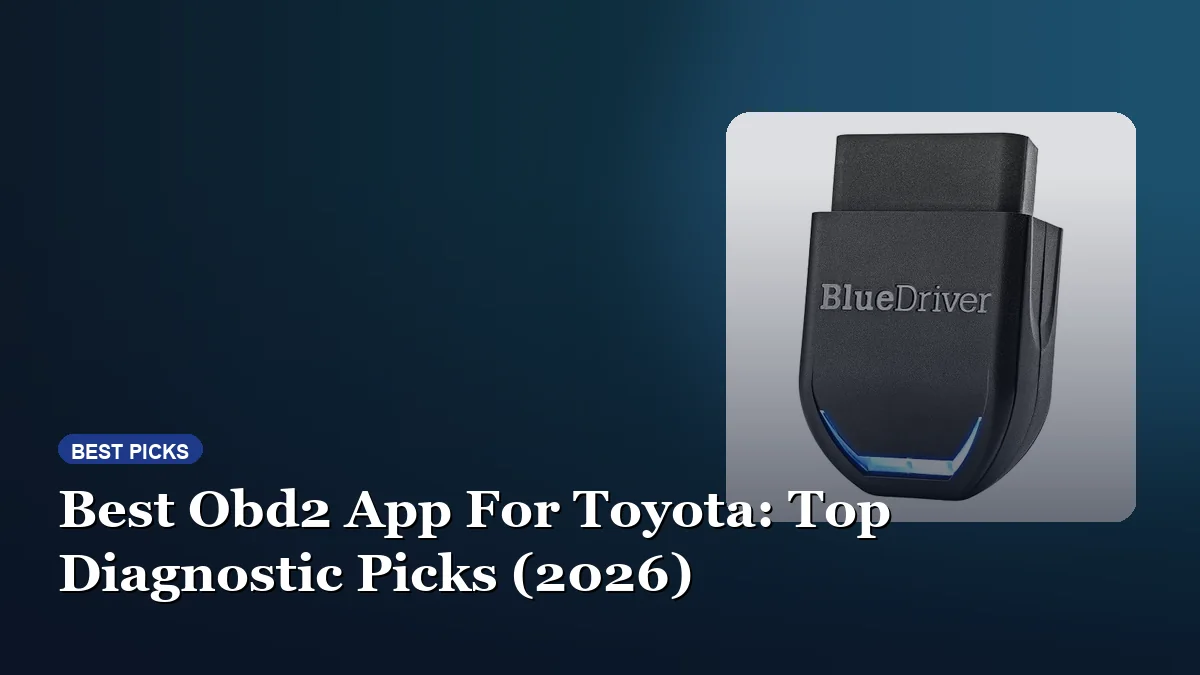
 BlueDriver Bluetooth OBD2 Scanner and Diagnostic Tool
Wireless Bluetooth . No Subscription . Verified Fixes
 Veepeak OBDCheck BLE Bluetooth OBD2 Scanner
Pocket-Sized . Third-Party Apps . Standard OBD-II
 Carista EVO Bluetooth OBD2 Scanner
Dealer Customizations . Wireless App . Subscription Needed
 UMEIJA V011 Bluetooth 5.4 OBD2 Scanner
Fast Bluetooth 5.4 . Visual Charts . Broad Support
 XTOOL A30M Bidirectional OBD2 Scanner
Full Bidirectional . Lifetime Updates . 26 Resets
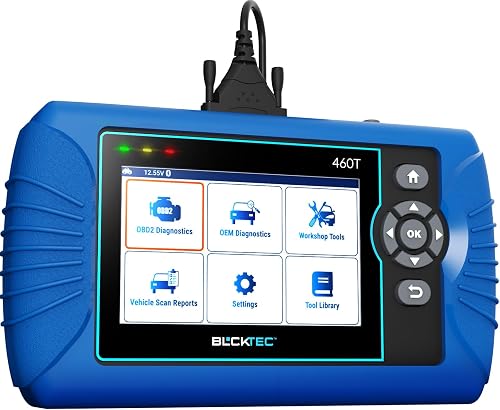 BLCKTEC 460T OBD2 Scanner Car Code Reader
Built-in Screen . 12 Reset Services . Free App Sync
Looking for the best obd2 app for toyota? The BlueDriver Bluetooth OBD2 Scanner and Diagnostic Tool stands out as our top recommendation due to its seamless wireless connectivity, robust manufacturer-specific diagnostics, and zero-subscription model.
It gives you deep insight into your vehicle's health right from your smartphone screen.
On This Page (8 sections)
How We Chose
- Toyota Compatibility: We prioritized tools capable of reading deep manufacturer-specific codes beyond basic powertrain faults.
- App Ecosystem: We checked whether the companion software offers intuitive navigation and reliable cloud or local data logs.
- Value & Subscriptions: We evaluated upfront hardware costs against hidden software fees to ensure lasting long-term value.
Who Needs This
- DIY mechanics who want to troubleshoot dashboard warning lights before visiting a repair shop.
- Toyota owners looking to customize hidden vehicle features like auto-lock behaviors and DRL settings.
- Road-trippers who want real-time engine monitoring and live sensor data on their smartphone.
Who Can Skip
- Drivers who prefer traditional standalone handheld scanners with built-in physical screens over phone apps.
- Vehicle owners who never want to deal with Bluetooth pairing or app updates.
- Those who only need a basic generic code reader for quick emissions tests.
Quick Comparison: Best Obd2 App For Toyota
| Model | Connectivity / OS | App Model / Fees | Primary Toyota Focus |
|---|---|---|---|
| Wireless Bluetooth / iOS & Android | No Subscription Required | Verified Fixes & Diagnostics |
| Mini Bluetooth / iOS & Android | Third-Party App Support | Pocket-Sized Code Reading |
| Wireless Bluetooth / iOS & Android | Subscription Needed | Dealer Customizations |
| Bluetooth 5.4 / Multi-OS | Proprietary Mobile App | Fast Visual Charts |
| Wireless OBD2 / iOS & Android | Lifetime Free Updates | Bidirectional Active Tests |
| Built-in Screen / App Sync | Free Cloud App Sync | Standalone Screen Reader |
The 6 Best Obd2 App For Toyotas, Reviewed
BlueDriver Bluetooth OBD2 Scanner and Diagnostic Tool
View on Amazon →This wireless OBD2 scanner pairs directly with your smartphone to turn complex diagnostic codes into easy-to-read, verified repair reports. It bridges the gap between basic code readers and expensive professional shop tools without tying you down to ongoing monthly subscription fees.
Delivering comprehensive diagnostic reports matched directly to your specific vehicle identification number.
Occasional Bluetooth pairing quirks can occasionally require a quick app restart to establish a stable connection.
| Metric | Listed Specification |
|---|---|
| Operating System | iOS and Android |
| Power Source | Vehicle Port |
| Automotive Fit | Vehicle Specific |
| Diagnostics | ABS, SRS, TPMS, Engine |
Setting up the unit involves plugging it into your dashboard port and pairing directly through the companion app rather than your phone's native system settings.
Day-to-day operation is smooth, letting you monitor live data streams and check smog readiness right from the driver's seat.
The dongle sits flush enough in most vehicles to stay plugged in without interfering with your knees while driving. Long-term upkeep is virtually non-existent, and free app updates ensure you maintain compatibility as your household fleet evolves.
- No subscription fees required
- Clear, technician-verified repair reports
- Extensive ABS and SRS coverage
- Occasional Bluetooth sync drops
- Higher upfront cost than basic adapters
Customers find the scanner to be a powerful, user-friendly tool that successfully diagnoses minor issues and saves money on repair bills. While most enjoy seamless operation, a few note occasional hiccups with Bluetooth pairing.
Everyday drivers and DIYers wanting professional diagnostics without recurring subscription costs.
Verify that your specific vehicle model is fully supported for enhanced ABS and SRS module diagnostics.
An intuitive, subscription-free diagnostic powerhouse that belongs in every car glove box.
View on Amazon →Verdict
The top choice for reliable, deep-dive mobile vehicle diagnostics.
Veepeak OBDCheck BLE Bluetooth OBD2 Scanner
View on Amazon →This pocket-sized adapter relies on third-party mobile apps to deliver flexible code reading and live sensor tracking without taking up permanent legroom in your car. It serves as a cost-effective bridge for everyday drivers who want basic engine health monitoring on a budget.
Pairing seamlessly with popular third-party diagnostic apps on both iOS and Android platforms.
Advanced manufacturer-specific features depend entirely on which third-party app you choose to download.
| Metric | Listed Specification |
|---|---|
| Dimensions | 1.61" x 1.97" x 0.87" |
| Power Source | OBD II Port |
| Model Type | BLE Bluetooth |
| Fit Type | Universal Fit |
The low-profile design means you can plug it into your lower dash and leave it tucked away indefinitely without bumping your feet. Connecting requires launching your chosen compatible app first and establishing the link internally.
Because it acts as a hardware bridge, your overall experience relies heavily on the quality and interface of the third-party app you select. Upkeep is effortless since the unit draws minimal power and requires no manual maintenance.
- Extremely compact low-profile design
- Compatible with many popular apps
- Great value for basic code reading
- Requires separate third-party apps
- Advanced diagnostics depend on app choice
Customers appreciate the scanner's ease of setup and ability to work smoothly with various third-party diagnostic apps. A few users mention experiencing occasional connection delays depending on the mobile app used.
Budget-conscious DIYers who prefer pairing hardware with their favorite third-party car apps.
Check whether your desired third-party app requires an in-app purchase for advanced vehicle modules.
An affordable, unobtrusive adapter that lets you choose your preferred mobile diagnostic interface.
View on Amazon →Verdict
The best economical choice for basic wireless code reading.
Carista EVO Bluetooth OBD2 Scanner
View on Amazon →Designed primarily to unlock hidden factory settings and dealer-level customizations, this tool lets you tailor comfort features and dashboard behaviors on supported vehicles. It transforms your smartphone into a deep vehicle customizer, though unlocking its full suite of advanced tools requires an ongoing app subscription.
Unlocking hidden convenience settings and customized vehicle behaviors tailored to your preferences.
Advanced diagnostics and customization features are gated behind a recurring monthly or annual subscription fee.
| Metric | Listed Specification |
|---|---|
| Model Number | COBD-EVO |
| Power Source | Port Powered |
| OS Support | Android, iOS |
| Language | Multiple Languages |
The hardware clicks securely into place, and initial setup takes just a few minutes of app configuration. Once connected, you can easily modify automated door locks, lighting behaviors, and chime settings from your phone screen.
While basic code reading is available out of the box, you will need to weigh the subscription cost against how frequently you plan to adjust deep system configurations. The hardware remains reliable and durable over long-term ownership.
- Unlocks hidden factory customizations
- Straightforward app configuration
- Broad manufacturer support
- Subscription required for advanced tools
- Some advanced features vary by model
Customers praise the scanner for letting them easily customize vehicle settings and disable annoying chimes. However, many express frustration over the recurring subscription model required to keep advanced features active.
Enthusiasts who want to personalize factory comfort settings and vehicle behaviors.
Factor the ongoing app subscription cost into your budget before committing to advanced features.
A powerful customizer that requires a ongoing financial commitment to unlock its true potential.
View on Amazon →Verdict
The ideal pick for drivers looking to personalize deep factory settings.
UMEIJA V011 Bluetooth 5.4 OBD2 Scanner
View on Amazon →Upgraded with a fast wireless chipset, this scanner provides stable data streaming and intuitive visual charts that make interpreting engine parameters straightforward for beginners. It pulls double duty by clearing trouble codes and monitoring live sensor data through a dedicated mobile application.
Maintaining a fast, reliable wireless link using modern Bluetooth architecture.
The proprietary mobile app can feel a bit clunky compared to more polished mainstream diagnostic suites.
| Metric | Listed Specification |
|---|---|
| Dimensions | 3.8" x 2.5" x 3.8" |
| Protocol Support | 9 Protocols |
| Language | Multilingual Support |
| Power Source | Wireless Power |
Pairing is simplified by letting the dedicated app handle connection protocols automatically without forcing you to dig through complex phone menus. The real-time charts help you spot minor temperature or voltage fluctuations before they turn into major roadside inconveniences.
The physical build is sturdy enough for glove box storage, though you should remember to unplug it during extended periods of vehicle inactivity to protect your car battery. Upkeep is minimal thanks to the free companion app.
- Upgraded Bluetooth 5.4 connectivity
- Clear real-time data charts
- Broad vehicle compatibility
- Companion app interface feels clunky
- Can drain battery if left plugged in
Customers find the scanner works reliably on a variety of trucks and cars, offering good value and helpful live data charts. Some users note that the companion app can occasionally feel unrefined during setup.
Shoppers looking for modern Bluetooth speed and visual data graphs on a budget.
Remember to unplug the unit when not in use to avoid gradual battery drain over long idle periods.
A fast, modern wireless scanner that visualizes engine health effectively for everyday drivers.
View on Amazon →Verdict
A solid mid-tier option featuring updated Bluetooth connectivity.
XTOOL A30M Bidirectional OBD2 Scanner
View on Amazon →Bringing professional-grade active testing to your garage, this bidirectional tool lets you send live commands directly to vehicle components like fuel pumps and windows. It stands out by offering comprehensive full-system diagnostics paired with lifetime software updates that eliminate ongoing subscription fees.
Executing active component tests and heavy-duty service resets from a mobile device.
The extensive menu options and advanced features have a steeper learning curve for casual DIYers.
| Metric | Listed Specification |
|---|---|
| Model Number | XTOOL A30M |
| Connectivity | Bluetooth 4.0 |
| System Scope | Full System Scan |
| Power Source | OBD II Port |
Wireless range allows you to sit comfortably inside the cabin while commanding exterior wipers, door actuators, or fuel injectors to verify mechanical response. Upgrades are included permanently, ensuring long-term compatibility as you service newer vehicles.
The diagnostic software is deep, offering multi-stream graphing that helps isolate stubborn engine quirks. While it requires some mechanical knowledge to master, the payoff is workshop-level capability right in your driveway.
- Full bidirectional active testing controls
- Lifetime free software updates
- Extensive full-system scan capabilities
- Steep learning curve for beginners
- Some specialized resets require extra setup
Customers rave about the scan tool's professional-grade capabilities, noting it performs just like high-end diagnostic units and saves hundreds in shop fees. A few users mention that navigating the advanced menus takes some practice.
Serious home mechanics and DIYers who need active component testing and maintenance resets.
Confirm that your specific vehicle make supports the exact service resets and bidirectional commands you need.
A professional-grade bidirectional scanner that delivers workshop performance without recurring fees.
View on Amazon →Verdict
The premier choice for advanced troubleshooting and active component testing.
BLCKTEC 460T OBD2 Scanner Car Code Reader
View on Amazon →Equipped with a physical color screen and an integrated processor, this standalone unit bypasses the need to stare entirely at your phone screen while working under the hood. It pairs rapid AutoVIN scanning with twelve essential service resets, making it a robust garage companion for routine vehicle upkeep.
Delivering rapid all-system scans on a dedicated physical screen without relying strictly on a smartphone.
The physical handheld design is bulkier and less pocketable than micro Bluetooth dongles.
| Metric | Listed Specification |
|---|---|
| Screen Size | 4.3 Inches |
| Dimensions | 7.75" x 1.5" x 4.4" |
| Operating System | iOS and Android Sync |
| Power Source | Vehicle Powered |
Plugging the unit into the diagnostic port immediately triggers an automated VIN retrieval and system scan without extra button presses.
Reviewing live data streams on the color display is crisp, and syncing with the companion cloud app provides detailed repair guides.
The rugged handheld build feels reassuring during garage work, standing up well to greasy fingers and accidental drops. Lifetime free updates ensure the onboard database stays current with newer vehicle releases.
- Dedicated 4.3-inch color display
- Automated VIN and system scanning
- Access to free RepairSolutions2 app
- Bulkier than smartphone dongles
- Function availability varies by vehicle
Customers find the scanner to be a reliable garage tool that quickly reads engine and ABS codes with minimal fuss. Some users note that certain advanced reset functions may not be available on every single car model.
Home mechanics who prefer a standalone handheld tool with a physical screen over smartphone apps.
Check the manufacturer's online compatibility tool to ensure your specific vehicle supports all 12 reset services.
A rugged, self-contained diagnostic tool that puts a clear color screen directly in your hands.
View on Amazon →Verdict
The best standalone reader for mechanics who want a dedicated physical display.
Setting Up and Maintaining Your Toyota OBD2 App
To get the most out of your diagnostic setup, plug your Bluetooth OBD2 adapter securely into the diagnostic port beneath your Toyota's steering column with the ignition off.
Turn the ignition to the accessory position, enable Bluetooth on your smartphone, and open your companion app to establish a secure connection.
Keep your phone's operating system and the diagnostic app updated to prevent pairing glitches, and always unplug the adapter during long-term vehicle storage to avoid slow battery drain.
Buying Guide & Red Flags for Best Obd2 App For Toyotas
Check these points before you buy to avoid common pitfalls:
Apps that charge recurring subscription fees for basic features you should own outright.
Adapters with unstable Bluetooth connections that drop mid-diagnostic scan.
Generic code readers that fail to pull deep manufacturer-specific Toyota trouble codes.
Clunky mobile interfaces laden with confusing ads and unresponsive menu buttons.
Lackluster customer support or abandoned apps that no longer receive security updates.
What does our 10-point Lab Score evaluate for these Toyota diagnostic tools?
Our editorial rating is a rigorous 10-point scale that combines everyday practicality, design quality, hardware durability, and verified owner satisfaction.
We test how easily each adapter pairs with mobile devices, how reliably it streams live sensor data, and whether the software provides accurate, actionable repair insights.
This holistic approach ensures that every recommended app delivers genuine value to everyday drivers and DIY mechanics alike.
Do I need a subscription to read trouble codes on my Toyota?
Many standard OBD2 apps let you read and clear basic generic engine codes for free, but manufacturer-specific systems often require paid upgrades.
Advanced features like ABS diagnostics, airbag checks, and deep vehicle customizations frequently sit behind tiered subscription models or one-time software unlocks.
If you want comprehensive access to your Toyota's proprietary computer modules, it pays to check the software pricing structure before purchasing your hardware adapter.
Can these mobile diagnostic apps fix my car problems automatically?
Diagnostic apps cannot physically repair mechanical or electrical faults, but they act as powerful guides for identifying the root cause of trouble lights.
By translating obscure error codes into verified fix suggestions and showing live sensor readings, these tools empower you to tackle repairs yourself or speak intelligently with a professional mechanic.
They remove the guesswork from dashboard warnings so you know exactly what needs attention before visiting a service center.
Will a third-party OBD2 app drain my car battery if left plugged in?
Leaving a Bluetooth OBD2 adapter plugged into your Toyota's diagnostic port indefinitely can cause a slow parasitic draw on your battery.
While modern micro-adapters feature low-power sleep modes, older or lower-quality units may continue drawing current even when the ignition is turned off.
For peace of mind and optimal battery health, it is always best practice to unplug your scanner if you plan to leave your vehicle parked for several days.
Are these wireless scanners compatible with both iOS and Android devices?
Most modern Bluetooth OBD2 adapters support both iOS and Android operating systems, though you should always verify compatibility before downloading companion apps.
Apple devices typically require Bluetooth Low Energy (BLE) certified adapters to establish a stable wireless connection, whereas Android phones offer slightly broader pairing flexibility.
Checking the manufacturer specifications ensures your smartphone will communicate smoothly with your chosen diagnostic hardware without frustrating pairing errors.
What is the difference between generic OBD2 codes and Toyota-specific codes?
Generic OBD2 codes are standardized across all vehicle makes to cover basic powertrain and emissions faults mandated by federal regulations.
Toyota-specific diagnostic trouble codes delve much deeper into proprietary modules like transmission control, body electronics, anti-lock brakes, and supplemental restraint systems.
Using an app built to parse these manufacturer-specific codes gives you a complete picture of your vehicle's overall health far beyond a standard check engine light.
Final Verdict
Choosing the best obd2 app for toyota comes down to balancing deep diagnostic depth with intuitive app design.
The BlueDriver Bluetooth OBD2 Scanner and Diagnostic Tool remains our top recommendation for its perfect blend of robust manufacturer data, zero subscription fees, and reliable wireless performance.
Whether you want to clear stubborn warning lights or monitor live engine data, equipping your glovebox with the right tool keeps you in control.
Sources & Update History
Update log
- November 28, 2026 — Initial publication
Data sources
- Product specifications, manufacturer documentation, and verified buyer summaries