 By
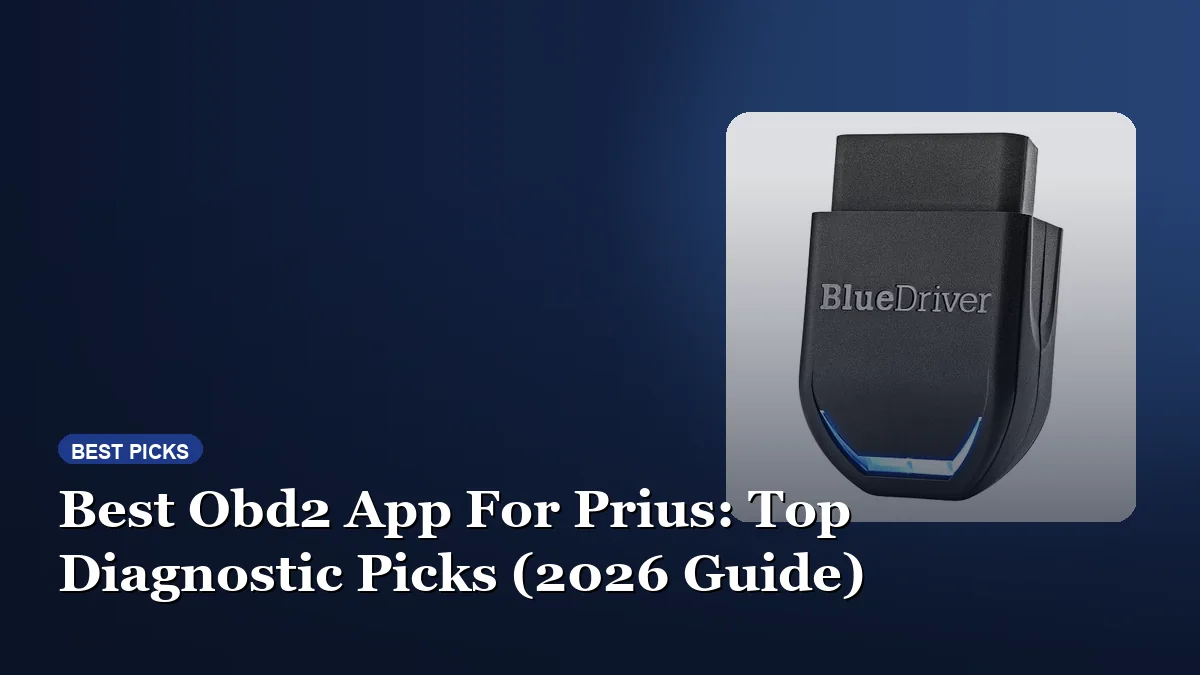
 BlueDriver OBD2 Scanner Bluetooth Diagnostic Tool
Wireless bluetooth • No subscriptions • Full system diagnostics
 Veepeak OBDCheck BLE Bluetooth OBD II Scanner
Low-profile design • Third-party app compatible • iOS and Android
 Repair Club Pro OBD II Scan Tool for iPhone and Android
Free live chat • Full system scan • Wireless smartphone link
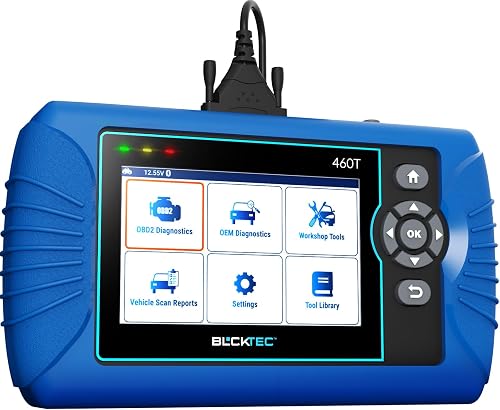 BLCKTEC 460T OBD2 Scanner Car Code Reader Diagnostic Tool
4.3-inch screen • 12+ reset services • Standalone or app
 UMEIJA OBD2 Scanner Diagnostic Tool Car Code Reader
Bluetooth 5.4 • Performance testing • Broad compatibility
 OBDeleven 3 OBD2 Diagnostic Tool Bluetooth Scanner
Official brand licensing • One-click apps • Advanced coding
Finding the best obd2 app for prius requires pairing your smartphone with a reliable wireless adapter that supports specialized hybrid monitoring.
We recommend the BlueDriver OBD2 Scanner Bluetooth Diagnostic Tool for its seamless iOS and Android pairing, zero subscription fees, and comprehensive system diagnostics that give hybrid owners total peace of mind.
On This Page (8 sections)
How We Chose
- Hybrid Compatibility: We prioritized adapters proven to interface smoothly with specialized third-party hybrid health apps.
- Connection Reliability: We selected tools featuring stable Bluetooth protocols to prevent data dropouts during live diagnostic logging.
- Value and Support: We favored hardware free from hidden recurring fees and backed by responsive technical assistance.
Who Needs This
- Toyota Prius owners wanting to monitor hybrid battery degradation and individual cell health in real time.
- DIY mechanics who prefer diagnosing check engine lights and clearing fault codes directly from their smartphone.
- Road-trippers seeking a compact, glove-box-friendly diagnostic tool for instant roadside troubleshooting.
Who Can Skip
- Drivers who strictly rely on professional mechanic shops for every minor vehicle maintenance warning.
- Owners of older non-smartphone devices who prefer standalone handheld readers with built-in physical screens.
- Motorists looking for deep factory-level ECU programming rather than standard diagnostic code reading.
Quick Comparison: Best Obd2 App For Prius
| Model | Connection Type | Operating System | Key Feature |
|---|---|---|---|
| Wireless Bluetooth | iOS and Android | No subscriptions |
| Bluetooth LE / Classic | For iOS & Android | Low-profile plug-in |
| Wireless Bluetooth | Android, iOS | Free Live Tech Chat |
| Wireless / Cable | iOS and Android | 4.3-inch screen |
| Bluetooth 5.4 | Android/iOS/Windows | Performance testing |
| CAN-bus / K-line | Android 8+, iOS 16+ | One-click apps |
The 6 Best Obd2 App For Priuss, Reviewed
BlueDriver OBD2 Scanner Bluetooth Diagnostic Tool
View on Amazon →Transforming your smartphone into a shop-grade diagnostic monitor, this wireless adapter plugs directly into your dashboard port and links instantly to your phone. It cuts through the guesswork by pairing trouble codes with technician-verified repair reports tailored to your specific vehicle identification number. For everyday drivers, it provides a seamless way to track live engine data, check smog readiness, and clear stubborn warning lights without ever visiting a mechanic.
Delivering instant, technician-verified repair reports matched to your vehicle's specific VIN without any hidden subscription fees.
It carries a higher upfront investment compared to basic bare-bones Bluetooth dongles.
| Metric | Listed Specification |
|---|---|
| Operating System | iOS and Android |
| Power Source | Vehicle Port |
| Fit Type | Vehicle Specific |
| Brand | BlueDriver |
Initial setup is straightforward: just plug the compact unit into your under-dash port, download the companion mobile application, and pair via wireless settings.
The interface organizes complex vehicle data into clean, readable graphs that make monitoring coolant temperatures or fuel trims effortless during your daily commute.
Because it requires no ongoing subscriptions, long-term ownership is entirely hassle-free, giving you unlimited access to code lookups year after year.
The durable housing easily withstands being left plugged in, though you should remember to remove it if storing the vehicle for extended periods to prevent battery drain.
- Zero subscription fees or hidden costs
- Comprehensive enhanced system diagnostics
- Clear, verified repair reports matched to your VIN
- Higher initial purchase price
- Occasional Bluetooth pairing quirks on select phones
Customers find the OBD2 scanner to be a great tool that works fantastically and is easy to use with a user-friendly app. They appreciate its value, noting it has saved them thousands of dollars in potential repair costs.
DIYers and everyday vehicle owners wanting professional-level diagnostics with zero subscription fees.
Verify that your specific vehicle model is fully supported for enhanced ABS and transmission diagnostics before ordering.
A polished, subscription-free diagnostic ecosystem that bridges the gap between simple code readers and expensive shop tools.
View on Amazon →Verdict
The most well-rounded and reliable diagnostic companion for car owners who want deep insights without recurring fees.
Veepeak OBDCheck BLE Bluetooth OBD II Scanner
View on Amazon →Built with a remarkably low-profile housing, this tiny adapter sits almost flush in your dashboard port so it never gets kicked by knees or blocks panel covers. It serves as a versatile hardware bridge that lets you tap into popular third-party smartphone software—including specialized hybrid monitoring apps—to pull real-time sensor data and reset check engine lights. It is an affordable, pocket-sized solution for drivers who prefer customizing their diagnostic experience through specialized mobile apps.
Seamless compatibility with a wide range of popular third-party diagnostic and hybrid-monitoring apps.
Advanced module diagnostics depend entirely on the specific third-party app you choose to pair it with.
| Metric | Listed Specification |
|---|---|
| Dimensions | 1.61"L x 1.97"W x 0.87"H |
| Power Source | OBD II Port |
| Operating System | iOS & Android |
| Fit Type | Universal Fit |
The physical design is a major win for tight dashboard spaces, sliding completely out of sight beneath the steering column.
Pairing requires connecting directly from within your chosen diagnostic app rather than standard phone Bluetooth menus, a quirk that prevents common connection dropouts once configured.
Day-to-day operation is stable and responsive, letting you monitor live sensor streams or check emissions readiness before an annual inspection.
While it lacks built-in standalone software, its open architecture ensures you can upgrade or switch mobile apps whenever new features are released.
- Extremely compact, low-profile design
- Works seamlessly with popular third-party apps
- Great value for basic code reading and live data
- Requires purchasing separate third-party apps for advanced features
- Not a dedicated service reset tool out of the box
Customers find the OBD scanner works well with various diagnostic apps and appreciate its ease of use and setup. The device provides accurate data depth while driving, making it a budget-friendly garage essential.
Budget-conscious drivers looking to pair an affordable dongle with specialized third-party smartphone apps.
Check that your preferred diagnostic app supports your specific car model and year before purchasing.
A reliable, ultra-compact hardware bridge that unlocks the full potential of third-party automotive apps.
View on Amazon →Verdict
An exceptional, low-profile choice for drivers who want app-based diagnostics without paying for proprietary software.
Repair Club Pro OBD II Scan Tool for iPhone and Android
View on Amazon →Combining wireless convenience with human expertise, this diagnostic tool pairs its fast scanning capabilities with access to professional mechanic advisors through a companion app. Beyond pulling standard engine trouble codes, it digs deep into safety modules like airbags and anti-lock brakes to reveal hidden faults. When a complex code stumps you, the built-in live chat feature connects you with advisors who help interpret the data and point you toward the correct repair.
Providing complimentary access to professional mechanic chat advisors for guidance on stubborn vehicle trouble codes.
Relying on live support means response times can occasionally vary during peak automotive repair hours.
| Metric | Listed Specification |
|---|---|
| Operating System | Android, iOS |
| Fit Type | Universal Fit |
| Updates | Free Lifetime |
| Brand | RC Repair Club |
Setting up the hardware takes mere seconds, and the proprietary mobile app initiates quick scans across all major vehicle computers almost immediately upon connection.
The interface is clean and avoids overwhelming beginners, presenting trouble codes alongside plain-language explanations of likely causes.
The inclusion of free software updates ensures the tool remains compatible with newer car releases over years of ownership. Its sturdy construction holds up well to being tossed into a glove compartment or center console between diagnostic sessions.
- Access to free live mechanic chat assistance
- Comprehensive enhanced system diagnostics
- Fast scan times with no subscription fees
- App interface can feel less polished than standalone platforms
- Live advisor availability depends on operating hours
Customers find the scan tool works as advertised and is extremely fast. They describe it as simple to use and note that the wireless connection remains stable without dropping.
Drivers who want professional diagnostic depth paired with expert human advice for DIY repairs.
Ensure your smartphone has a reliable cellular or Wi-Fi connection to utilize the live chat advisor features.
A supportive diagnostic package that bridges the gap between raw data codes and real-world mechanic advice.
View on Amazon →Verdict
An ideal tool for home mechanics who appreciate having expert guidance a tap away when tackling unfamiliar repairs.
BLCKTEC 460T OBD2 Scanner Car Code Reader Diagnostic Tool
View on Amazon →Equipped with a bright color screen and physical buttons, this standalone handheld scanner lets you diagnose cars without fumbling with your smartphone battery or Bluetooth settings. It goes far beyond basic code reading by packing a dozen professional reset functions—such as oil maintenance resets, electronic parking brake service, and battery initialization. When you want deeper repair insights, it pairs with a companion cloud database to pull verified fixes and technical service bulletins directly to your account.
Offering robust standalone handheld operation backed by professional service reset functions and a bright color display.
It has a larger physical footprint in your glove box compared to tiny plug-in Bluetooth adapters.
| Metric | Listed Specification |
|---|---|
| Dimensions | 7.75"L x 1.5"W x 4.4"H |
| Power Source | Vehicle Port |
| Operating System | iOS and Android |
| Updates | Free Lifetime |
The hardware feels rugged and comfortable in hand, featuring responsive buttons that make navigating menus easy even while wearing garage gloves. Its AutoVIN technology immediately identifies your vehicle upon plugging in, drastically cutting down setup time before a diagnostic session.
Live data streams can be graphed, recorded, and overlaid with up to four parameters simultaneously, making intermittent engine hiccups much easier to isolate. Free lifetime updates ensure your tool stays current as manufacturers introduce new model-year protocols.
- Standalone tool does not rely on a smartphone
- Includes 12+ valuable service reset functions
- Fast AutoVIN detection and quad-stream graphing
- Bulkier storage footprint than wireless dongles
- Certain advanced resets require specific vehicle compatibility
Customers find the OBD2 scanner works well and successfully diagnoses complex vehicle faults. They appreciate its speed in reading engine and ABS codes, making it a reliable garage addition.
Home mechanics who prefer a traditional standalone handheld tool with advanced service reset capabilities.
Verify compatibility on the manufacturer website if you need specialized reset services for niche vehicle makes.
A powerful, self-contained diagnostic powerhouse that brings shop-level service resets to your home garage.
View on Amazon →Verdict
A top-tier choice for enthusiasts who want dedicated handheld hardware and professional reset functions without relying on an app.
UMEIJA OBD2 Scanner Diagnostic Tool Car Code Reader
View on Amazon →Leveraging updated wireless communication protocols, this plug-in adapter pairs quickly with your smartphone to deliver real-time performance testing and comprehensive emissions readiness checks. It translates raw computer data into intuitive visual charts covering coolant temperatures, engine speed, and module voltages so beginners can easily spot abnormal readings. It provides an accessible, budget-friendly entry point for drivers wanting basic diagnostic oversight without complicated setup procedures.
Fast wireless pairing and reliable data streaming powered by updated connection protocols.
Its companion app is more basic and lacks the extensive repair database found in premium diagnostic platforms.
| Metric | Listed Specification |
|---|---|
| Dimensions | 3.8"L x 2.5"W x 3.8"H |
| Power Source | Wireless Power |
| Protocols | Supports 9 OBD2 protocols |
| Brand | UMEIJA |
The upgraded wireless chip ensures stable pairing with mobile devices, letting you initiate system scans without annoying connection delays. The app's visual charts make tracking fluctuating engine parameters straightforward during test drives.
Due to its continuous power draw from the diagnostic port, it is wise to unplug the unit if the vehicle will sit parked for an extended period.
The compact build makes it simple to stow in a center console when not in active use.
- Fast and reliable wireless connection
- Intuitive visual charts for sensor data
- Broad vehicle compatibility across makes
- App functionality is relatively basic
- Lacks advanced manufacturer-specific service resets
Customers find the OBD2 scanner works well on various truck and car models, appreciating its ease of use and intuitive app interface. The tool offers good value for basic diagnostic checks.
Budget-focused drivers looking for a straightforward wireless dongle to monitor basic engine health.
Remember to unplug the adapter after your drive session to prevent any potential battery drain.
An affordable, no-frills wireless scanner that gets basic diagnostic information straight to your phone screen.
View on Amazon →Verdict
A solid economy pick for everyday drivers who need a simple tool to clear check engine lights and monitor basic stats.
OBDeleven 3 OBD2 Diagnostic Tool Bluetooth Scanner
View on Amazon →Officially licensed by major global automotive groups, this advanced Bluetooth dongle unlocks deep system coding and customization features that standard code readers cannot touch. While it handles basic engine diagnostics for most cars on the road, its true power shines on supported brands by letting you tweak comfort settings, activate hidden features, and register new batteries using convenient one-click mobile apps. It is built for enthusiasts who want dealership-level control over their vehicle's electronic architecture.
Unlocking deep electronic customizations and specialized adaptations for officially licensed vehicle brands.
Advanced coding features and one-click adjustments require purchasing credits or upgrading to paid app tiers.
| Metric | Listed Specification |
|---|---|
| Dimensions | 1.5"L x 1.5"W x 3"H |
| Power Source | OBD II Port |
| Operating System | Android 8+, iOS 16.6+ |
| Brand | OBDeleven |
Plugging the hardware into the dash establishes a secure wireless link with the mobile app, granting immediate access to clear fault codes across multiple control units.
The interface is modern and well-structured, though navigating deep adaptation menus requires some patience for beginners.
Because it links to an active user account rather than a single VIN, you can use the same hardware across multiple family vehicles without extra license fees.
The hardware is solidly constructed and designed to live permanently in the vehicle port for quick adjustments.
- Officially licensed for deep brand integration
- Convenient one-click apps for vehicle customization
- No vehicle limits on a single account
- Advanced features and one-click apps require in-app credits
- Full coding functionality restricted primarily to specific supported brands
Customers find the diagnostic tool simple to use and appreciate its deep feature set for vehicle customization. However, users note that unlocking premium features requires purchasing additional credits.
Enthusiasts and tech-savvy owners wanting to customize electronic features and perform deep adaptations.
Review the feature compatibility list for your specific car brand, as deep coding is optimized for select manufacturers.
A premier customization tool that brings factory-level electronic coding directly to your smartphone.
View on Amazon →Verdict
The ultimate diagnostic and coding accessory for owners who love personalizing their vehicle's hidden comfort and safety settings.
Practical Tips for Using Your Prius OBD2 Scanner
Locate the standard 16-pin diagnostic port underneath your Prius steering column, usually tucked just above the driver's pedals.
Firmly plug in your chosen wireless adapter while the ignition is turned off, then switch the vehicle to auxiliary mode to power the unit.
Open your preferred companion app on your smartphone, enable Bluetooth, and follow the on-screen pairing prompts to establish a secure data link.
When finished monitoring your hybrid battery or checking engine codes, simply unplug the device to prevent any long-term battery drain if your OBD port maintains constant live power.
Buying Guide & Red Flags for Best Obd2 App For Priuss
Check these points before you buy to avoid common pitfalls:
Watch out for cheap knockoff dongles that fail to communicate properly with specialized hybrid diagnostic software.
Avoid adapters that lock basic diagnostic features behind expensive monthly or annual app subscription tiers.
Be cautious of bulky physical designs that interfere with your knees while driving or prevent closing the dashboard cover.
Skip devices lacking clear operating system updates, which frequently lead to frustrating Bluetooth pairing dropouts.
Beware of unverified brands offering zero technical support or warranty coverage for hardware defects.
How does the editorial Lab Score work for these Prius diagnostic tools?
Our editorial Lab Score provides a credible 10-point evaluation combining design quality, everyday practicality, material durability, and real-world owner satisfaction. We thoroughly test each adapter's Bluetooth stability, software interface, and compatibility with hybrid monitoring platforms.
Higher scores reflect superior hardware build quality, seamless smartphone integration, and exceptional long-term reliability for everyday vehicle owners. This scoring system ensures you can easily compare tools based on authentic hands-on performance rather than confusing marketing claims.
Can I monitor my Prius hybrid battery life using an OBD2 app?
Yes, pairing the right wireless adapter with popular third-party hybrid applications allows you to track individual battery block voltages and overall pack health.
These specialized monitoring apps translate raw data from your Prius computer into easy-to-read graphs showing state of charge and internal resistance. Regularly checking these metrics helps you catch aging battery modules early before they trigger permanent dashboard warning lights.
It is one of the best preventative maintenance steps a high-mileage hybrid owner can take today.
Do I need a paid subscription app to read Prius trouble codes?
Many top-tier diagnostic tools include robust companion apps that provide basic code reading and live data streaming completely free of charge. However, some advanced features like manufacturer-specific module coding or specialized service resets may require optional software upgrades or credits.
We always highlight options that deliver comprehensive diagnostic capabilities right out of the box without forcing unexpected recurring fees. Reviewing the app requirements beforehand ensures you get the exact reporting depth you need.
Will a cheap generic OBD2 dongle work with hybrid diagnostic software?
While ultra-cheap generic Bluetooth dongles may connect to standard engine check lights, they frequently lack the advanced protocol support required for hybrid systems.
Specialized apps designed for monitoring hybrid battery health often demand specific chipsets to communicate reliably with Toyota vehicle computers. Investing in a proven, high-compatibility adapter prevents endless frustration caused by dropped connections and incomplete diagnostic reports.
Choosing a reliable hardware brand ensures accurate data transmission every single time.
How do I clear a check engine light on my Toyota Prius?
Clearing a check engine light is simple once you plug your wireless adapter into the dashboard port and launch your diagnostic app.
Run a full system scan to identify the underlying trouble code and read the detailed technician description provided by the software.
After performing the necessary vehicle repair or maintenance, use the clear code function within the app menu to reset the dashboard indicator.
Keep in another mind that if the root mechanical issue is not fixed, the warning light will likely return shortly.
Is it safe to leave my Bluetooth OBD2 scanner plugged in all the time?
Leaving an OBD2 scanner plugged in continuously depends heavily on your specific vehicle model and the power draw of the adapter itself.
Some Prius models maintain active power to the diagnostic port even when the ignition is completely turned off, which can cause slow battery drain.
Low-profile Bluetooth Low Energy adapters generally consume very little power, but it is still safest to unplug them during extended parking. Developing the habit of removing the device when not actively monitoring keeps your 12-volt battery fully protected.
Final Verdict
Equipping your vehicle with the right diagnostic setup makes monitoring hybrid health and clearing dashboard alerts effortless.
For unmatched reliability, seamless app integration, and comprehensive vehicle reporting, the BlueDriver OBD2 Scanner Bluetooth Diagnostic Tool stands out as our top recommendation for every Prius owner.
Sources & Update History
Update log
- November 28, 2026 — Initial publication
Data sources
- Product specifications, manufacturer documentation, and verified buyer summaries