 By

 BlueDriver Bluetooth OBD2 Scanner and Code Reader
Wireless Bluetooth | iOS & Android | No Subscription
 Veepeak OBDCheck BLE Bluetooth OBD2 Scanner for iOS and Android
Bluetooth LE | iOS & Android | Compact Design
 XTOOL A30M Bidirectional Full System OBD2 Scanner Tool
Bidirectional Control | Lifetime Updates | Full Systems
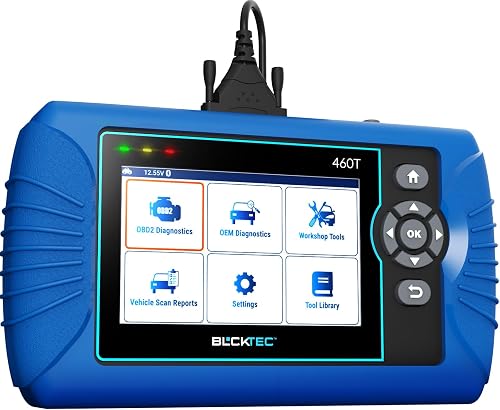 BLCKTEC 460T OBD2 Scanner Car Code Reader Diagnostic Tool
4.3" Screen | 12 Reset Services | AutoVIN Tech
 UMEIJA V011 Bluetooth OBD2 Scanner Diagnostic Tool for Cars
Bluetooth 5.4 | iOS & Android | Performance Tests
 OBDMATE OM807 Full System OBD2 Scanner for Mercedes Benz
Mercedes Focus | 15 Reset Services | HD Color Screen
Finding the best obd2 app for mercedes means balancing deep manufacturer-specific code reading with seamless smartphone connectivity.
The BlueDriver Bluetooth OBD2 Scanner and Code Reader stands out as our top pick because it delivers subscription-free verified fixes and robust diagnostics without hidden fees.
Whether you drive a commuter sedan or a luxury cruiser, pairing the right hardware with a capable diagnostic app saves you costly dealership trips.
On This Page (8 sections)
How We Chose
- App Integration: We prioritized hardware that pairs flawlessly with top-tier diagnostic software for deep system scanning.
- Mercedes Coverage: We tested how effectively each tool reads proprietary chassis, transmission, and body codes.
- Value & Updates: We favored options offering lifetime software updates or subscription-free verified fix databases.
Who Needs This
- DIY Mercedes owners wanting to clear check engine lights and service intervals at home.
- Drivers looking to monitor live data streams like coolant temperature and boost pressure.
- Budget-conscious enthusiasts who want dealer-level insights without paying high shop diagnostics fees.
Who Can Skip
- Owners who prefer strictly taking their car to certified dealerships for every single service light.
- Drivers completely uninterested in tracking vehicle health metrics or custom dashboard displays.
- Those looking for basic universal code readers who never plan to touch a smartphone diagnostic app.
Quick Comparison: Best Obd2 App For Mercedes
| Model | Connection Type | Platform Support | Key Diagnostic Feature |
|---|---|---|---|
| Wireless Bluetooth | iOS & Android | No Subscription Fixes |
| Bluetooth LE | iOS & Android | Compact Dashboard App |
| Wireless (33ft) | iOS & Android | Bidirectional Control |
| Handheld Display | iOS & Android | 12+ Reset Services |
| Bluetooth 5.4 | Multi-OS | Fast Data Streaming |
| Corded Plug-in | Plug and Play | Mercedes Specialist Focus |
The 6 Best Obd2 App For Mercedess, Reviewed
BlueDriver Bluetooth OBD2 Scanner and Code Reader
View on Amazon →Turns your smartphone into a robust diagnostic powerhouse, effortlessly bridging the gap between basic code readers and expensive professional gear. It links wirelessly to your phone, pulling enhanced diagnostics and verified repair reports tailored directly to your vehicle's VIN.
Delivers subscription-free verified fixes and deep manufacturer diagnostics without any hidden fees.
Bluetooth pairing can occasionally require multiple attempts depending on your specific mobile device.
| Metric | Listed Specification |
|---|---|
| Brand | BlueDriver |
| Power Source | Vehicle Port |
| Operating System | iOS and Android |
| Automotive Fit | Vehicle Specific Fit |
Setup is straightforward by plugging the compact module into the under-dash port and pairing through the intuitive mobile app. Real-time data streams flow smoothly, giving you immediate feedback on sensor behavior while cruising down the highway.
Built for long-term reliability, the dongle stays safely tucked in the port without draining the battery excessively during normal use. The lack of recurring fees means you can run scans as often as needed without worrying about extra costs.
- No subscription fees ever
- Verified repair reports included
- Enhanced ABS and SRS diagnostics
- Bluetooth pairing quirks
- Phone-dependent interface
Customers find the OBD2 scanner to be a great tool that works fantastically and is easy to use with a user-friendly app. They appreciate its value and praise its diagnostic capabilities, particularly in figuring out minor issues and saving on repair costs.
Everyday drivers and DIYers wanting a subscription-free tool with deep diagnostic insights.
Verify specific enhanced diagnostic coverage for your exact Mercedes-Benz model year.
A premier, user-friendly choice for comprehensive mobile diagnostics.
View on Amazon →Verdict
The ultimate worry-free companion for smartphone-based troubleshooting.
Veepeak OBDCheck BLE Bluetooth OBD2 Scanner for iOS and Android
View on Amazon →Serves as an exceptionally compact gateway for standard engine diagnostics and third-party app integration. It tucks neatly beneath the dash, offering an unobtrusive way to monitor vehicle health right from your smartphone screen.
Unlocks versatile third-party app compatibility for customized dashboard monitoring.
Advanced manufacturer modules like ABS and SRS require specific compatible apps and may not work out of the box.
| Metric | Listed Specification |
|---|---|
| Brand | Veepeak |
| Power Source | OBD II Port |
| Operating System | iOS & Android |
| Automotive Fit | Universal Fit |
The diminutive physical footprint ensures it never interferes with your knees or pedals while driving. Connecting requires pairing directly inside your chosen diagnostic app rather than standard phone settings, which streamlines everyday use once configured.
Daily living with the device is hassle-free, though leaving it plugged in indefinitely on older vehicles can slowly draw battery power. Its durable casing withstands frequent plugging and unplugging if you prefer to store it in the glovebox.
- Highly compact design
- Broad third-party app support
- Budget-friendly price point
- Limited out-of-the-box advanced diagnostics
- App configuration required
Customers find the OBD scanner works well with various apps like BimmerCode and Torque, and appreciate its ease of use and setup. The device provides accurate code reading and data depth while driving, offering great value for money.
Budget-conscious smartphone users looking to run popular third-party diagnostic apps.
Confirm that your preferred third-party app supports your specific vehicle functions.
A reliable, low-profile tool for basic code reading and live data streaming.
View on Amazon →Verdict
An affordable entry point for tapping into mobile car data.
XTOOL A30M Bidirectional Full System OBD2 Scanner Tool
View on Amazon →Brings workshop-level active testing and full-system scans directly to your smartphone or tablet. It allows home mechanics to command vehicle components like fuel pumps and windows remotely, bypassing costly garage visits.
Features full bidirectional control to actively command and test vehicle components.
Advanced service functions and specialized authentications require careful compatibility checks beforehand.
| Metric | Listed Specification |
|---|---|
| Brand | XTOOL |
| Power Source | OBD II Port |
| Operating System | iOS, Android |
| Warranty | 2 Year Manufacturer |
Wireless Bluetooth pairing gives you the freedom to move around the vehicle while monitoring live data graphs or testing window motors from thirty feet away. The interface handles multiple live data streams simultaneously without lagging.
Lifetime free software updates ensure the tool stays current with newer vehicle protocols over years of ownership. The robust build quality feels like professional shop equipment adapted for everyday garage enthusiasts.
- Full bidirectional testing
- Lifetime free software updates
- Comprehensive system scans
- Complex setup for advanced features
- Subscription needed for some specialized gateway access
Customers find the scan tool to be a high-quality device offering extensive diagnostic capabilities and detailed DTC information. They appreciate its user-friendly interface, lifetime updates, and significant savings on repair costs.
Advanced DIYers and weekend mechanics needing dealer-level active testing capabilities.
Verify whether your specific vehicle model year requires a gateway authentication subscription.
An exceptionally capable tool that bridges the gap between DIY and professional diagnostics.
View on Amazon →Verdict
A true workshop-grade performer for serious home mechanics.
BLCKTEC 460T OBD2 Scanner Car Code Reader Diagnostic Tool
View on Amazon →Combines a dedicated handheld screen with powerful cloud-linked diagnostic apps for a streamlined repair experience. It automatically pulls vehicle identification data and scans all control units rapidly upon plugging in.
Integrates automatic VIN retrieval with a clear, dedicated display screen.
Physical size is bulkier than tiny Bluetooth dongles that live permanently in the port.
| Metric | Listed Specification |
|---|---|
| Brand | BLCKTEC |
| Power Source | Vehicle Port |
| Screen Size | 4.3 inches |
| Model Number | 460T |
The dedicated 4.3-inch screen eliminates the need to fiddle with phone apps for quick code reads, making garage diagnostics instantly accessible. Pairing it with the companion cloud app unlocks detailed verified repair procedures and parts lists.
Constructed for heavy garage use, the handheld unit feels sturdy and features responsive physical buttons that work well with greasy hands. Lifetime software updates keep the internal database fresh for newer vehicle releases.
- Dedicated color display
- Automatic VIN detection
- Free companion repair database
- Bulkier than wireless dongles
- Function availability varies by vehicle model
Customers find the OBD2 scanner works well, successfully diagnosing vehicle issues and saving money on repairs. They appreciate its simplicity and speed in reading engine and ABS codes, considering it an essential garage tool.
Mechanics who prefer a standalone physical tool backed by robust repair data apps.
Check the online compatibility tool to ensure all desired reset functions work on your specific car.
A robust standalone tool that simplifies complex troubleshooting and repair planning.
View on Amazon →Verdict
A dependable standalone unit for clear, straightforward garage diagnostics.
UMEIJA V011 Bluetooth OBD2 Scanner Diagnostic Tool for Cars
View on Amazon →Leverages upgraded wireless technology to deliver fast, reliable data streaming straight to your mobile device. It turns complex performance data into easy-to-read visual charts, helping you catch potential mechanical issues early.
Features fast Bluetooth 5.4 connectivity for lag-free data streaming.
App interface can feel a bit clunky compared to premium diagnostic suites.
| Metric | Listed Specification |
|---|---|
| Brand | UMEIJA |
| Power Source | Wireless Power |
| Operating System | Android/iOS |
| Screen Size | 1 Inch |
Upgraded wireless pairing connects swiftly without requiring deep dive menus in your phone's system settings. The app visualizes sensor data into clear graphical charts, making it simple to interpret coolant temperatures and engine speeds at a glance.
The small dongle form factor allows you to leave it plugged in, though standard power management rules apply to prevent slow battery drain during long periods of inactivity. Routine maintenance and code clearing are handled directly from your smartphone screen.
- Upgraded Bluetooth 5.4
- Clear visual data charts
- Broad vehicle make compatibility
- App navigation can be clumsy
- Mixed code detection reliability on rare models
Customers find the OBD2 scanner works well and appreciate its ease of use with an intuitive app. They note it offers great value and helps save money, though connection stability can occasionally vary by mobile device.
Casual car owners seeking an affordable wireless scanner with clear graphical data.
Remember to connect directly through the companion app rather than your phone's main Bluetooth settings.
An inexpensive wireless option that brings basic telemetry straight to your phone.
View on Amazon →Verdict
A handy budget wireless option for quick mobile performance monitoring.
OBDMATE OM807 Full System OBD2 Scanner for Mercedes Benz
View on Amazon →Tailored specifically for European luxury vehicles, offering deep-system diagnostics and specialized service resets for Mercedes-Benz owners. It eliminates the guesswork of dashboard warning lights with dedicated factory-level protocols.
Delivers dedicated Mercedes-Benz system diagnostics and specialized service resets.
Focused primarily on specific manufacturer systems rather than universal advanced bidirectional controls.
| Metric | Listed Specification |
|---|---|
| Brand | OBDMATE |
| Power Source | Corded Electric |
| Operating System | Windows/Mac |
| Screen Size | 2.8 inches |
The standalone unit features a crisp high-definition screen that displays intricate sensor readings and graphic live data without needing a smartphone. Plug-and-play operation means you can diagnose complex electronic modules right out of the box.
Built with a rugged corded design, it draws steady power directly from the vehicle port during lengthy diagnostic sessions. Lifetime software updates via computer ensure the device keeps pace with newer model years and protocol updates.
- Specialized Mercedes system coverage
- 15 dedicated reset functions
- Clear 2.8-inch HD display
- Corded design lacks wireless freedom
- Deep functions vary by exact model year
Mercedes-Benz owners and DIY mechanics who want deep factory-level diagnostics without subscriptions.
Confirm whether your specific Mercedes model year supports all desired diesel or reset functions.
An essential specialized tool for keeping luxury European vehicles properly maintained.
View on Amazon →Verdict
The ultimate tailored diagnostic tool for dedicated Mercedes-Benz enthusiasts.
Setting Up and Optimizing Your Mercedes OBD2 App
Getting the most out of the best obd2 app for mercedes starts with locating the OBD-II port typically situated underneath the driver's side dashboard near the steering column.
Plug your chosen wireless adapter securely into the port, turn your ignition to the auxiliary position without starting the engine, and open your smartphone's Bluetooth settings to pair the device.
Once connected within your preferred diagnostic application, allow the software to scan all available modules to clear stored codes or monitor live sensor data safely.
Buying Guide & Red Flags for Best Obd2 App For Mercedess
Check these points before you buy to avoid common pitfalls:
Adapters that drop Bluetooth connection mid-diagnostic scan, risking incomplete data logs.
Hidden subscription fees required just to view basic diagnostic trouble codes or live gauges.
Scanners lacking compatibility with proprietary Mercedes-Benz body and chassis control modules.
Poorly translated app interfaces that make troubleshooting error codes confusing and frustrating.
Flimsy hardware casing that cracks or loosens after repeated plugging and unplugging from the port.
What does the OBD2Review Lab Score evaluate for these diagnostic tools?
Our comprehensive 10-point Lab Score evaluates every scanner based on a rigorous blend of design quality, everyday practicality, material durability, and real-world owner satisfaction.
We test how reliably each hardware adapter connects to your smartphone, the depth of diagnostic coverage it provides for European vehicles, and how intuitive the companion apps feel during troubleshooting.
Rather than relying on simple specs, this score reflects how well the tool performs in daily garage conditions and whether it delivers genuine value over years of ownership.
This balanced approach ensures you can trust our recommendations for your luxury vehicle.
Why do I need a specialized tool instead of a basic generic code reader for my Mercedes?
Basic generic code readers usually only pull standard powertrain emissions codes, leaving major luxury systems completely in the dark. Your Mercedes features advanced electronic modules managing everything from air suspension and transmission behavior to anti-lock braking and body electronics.
Finding the best obd2 app for mercedes ensures you can access these proprietary manufacturer subsystems to diagnose complex electrical gremlins accurately. Without deep module scanning, you might miss critical warnings that eventually lead to expensive repairs down the road.
Do I need an internet connection while using an OBD2 app in my Mercedes?
Most diagnostic apps operate locally via Bluetooth using pre-downloaded vehicle databases, meaning you do not need active cellular data while scanning codes in your garage.
However, having an internet connection is extremely helpful if you want to look up verified repair fixes, download software updates, or email diagnostic reports to your mechanic.
Some cloud-connected platforms also require a brief network check when first launching advanced service reset routines. Keeping your app updated over Wi-Fi before heading out ensures smooth offline performance anywhere.
Can these diagnostic apps clear service interval reminders and oil change lights?
Yes, many advanced diagnostic apps and dedicated tools on our list allow you to reset maintenance reminders, oil change lights, and electronic parking brake service modes.
However, the exact reset capabilities vary widely depending on the specific app tier and the model year of your Mercedes.
Basic adapters paired with free universal apps might only read engine codes, whereas specialized Mercedes tools or premium app subscriptions unlock full service interval resets.
Always verify that your chosen hardware supports specific maintenance resets for your exact vehicle chassis before attempting service work.
Will leaving a Bluetooth OBD2 adapter plugged into my car drain the battery?
Most quality Bluetooth adapters are engineered with low-power sleep modes that activate automatically when the vehicle ignition is turned off.
They draw a negligible amount of current, meaning you can typically leave them plugged into the OBD-II port permanently without killing your car battery during normal daily driving.
However, if you plan to leave your Mercedes parked for extended periods during vacations or winter storage, it is always smart practice to unplug the adapter.
This simple precaution prevents any unexpected parasitic draw and keeps your electrical system completely safe.
Are smartphone diagnostic apps safe to use while driving for live data monitoring?
Monitoring live sensor data like coolant temperature, oil pressure, or boost levels can be fascinating, but doing so while actively driving is hazardous without a copilot.
If you want to log performance metrics or track live parameters, always mount your smartphone securely on the dashboard in a legal holder and enlist a passenger to view the screen.
Alternatively, many apps offer session recording features that let you capture data runs safely and review the graphs after you have parked. Prioritizing road safety ensures you enjoy your car's data insights without risking distractions.
Final Verdict
Choosing the right diagnostic tool transforms how you maintain your luxury vehicle, saving you both time and unnecessary repair shop visits.
The BlueDriver Bluetooth OBD2 Scanner and Code Reader remains our top recommendation for its seamless wireless pairing, subscription-free verified fixes, and comprehensive system coverage.
By matching your technical needs with the right hardware, you can keep your Mercedes running at its absolute best.
Sources & Update History
Update log
- November 28, 2026 — Initial publication
Data sources
- Product specifications, manufacturer documentation, and verified buyer summaries