 By
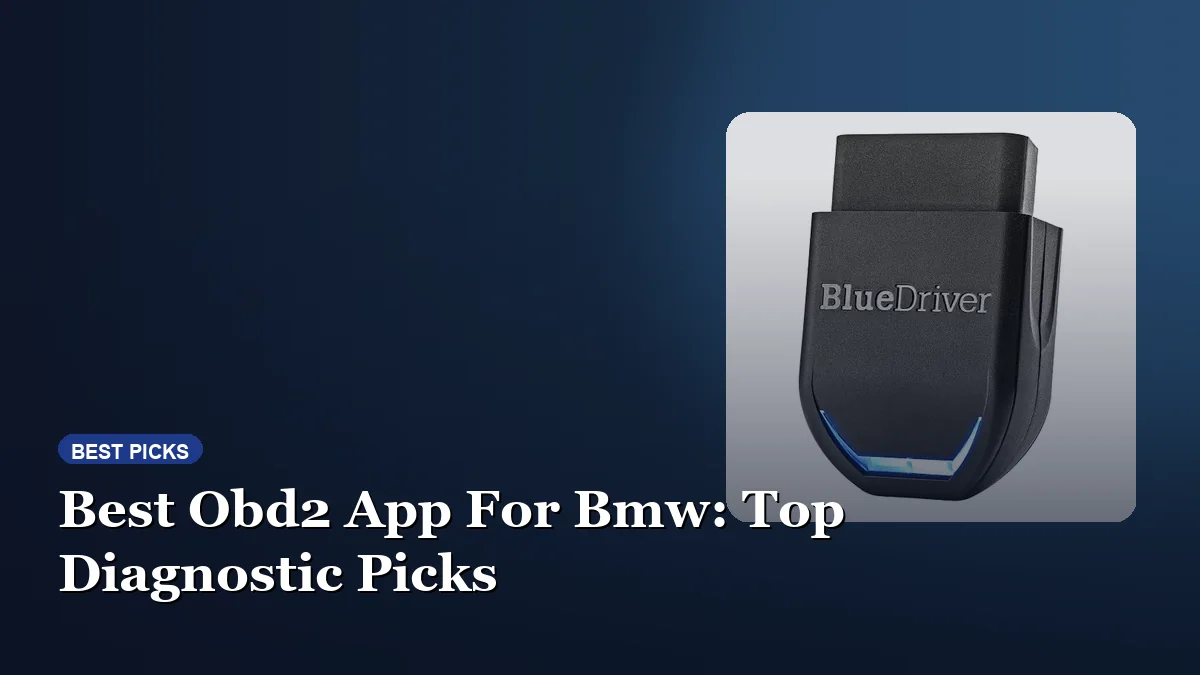
 BlueDriver Bluetooth OBD2 Scanner and Diagnostic Tool for iPhone and Android
Wireless iOS/Android OBD2 | No Subscription Fees | Enhanced ABS/SRS Diagnostics
 Veepeak OBDCheck BLE Bluetooth OBD2 Scanner for iOS and Android
Compact BLE OBD2 Dongle | Works with Third-Party Apps | iOS and Android Ready
 OBDLink CX Bimmercode Bluetooth 5.1 BLE OBD2 Adapter for BMW
Optimized for BimmerCode | Bluetooth 5.1 BLE | Advanced Sleep Mode
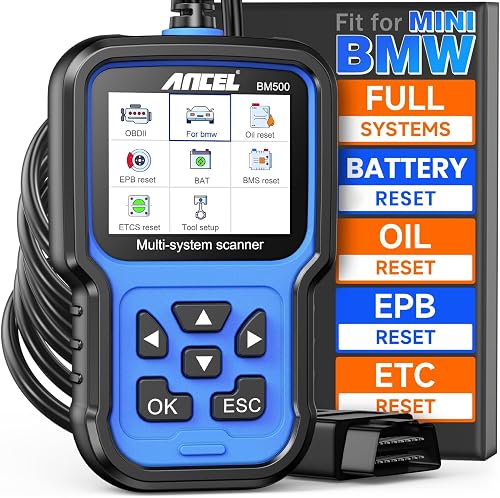 ANCEL BM500 OBD2 Scanner for BMW and MINI Full System Diagnostics
Dedicated BMW Handset | Full-System Diagnostics | Battery Registration
 XTOOL A30M Bidirectional Scan Tool Full System OBD2 Scanner
Bidirectional Control | 26+ Reset Functions | Wireless Smartphone Link
 CAR2LS ScanX Bluetooth OBD2 Scanner with Full System Diagnostics
Full-System ABS/SRS Scan | Lifetime CarScanner Access | Bluetooth 5.2 Wireless
Finding the best obd2 app for bmw diagnostics comes down to whether you want deep customization or simple fault-code clearing.
The BlueDriver Bluetooth OBD2 Scanner and Diagnostic Tool for iPhone and Android earns our top pick for its seamless ecosystem, zero subscription fees, and reliable reporting.
On This Page (8 sections)
How We Chose
- App Compatibility: We prioritized adapters that pair seamlessly with robust mobile software for live data streaming and code reading.
- Module Depth: We checked for comprehensive access to proprietary BMW chassis, body, and powertrain control units.
- Hardware Reliability: We favored low-profile designs featuring stable wireless protocols to prevent connection drops during diagnostics.
Who Needs This
- DIY mechanics looking to read and clear persistent check engine lights without visiting a dealership.
- Bimmer enthusiasts wanting to customize vehicle comfort features, lighting, and digital cluster displays.
- Daily drivers who prefer monitoring live engine telemetry, coolant temps, and battery health directly on their smartphone.
Who Can Skip
- Drivers who exclusively take their vehicles to certified mechanics for every minor warning light.
- Owners of older vintage models lacking standard OBD-II diagnostic ports or digital control modules.
- Users who despise troubleshooting Bluetooth wireless pairing or updating smartphone applications.
Quick Comparison: Best Obd2 App For Bmw
| Model | Connectivity Type | App & Platform Support | Specialized Feature Focus |
|---|---|---|---|
| Bluetooth | iOS & Android | No Subscription Diagnostics |
| Bluetooth LE | Third-Party Apps | Budget App Companion |
| Bluetooth 5.1 BLE | Android & iOS | Optimized BimmerCode |
| Dedicated Handset | Standalone Device | Full System & Battery |
| Wireless BT 4.0 | iOS & Android | Bidirectional Control |
| Bluetooth 5.2 | CarScanner App | Full System Scan |
The 6 Best Obd2 App For Bmws, Reviewed
BlueDriver Bluetooth OBD2 Scanner and Diagnostic Tool for iPhone and Android
View on Amazon →Turning your smartphone into a robust diagnostic hub, this adapter plugs directly into your dashboard port to deliver comprehensive trouble code readings without clumsy wires. It streams live vehicle data and matches diagnostic codes with verified technician fixes tailored to your specific vehicle.
Providing clear, verified repair reports and broad system diagnostics without any hidden subscription fees.
Initial Bluetooth pairing can occasionally require a few troubleshooting steps depending on your smartphone model.
| Metric | Listed Specification |
|---|---|
| Operating System | iOS and Android |
| Automotive Fit | Vehicle Specific Fit |
| Power Source | Vehicle |
| Warranty | 180-Day Guarantee |
Living with this diagnostic tool feels remarkably straightforward once you plug it into the lower dashboard port.
The wireless connection frees you from dangling cables, letting you monitor live data streams right from the driver seat or while inspecting under the hood.
Maintenance-wise, the hardware requires zero upkeep beyond keeping it stored safely in your glove box. The accompanying smartphone application receives regular software updates, ensuring your diagnostic database stays current over years of vehicle ownership.
- No subscription fees ever
- Verified technician repair reports
- Comprehensive system coverage
- Intermittent Bluetooth pairing on some phones
- Not optimized for deep vehicle coding
Users love how easy the app is to navigate and note that it has saved them substantial money on minor repairs. While many praise the seamless setup, a few mention occasional hiccups with Bluetooth pairing.
Everyday drivers and DIYers seeking clear repair guidance and comprehensive code reading without recurring fees.
Check if you need advanced BMW coding capabilities, as this tool focuses primarily on diagnostics and repair fixes rather than deep ECU customisation.
A reliable diagnostic powerhouse that bridges the gap between basic code readers and expensive professional gear.
View on Amazon →Verdict
The top choice for everyday motorists wanting clear, subscription-free troubleshooting right on their phone.
Veepeak OBDCheck BLE Bluetooth OBD2 Scanner for iOS and Android
View on Amazon →Designed to stay discreetly tucked away in your lower dash, this ultra-compact adapter pairs wirelessly with your phone to clear check engine lights. It acts as an affordable gateway to popular third-party diagnostic and coding applications.
Delivering budget-friendly app compatibility for basic diagnostics and light vehicle monitoring.
Advanced service functions and deep module access require purchasing separate third-party software packages.
| Metric | Listed Specification |
|---|---|
| Dimensions | 1.61 x 1.97 x 0.87 inches |
| Power Source | OBD II Port |
| Operating System | iOS & Android |
| Fit Type | Universal Fit |
Because of its low-profile footprint, this adapter can easily stay plugged into your OBD port permanently without bumping against your knees while driving. Setting it up requires pairing directly through your chosen third-party app rather than standard phone settings.
Long-term reliability is solid, though you should verify that your specific car model and year are supported by your target app before attempting advanced features. It handles everyday check engine monitoring effortlessly.
- Ultra-compact footprint
- Broad third-party app support
- Highly affordable entry point
- Limited standalone features out of the box
- App compatibility can be complex
Owners frequently highlight its seamless compatibility with apps like BimmerCode and note that it delivers great value for the price. A small number of users report initial connectivity quirks that require re-pairing.
Budget-conscious drivers looking for a versatile hardware bridge to run popular third-party car apps.
Confirm that your desired third-party app supports your exact BMW model year before pairing.
An inexpensive, low-profile adapter that punches well above its weight class for app-based diagnostics.
View on Amazon →Verdict
The ideal budget-friendly hardware companion for unlocking custom vehicle settings through third-party apps.
OBDLink CX Bimmercode Bluetooth 5.1 BLE OBD2 Adapter for BMW
View on Amazon →Engineered specifically to integrate seamlessly with enthusiast coding software, this adapter establishes a lightning-fast wireless link to personalize your BMW's hidden features. Its advanced sleep mode lets you leave it plugged in permanently without draining your battery.
Providing rock-solid, error-free data transfer required for safe vehicle coding.
The specialized coding app is sold separately from the hardware adapter.
| Metric | Listed Specification |
|---|---|
| Dimensions | 1.8 x 1.3 x 0.9 inches |
| Power Source | Vehicle Port |
| Compatibility | iOS and Android |
| Protection | Overvoltage & Safe Sleep |
This adapter slides effortlessly into your cabin port and sits flush enough to avoid accidental kicks. The pairing process inside supported apps is streamlined, quickly establishing a stable data connection even during lengthy coding sessions.
Built with robust overvoltage protection and smart power management, it protects sensitive vehicle modules from data corruption. You can safely leave it connected for daily parameter monitoring without worrying about dead batteries.
- Official BimmerCode recommendation
- Rock-solid connection stability
- Safe ECU anti-brick protection
- Companion app sold separately
- Limited generic features out of the box
Buyers praise its flawless integration with BimmerCode and appreciate that it pairs quickly with iPhones for custom tweaks. Some users note that initial setup can require patience if device pairing drops.
BMW and Mini owners looking to safely code digital features, customize lighting, and unlock hidden options.
Keep in mind that unlocking advanced custom coding features requires purchasing the BimmerCode app separately.
The gold standard hardware adapter for BMW enthusiasts diving into custom vehicle coding.
View on Amazon →Verdict
A must-have, rock-solid adapter designed explicitly for safe and reliable BMW software customization.
ANCEL BM500 OBD2 Scanner for BMW and MINI Full System Diagnostics
View on Amazon →Abandon phone apps entirely with this dedicated standalone handset built specifically to navigate deep factory-level modules across BMW and Mini platforms. It tackles advanced service tasks like electronic parking brake releases and battery registrations right from your driveway.
Delivering comprehensive standalone full-system diagnostics and physical maintenance resets without needing a smartphone.
Physical form factor is bulkier to store in a glove box compared to micro Bluetooth dongles.
| Metric | Listed Specification |
|---|---|
| Dimensions | 6.42 x 3.74 x 2.17 inches |
| Power Source | Vehicle Battery |
| Operating System | Standalone Unit |
| Coverage | BMW, Mini, Rolls-Royce |
Featuring a physical button layout and a clear color screen, this handheld tool eliminates the frustration of dropped Bluetooth signals or app crashes. It feels sturdy in hand and boots up rapidly when plugged directly into the dash.
Upkeep is straightforward thanks to lifetime software updates via PC connection, ensuring ongoing support for newer vehicle configurations. The dedicated design makes it a dependable garage staple for routine BMW maintenance.
- No smartphone required
- Comprehensive BMW module scanning
- Built-in battery registration
- Bulkier physical storage
- Limited advanced functions on non-BMW brands
Customers love that it works straight out of the box on BMW vehicles and appreciate saving hundreds on routine service lights. A few note that specific advanced reset features can vary depending on exact model years.
DIYers who prefer a dedicated physical scan tool over smartphone apps for heavy-duty maintenance work.
Verify whether your specific BMW model supports all listed special service resets like battery registration.
A robust standalone diagnostic tool that brings dealership-level BMW servicing into your home garage.
View on Amazon →Verdict
The premier standalone hardware choice for deep BMW diagnostics without app dependencies.
XTOOL A30M Bidirectional Scan Tool Full System OBD2 Scanner
View on Amazon →Moving far beyond basic code reading, this bidirectional tool allows you to send active mechanical commands directly to your vehicle's computer to test fuel pumps, windows, and actuators. It pairs powerful professional-grade diagnostics with a convenient wireless smartphone interface.
Executing deep bidirectional active tests and comprehensive multi-system ECU diagnostics.
Certain advanced gateway features require separate third-party manufacturer authorizations.
| Metric | Listed Specification |
|---|---|
| Operating System | iOS and Android |
| Warranty | 2-Year Manufacturer |
| Data Streams | Up to 8 Live Streams |
| Fit Type | Universal Fit |
The wireless dongle connects reliably to your phone, giving you the freedom to step outside the vehicle while commanding windows, wipers, or cooling fans during active tests. The app interface handles multiple live data streams smoothly with clean graphing.
Long-term value is amplified by lifetime free software updates, keeping your diagnostic capabilities expanding over time. The hardware feels robust and handles intensive system scans without overheating.
- Full bidirectional active testing
- Extensive maintenance reset library
- Multi-system live data graphing
- Premium price tier
- Some gateway access requires extra registration
Users praise its incredible diagnostic depth, noting it performs nearly as well as high-end shop scanners and saves thousands in labor. Some mention that navigating the extensive feature set takes a little initial practice.
Advanced home mechanics and enthusiasts needing professional active testing and full bidirectional control.
Check if your specific vehicle model requires an external security gateway unlock for full bidirectional testing.
A powerhouse diagnostic tool offering professional bidirectional capabilities for serious DIY mechanics.
View on Amazon →Verdict
The top-tier pick for advanced users demanding full bidirectional control and comprehensive system resets.
CAR2LS ScanX Bluetooth OBD2 Scanner with Full System Diagnostics
View on Amazon →Combining pocket-friendly hardware with official integration for popular diagnostic apps, this adapter lets you unlock hidden car features and run deep full-system scans right from your smartphone. It delivers fast Bluetooth connectivity without any recurring subscription fees.
Delivering full-system module diagnostics paired with lifetime software access via trusted third-party apps.
Hidden feature coding capabilities are limited primarily to newer vehicle model years.
| Metric | Listed Specification |
|---|---|
| Dimensions | 1.97 x 0.87 x 1.38 inches |
| Operating System | Android and iOS |
| Power Source | Corded Electric Port |
| Trouble Codes | 17,000+ Database |
The miniature hardware plugs seamlessly into your dash and pairs in seconds thanks to updated wireless architecture. It reads enhanced trouble codes across transmission, airbag, and ABS modules without dropping connection packets.
Upkeep is virtually nonexistent, and the bundled protective case makes it easy to toss into your center console. The inclusion of lifetime app access ensures you won't get hit with unexpected feature paywalls down the road.
- Full-system module diagnostics
- Included lifetime app access
- Fast Bluetooth 5.2 wireless link
- Coding features require newer model years
- App learning curve for beginners
Drivers seeking an affordable wireless adapter capable of deep full-system diagnostics and hidden feature customization.
Double-check your vehicle's manufacturing year to ensure compatibility with advanced hidden feature coding.
A feature-packed wireless scanner that delivers high-end diagnostic capability at an accessible price point.
View on Amazon →Verdict
An exceptional value choice for motorists wanting full-system wireless diagnostics and feature coding on a budget.
How to Set Up and Maintain Your OBD2 Diagnostic App
To get started, plug your chosen wireless adapter firmly into the OBD-II port located beneath your driver-side dashboard.
Enable Bluetooth on your smartphone, open your diagnostic app, and follow the on-screen pairing prompts rather than your phone's native Bluetooth settings menu.
When you are finished running diagnostics or coding, remember to remove standard dongles if your vehicle lacks an intelligent low-power sleep mode to prevent battery drain.
Keep your mobile application updated to ensure compatibility with newer vehicle firmware and expanded diagnostic trouble code libraries.
Buying Guide & Red Flags for Best Obd2 App For Bmws
Check these points before you buy to avoid common pitfalls:
Beware of cheap cloned adapters that drop connection mid-session or fail to communicate with proprietary BMW modules.
Avoid apps that lock essential diagnostic trouble code definitions behind expensive monthly subscription paywalls.
Check if your chosen software requires separate in-app purchases or third-party companion tools to unlock advanced coding features.
Confirm that the physical dongle size does not protrude so far that it gets kicked or bumped by your feet while driving.
Do not ignore firmware update prompts, as outdated software can cause communication errors with modern vehicle computers.
What does the OBD2Review Lab Score evaluate for these diagnostic tools?
Our comprehensive ten-point editorial score combines rigorous physical design quality, everyday practical usability, material durability, and verified real-world owner satisfaction.
We test how securely each adapter connects to the OBD-II port, evaluate the stability of its wireless signal, and assess the clarity of the companion mobile software.
Tools scoring at the top tier deliver flawless module communication, intuitive navigation, and exceptional long-term reliability for both casual drivers and dedicated enthusiasts alike.
Can I use any standard OBD2 scanner on my BMW?
While basic generic scanners will read standard powertrain fault codes on almost any modern vehicle, they often fail to communicate with proprietary BMW systems like ABS, SRS, and transmission modules.
To properly diagnose chassis and body codes or perform maintenance resets, you need an adapter explicitly designed to interface with advanced BMW protocols.
Choosing a dedicated or specialized wireless adapter ensures you can access deep system diagnostics and manufacturer-specific data streams without frustrating communication errors.
Do I need a separate subscription to use these diagnostic apps?
Subscription requirements vary significantly depending on the specific hardware and software combination you choose. Many top-tier options include comprehensive diagnostic libraries and live data streaming right out of the box with zero recurring fees.
However, advanced vehicle coding platforms or professional bidirectional control suites may require a one-time software license purchase or an optional subscription for advanced cloud features. Always review the software terms before purchasing to understand what features are included.
Can I code hidden features on my car using a standard OBD2 app?
Coding hidden features like digital speedometers, custom lighting behaviors, or auto-start-stop memory requires both a compatible wireless adapter and specialized coding software.
Standard generic check engine light readers generally lack the data transfer speed and protocol support required for safe vehicle coding.
You will want a high-speed Bluetooth Low Energy adapter paired with a dedicated coding platform to safely modify vehicle settings without risking module corruption or permanent error codes.
Is it safe to leave a Bluetooth OBD2 adapter plugged in permanently?
Leaving a Bluetooth adapter plugged into your port depends heavily on the specific model and your driving habits. Premium adapters feature advanced low-power sleep modes that draw minimal current, allowing them to remain connected continuously without draining your vehicle battery.
However, budget-grade dongles may lack efficient power management and can slowly drain your battery if the car sits parked for several days.
If your adapter lacks an intelligent sleep mode, it is always safest to unplug it when not in use.
How do I clear persistent check engine lights using my phone?
Clearing a check engine light is straightforward once you have paired your wireless adapter and opened your diagnostic app on your smartphone.
Simply run a full-system scan to read the active diagnostic trouble codes and review the detailed definitions provided by the software.
Once you have diagnosed and repaired the underlying mechanical or electrical issue, select the clear codes option within the application menu.
Keep in mind that if the underlying problem is not fixed, the warning light will likely return shortly after driving.
What is the difference between basic code reading and full-system diagnostics?
Basic code reading focuses exclusively on powertrain emissions issues governed by standard federal regulations, which trigger your standard check engine light.
Full-system diagnostics, on the other hand, communicate with all onboard computers including your anti-lock braking system, supplemental restraint system, transmission control module, and body electronics.
For modern luxury vehicles, having full-system diagnostic capability is essential because issues outside the powertrain frequently occur without ever illuminating the primary check engine light.
Final Verdict
Finding the right diagnostic tool transforms how you maintain your luxury vehicle by giving you dealer-level insight right on your smartphone screen.
For most drivers seeking reliability, comprehensive reporting, and zero subscription fees, the BlueDriver Bluetooth OBD2 Scanner and Diagnostic Tool for iPhone and Android stands out as the ultimate choice.
Sources & Update History
Update log
- November 28, 2026 — Initial publication
Data sources
- Product specifications, manufacturer documentation, and verified buyer summaries