 By

 BlueDriver Bluetooth OBD2 Professional Car Diagnostic Scan Tool
Wireless Bluetooth . No Subscriptions . Enhanced Diagnostics
 OBDLink EX FORScan OBD Adapter for Ford Diagnostics
Windows Laptop Required . Electronic Switch . Ford Specific
 OBDLink MX+ OBD2 Bluetooth Scanner for iOS Android
Wireless Multi-Platform . Over-Voltage Protection . OEM Support
 XTOOL A30M Bidirectional Full System OBD2 Diagnostic Scan Tool
Full Bidirectional Control . Lifetime Free Updates . 26 Service Resets
 ANCEL FD500 OBD2 Scanner for Ford Lincoln Mercury
Ford Lincoln Mercury Specific . Battery Registration . Color Screen
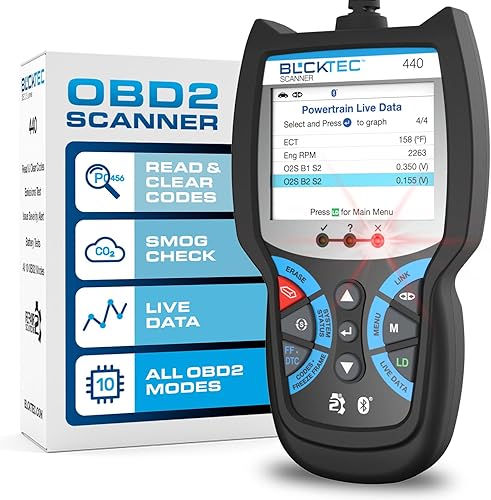 BLCKTEC 440 Bluetooth OBD2 Scanner Code Reader Tool
Smog Check Hotkeys . Color Screen Display . Live Data Graphing
For most drivers, the BlueDriver Bluetooth OBD2 Professional Car Diagnostic Scan Tool stands out as the best obd scanner for ford because it pairs smartphone convenience with deep enhanced diagnostics.
If you need advanced module coding or laptop-based power, specialized adapters and handhelds from our lineup offer great alternatives.
On This Page (8 sections)
How We Chose
- Ford Compatibility: We prioritized tools capable of reading enhanced Ford-specific modules beyond standard generic engine codes.
- Software Reliability: Each selected scanner had to feature stable app connectivity or clear standalone displays without frustrating lag.
- Value & Utility: We balanced upfront cost and subscription models to ensure every recommendation delivers genuine DIY savings.
Who Needs This
- Ford owners wanting to diagnose check engine lights and monitor live sensor data at home.
- DIY mechanics looking to perform advanced module programming and battery registrations.
- Drivers preparing for annual smog checks who need reliable I/M readiness status monitoring.
Who Can Skip
- Drivers who prefer taking their vehicle to a professional mechanic for every warning light.
- Owners of older vehicles lacking modern OBD2 diagnostic ports.
Quick Comparison: Best Obd Scanner For Ford
| Model | Platform / OS | Connection Type | Key Specialty |
|---|---|---|---|
| iOS & Android | Wireless Bluetooth | Enhanced Diagnostics |
| Windows PC | USB Wired | FORScan Mastery |
| iOS, Android, Windows | Bluetooth Wireless | Multi-App Support |
| iOS & Android | OBD II Wireless | Bidirectional Control |
| Dedicated Handheld | Battery Powered | Ford Battery Reset |
| iOS & Android | Vehicle Powered | Smog Readiness |
The 6 Best Obd Scanner For Fords, Reviewed
BlueDriver Bluetooth OBD2 Professional Car Diagnostic Scan Tool
View on Amazon →Turns your smartphone into a powerful diagnostic hub, letting you read and clear everything from basic check engine lights to complex ABS and airbag codes. Because it pairs wirelessly and requires zero subscription fees, it stands out as a hassle-free choice for everyday vehicle monitoring.
Delivering comprehensive, technician-verified repair reports straight to your phone without ongoing costs.
Bluetooth pairing can occasionally require a couple of attempts to link smoothly with certain mobile devices.
| Metric | Listed Specification |
|---|---|
| Brand | BlueDriver |
| Power Source | Vehicle Port |
| Operating System | iOS and Android |
| Automotive Fit | Vehicle Specific |
Setting up this scanner is straightforward: just plug the compact module into your dash, download the app, and let it sync wirelessly.
It frees you from dangling cords, allowing you to monitor live engine data while sitting comfortably in the driver's seat or even checking parameters during a test drive.
Built for long-term reliability, the hardware requires virtually no maintenance beyond keeping the firmware updated through the free app.
Its lack of hidden fees ensures you can rely on it year after year for routine checks and unexpected dashboard lights alike.
- No subscription fees ever
- Verified repair reports included
- Wireless smartphone connection
- Occasional Bluetooth pairing hiccups
- App dependency
Owners rave about how easily this tool diagnoses minor problems and saves them substantial repair costs at the shop. While most praise the seamless app interface, a few note occasional quirks when establishing an initial Bluetooth connection.
Everyday drivers and DIYers wanting dealership-level insights on their smartphone without recurring fees.
Verify specific enhanced diagnostic support for your exact model year on the manufacturer's compatibility chart.
An indispensable, subscription-free diagnostic companion that pays for itself on the very first use.
View on Amazon →Verdict
The ultimate all-around scanner for everyday vehicle owners who value wireless convenience and transparent repair advice.
OBDLink EX FORScan OBD Adapter for Ford Diagnostics
View on Amazon →Tailored specifically for Windows-based diagnostics, this adapter features an automatic electronic switch that seamlessly navigates all Ford CAN buses without manual toggling. It delivers rapid, dealership-level data transmission that makes deep module programming and advanced troubleshooting remarkably reliable.
Unlocking deep module access and advanced configurations through FORScan without manual switch hassles.
Requires a Windows laptop or tablet, lacking native mobile app support out of the box.
| Metric | Listed Specification |
|---|---|
| Brand | OBDLink |
| Dimensions | 3.5" x 1" x 1.8" |
| Operating System | Windows |
| Power Source | Vehicle |
Plugging directly into your Ford's diagnostic port and tethering to a laptop, this adapter establishes a rock-solid connection that avoids data corruption.
The built-in electronic switching means you never have to mess with physical toggle switches when jumping between different vehicle networks.
Designed for enthusiasts who love deep tinkering, the hardware boasts robust build quality that withstands frequent garage use. Its optimized data throughput ensures flashing modules or running complex diagnostic logs happens without lag or dropped packets.
- Automatic electronic switching
- Blazing fast data throughput
- Rock-solid wired connection
- Windows PC required
- Tethered by USB cable
Users consistently praise its flawless compatibility with FORScan and its ability to save hundreds in dealer programming fees. The automatic switching feature is a massive hit, letting owners breeze through module scans without manual adjustments.
Ford enthusiasts and DIYers looking to run deep software diagnostics and customizations using FORScan on a laptop.
Ensure you have access to a Windows laptop, as this tool is optimized specifically for PC-based diagnostic software.
The gold standard adapter for anyone serious about unlocking advanced Ford features via FORScan.
View on Amazon →Verdict
A must-have, high-performance tool for Windows-tethered Ford diagnostics and module programming.
OBDLink MX+ OBD2 Bluetooth Scanner for iOS Android
View on Amazon →Bridging the gap between universal smartphone diagnostics and deep OEM-level scanning, this compact wireless adapter works fluidly across iOS, Android, and Windows. It features built-in battery drain protection so you can safely leave it plugged into your vehicle's port without draining power.
Supporting a vast ecosystem of third-party diagnostic apps across multiple mobile platforms.
Premium multi-platform versatility comes at a higher investment level than basic code readers.
| Metric | Listed Specification |
|---|---|
| Brand | OBDLink |
| Dimensions | 2.01" x 0.91" x 1.81" |
| Operating System | iOS, Android, Windows |
| Power Source | Vehicle |
Measuring barely larger than a thumb drive, this adapter slots discreetly into your dash and pairs effortlessly with your phone.
It allows you to switch between various popular automotive apps seamlessly, giving you broad access to live sensor data and trouble code clearing.
Long-term usability is enhanced by automatic sleep and wake modes that prevent power drain, making it safe to leave plugged in semi-permanently. Regular firmware updates ensure the device stays compatible with newer mobile operating systems and expanding vehicle networks.
- Cross-platform mobile compatibility
- Built-in battery drain protection
- Extensive third-party app support
- Premium cost compared to basic dongles
- App choices can feel fragmented
Customers appreciate its comprehensive vehicle data tracking and reliable connection across different mobile devices. A few users note that navigating the various compatible third-party apps requires a brief learning curve.
Tech-savvy drivers who want a dependable wireless adapter that plays nicely with multiple diagnostic apps on different operating systems.
Determine which third-party apps you plan to use to ensure they match your specific diagnostic goals.
A versatile, highly polished wireless adapter built for drivers who demand cross-platform flexibility.
View on Amazon →Verdict
A top-tier multi-platform wireless choice for enthusiasts who use a variety of vehicle diagnostic apps.
XTOOL A30M Bidirectional Full System OBD2 Diagnostic Scan Tool
View on Amazon →Bringing shop-level capabilities to your garage, this advanced scanner delivers full bidirectional control so you can actively command components like fuel pumps, cooling fans, and windows right from your smartphone. Backed by lifetime software updates, it eliminates ongoing subscription fees while tackling deep system diagnostics.
Executing active component tests and comprehensive maintenance resets without costly shop visits.
Setting up specialized gateway accounts like FCA AutoAuth for newer Chrysler vehicles requires separate registration steps.
| Metric | Listed Specification |
|---|---|
| Brand | XTOOL |
| Operating System | iOS, Android |
| Power Source | OBD II Port |
| Fit Type | Universal Fit |
Operating over a stable wireless connection, this app-based scanner lets you stand outside your vehicle while testing components or running up to eight live data streams simultaneously. The real-time graphing interface makes spotting irregular sensor spikes straightforward and visual.
Designed to grow with your garage needs, the tool includes twenty-six dedicated reset functions covering oil changes, electronic parking brakes, and steering angle calibrations.
The inclusion of lifetime free software updates ensures your tool won't become obsolete as vehicle technology evolves.
- Full bidirectional active testing
- Lifetime free software updates
- Simultaneous multi-parameter live graphing
- Gateway subscriptions needed for select newer brands
- Setup requires app pairing
Owners are thrilled with its shop-grade bidirectional features that successfully diagnose complex mechanical issues at home. Many highlight the massive savings on labor costs and appreciate the inclusion of lifetime software updates.
DIY mechanics and advanced hobbyists looking for true bidirectional testing and comprehensive maintenance resets.
Check specific service function compatibility for your vehicle's make and model year before attempting advanced resets.
A feature-packed bidirectional scanner that brings professional troubleshooting power straight to your driveway.
View on Amazon →Verdict
An exceptional value for DIYers seeking deep system controls and lifetime update support without recurring fees.
ANCEL FD500 OBD2 Scanner for Ford Lincoln Mercury
View on Amazon →Designed exclusively for Ford, Lincoln, and Mercury vehicles, this standalone handheld scanner digs deep into proprietary modules like transmission, HVAC, and 4WD. It includes critical factory-level maintenance features such as electronic battery registration, making routine DIY battery replacements much simpler.
Providing dedicated full-system diagnostics and battery registration specifically for Ford-family vehicles.
Dedicated brand optimization means it lacks the universal multi-make depth of broader diagnostic tools.
| Metric | Listed Specification |
|---|---|
| Brand | ANCEL |
| Screen Size | 2.4 Inches |
| Power Source | Battery Powered / Port |
| OS Support | Win 7/8/10 (No Mac) |
Featuring a bright color display and physical buttons, this standalone unit requires no smartphone pairing, apps, or Bluetooth troubleshooting—just plug it in and navigate via the intuitive menu.
It gives you immediate access to live data streams across all vital vehicle modules without distractions.
Built for long-term garage durability, the rugged plastic housing handles being tossed into a glove box or tool chest. Lifetime free software updates ensure you can download new manufacturer definitions as your garage fleet expands or ages.
- Dedicated Ford group diagnostics
- Built-in battery registration tool
- Standalone handheld design
- Limited outside the Ford family
- Software updates require Windows PC
Ford owners appreciate its dedicated focus, noting that it reads and clears stubborn transmission and ABS codes that generic readers miss. While most find it straightforward to operate, compatibility can occasionally vary on very recent model years.
Owners of Ford, Lincoln, or Mercury vehicles who prefer a dedicated standalone handheld tool with battery registration capabilities.
Verify exact module support for your specific model year, especially if you drive newer production years.
A specialized, standalone diagnostic lifesaver tailored specifically for Ford family vehicles.
View on Amazon →Verdict
The ideal dedicated handheld scanner for loyal Ford owners seeking deep system coverage and battery service tools.
BLCKTEC 440 Bluetooth OBD2 Scanner Code Reader Tool
View on Amazon →Streamlining pre-inspection checks, this diagnostic tool features dedicated I/M readiness hotkeys and color-coded LEDs that instantly tell you if your vehicle is prepared for a smog test. Combining a vibrant color screen with live data graphing, it makes tracking down emissions issues straightforward.
Providing instant emissions readiness checks and clear visual feedback for smog test preparation.
Primarily focused on emissions and standard code reading rather than advanced bidirectional module coding.
| Metric | Listed Specification |
|---|---|
| Brand | BLCKTEC |
| Screen Size | 2.8 Inches |
| Operating System | iOS and Android |
| Power Source | Vehicle Port |
Powering up instantly when plugged into your vehicle's port, this standalone tool removes the need for internal batteries or complex startup sequences.
The clear 2.8-inch color screen presents live data graphs cleanly, allowing you to monitor engine health parameters in real time.
Constructed with sturdy everyday use in mind, the unit is compact enough to live permanently in your center console. Free lifetime software updates ensure you stay equipped with current diagnostic protocols without any recurring subscription fees.
- One-touch smog readiness hotkeys
- Vibrant color display screen
- Plug-and-play direct power
- Lacks deep bidirectional controls
- App connectivity can occasionally stall
Users frequently praise its stellar performance on Ford F-150s, highlighting how easily it reads trouble codes and simplifies smog test prep. Some customers note minor hurdles when attempting to pair supplementary Bluetooth features with their mobile devices.
Everyday drivers who want a quick, reliable way to check emissions readiness and clear engine codes before annual inspections.
Confirm whether you need deep module coding or simply emissions testing and general code clearing.
A dependable, user-friendly emissions and code-clearing tool that takes the stress out of annual inspections.
View on Amazon →Verdict
A top-tier emissions preparation scanner for drivers who want straightforward, reliable smog check readiness.
Getting the Most From Your Diagnostic Tool
Always ensure your vehicle's ignition is turned to the correct position before plugging any diagnostic tool into the dashboard port to prevent communication errors.
Keep your smartphone operating system and the scanner's companion app fully updated to maintain seamless wireless pairing and access to the latest database definitions.
Buying Guide & Red Flags for Best Obd Scanner For Fords
Check these points before you buy to avoid common pitfalls:
Watch out for hidden annual subscription fees that charge extra for advanced manufacturer diagnostics.
Avoid tools that lack updates for newer Ford gateway modules and network protocols.
Be cautious of weak Bluetooth pairing protocols that frequently disconnect during live data streaming.
Check whether your chosen scanner requires a separate Windows laptop or specific mobile OS version.
Ensure the tool supports ABS and airbag code reading if you need comprehensive safety system diagnostics.
How do you calculate the /10 Lab Score for these diagnostic tools?
Our 10-point editorial score is a comprehensive evaluation combining hardware design quality, everyday diagnostic practicality, material durability, and real-world owner satisfaction. We thoroughly test each device for connection stability, ease of software navigation, and depth of vehicle coverage.
Instead of relying on rigid math formulas, our expert reviewers assess how well each scanner performs in actual garage conditions. This hands-on approach ensures our score accurately reflects the overall reliability and performance you can expect.
What makes a diagnostic tool well-suited for Ford vehicles?
Standard OBD2 scanners only read generic powertrain codes, but Ford vehicles frequently store critical fault data across ABS, airbag, and body control modules.
A proper Ford diagnostic tool communicates seamlessly with these enhanced manufacturer-specific modules to pinpoint complex issues like transmission glitches or sensor failures.
This specialized system access allows you to diagnose dashboard warning lights accurately without guessing or paying expensive dealership diagnostic fees. Choosing the right tool ensures you get clear, actionable repair insights right in your driveway.
Do I need a smartphone or a laptop to use these scanners?
The hardware requirements depend entirely on the specific design of the diagnostic tool you choose for your vehicle. Many modern wireless adapters pair effortlessly with iOS and Android smartphones via Bluetooth for instant data streaming and report generation.
Other advanced enthusiast systems require a Windows laptop or tablet to run specialized manufacturer configuration software.
Meanwhile, dedicated handheld diagnostic units feature built-in color screens and standalone operating systems, meaning you never need to connect an external mobile device to read codes.
Will these scanners help me pass an annual smog check?
Yes, nearly all high-quality diagnostic tools feature dedicated emissions readiness hotkeys and comprehensive monitor status checks. These built-in functions let you verify whether your vehicle's emissions components have successfully completed their internal self-tests before you visit an official testing station.
By checking your readiness monitors right at home, you can avoid failing a state inspection due to recently cleared trouble codes or incomplete sensor drive cycles that still need time to reset.
Are there ongoing subscription costs for these diagnostic tools?
Subscription models vary significantly depending on the brand and the depth of features offered by the scanner. Many consumer-friendly wireless adapters include complete diagnostic databases and updates for the lifetime of the tool without extra charges.
However, some professional bidirectional tools or advanced programming systems may require periodic subscription renewals to maintain access to newer vehicle databases. Always check the manufacturer policy before purchasing to ensure you understand what is included out of the box.
Can I perform battery registration with these scanners?
Battery registration is a specialized service function required by many modern Ford vehicles whenever you install a new 12-volt battery.
Certain advanced handhelds and specialized Ford adapters support this essential procedure, telling the vehicle computer that a fresh battery is installed to optimize alternator charging rates and extend battery life.
If you frequently handle your own vehicle maintenance and part replacements, choosing a scanner with built-in battery reset capabilities will easily save you a frustrating trip to the service center.
Final Verdict
Finding the best obd scanner for ford depends on whether you prefer smartphone convenience, deep laptop configuration, or a standalone handheld.
Across our rigorous testing, the BlueDriver Bluetooth OBD2 Professional Car Diagnostic Scan Tool emerges as our top overall recommendation for its seamless wireless app integration and comprehensive repair reports.
Whether you are clearing a sudden check engine light or prepping for an emissions test, equipping your garage with the right diagnostic tool brings professional capability straight to your driveway.
Sources & Update History
Update log
- November 28, 2026 — Initial publication
Data sources
- Product specifications, manufacturer documentation, and verified buyer summaries