 By

 BlueDriver Pro Bluetooth OBD2 Diagnostic Scan Tool
iOS & Android . Wireless Bluetooth . Subscription-Free
 OBDLink CX Bimmercode Bluetooth 5.1 BLE OBD2 Adapter
Bluetooth 5.1 BLE . iOS & Android . Low-Profile
 FOXWELL NT510 Elite Full System Scanner for BMW
2.8-inch Color Screen . Linux . Lifetime Updates
 Veepeak OBDCheck BLE Bluetooth OBD II Scanner
Bluetooth LE . Compact . iOS & Android
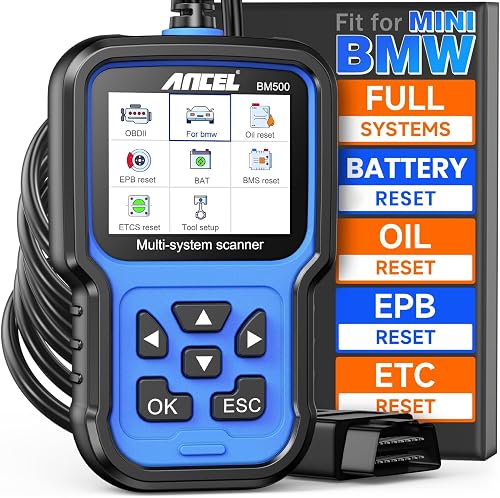 ANCEL BM500 Full System OBD2 Scanner for BMW
2.4-inch Screen . BMW Focus . Lifetime Updates
 XTOOL A30M Bidirectional Scan Tool Full System Scanner
33 ft Wireless . 26+ Resets . Live Graphing
Choosing the right diagnostic companion for your luxury vehicle prevents minor glitches from turning into expensive shop visits.
The BlueDriver Pro Bluetooth OBD2 Diagnostic Scan Tool stands out as our top pick for its intuitive smartphone interface and comprehensive repair reports.
Whether you need deep module scanning or custom coding features, matching the right adapter to your garage routine saves both time and money.
On This Page (8 sections)
How We Chose
- Module Coverage: We prioritized tools capable of communicating with all onboard computer modules rather than generic engine codes alone.
- App Integration: We favored reliable wireless adapters that pair seamlessly with popular diagnostic and coding software.
- Value & Updates: We selected devices offering accessible firmware updates and transparent features without mandatory recurring subscription fees.
Who Needs This
- DIY mechanics who want to perform their own routine maintenance and clear stubborn warning lights.
- Owners interested in customizing vehicle features using advanced coding apps like BimmerCode.
- Drivers looking to decode check engine lights before visiting a professional repair shop.
Who Can Skip
- Drivers who prefer leaving all diagnostics and maintenance exclusively to dealership service departments.
- Owners of older non-OBD-II legacy vehicles manufactured before the standard implementation year.
- Those who only need a basic, universal code reader and never plan to service a European luxury car.
Quick Comparison: Best Obd Ii Scanner For Bmw
| Model | Platform / Interface | Connection Type | Key Diagnostic Focus |
|---|---|---|---|
| iOS & Android App | Wireless Bluetooth | Verified Repair Reports |
| iOS & Android App | Bluetooth 5.1 BLE | BimmerCode Customization |
| 2.8-inch Color Screen | Corded Handheld | Full System & Battery Reset |
| iOS & Android App | Bluetooth LE | Universal Mobile Diagnostics |
| 2.4-inch Display | Corded Handheld | BMW Maintenance Resets |
| iOS & Android App | 33 ft Wireless BT | Bidirectional Active Testing |
The 6 Best Obd Ii Scanner For Bmws, Reviewed
BlueDriver Pro Bluetooth OBD2 Diagnostic Scan Tool
View on Amazon →Turns your smartphone into a powerful diagnostic hub, letting you read and clear enhanced codes without dealing with messy wires or hidden subscription fees. It pulls technician-verified repair reports matched directly to your VIN to take the guesswork out of weekend maintenance.
Providing clear, technician-verified repair reports matched to your vehicle's exact VIN.
Advanced manufacturer-specific programming for certain European luxury systems can be limited compared to dedicated dealer tools.
| Metric | Listed Specification |
|---|---|
| Operating System | iOS and Android |
| Power Source | Vehicle Port |
| Fit Type | Vehicle Specific |
| Updates | Free Included |
Pairing the adapter to your smartphone is generally straightforward, relying on a wireless Bluetooth link that frees you from dangling cables inside the driver's footwell.
The companion app launches quickly, presenting a clean layout that makes checking smog readiness or monitoring live data streams effortless during a test drive.
Living with the tool long-term is stress-free thanks to zero subscription fees, meaning you get lifetime app updates without unexpected renewal notices.
While occasional Bluetooth pairing hiccups can require a quick phone restart, its robust build quality easily withstands being tossed into a glove compartment.
- No subscription fees ever
- Technician-verified repair reports
- Wireless smartphone integration
- Occasional Bluetooth pairing quirks
- Limited advanced coding for luxury makes
Customers find the OBD2 scanner to be a great tool that works fantastically and is easy to use with a user-friendly app. They appreciate its value and diagnostic capabilities, though some note occasional Bluetooth pairing hiccups.
Everyday drivers and DIYers who want a reliable, subscription-free diagnostic tool for multiple family vehicles.
Check specific enhanced diagnostic coverage for your exact model year if you need deep proprietary module access.
A top-tier diagnostic scanner that blends wireless convenience with zero ongoing costs.
View on Amazon →Verdict
The most well-rounded option for drivers who want comprehensive code reading without recurring subscription fees.
OBDLink CX Bimmercode Bluetooth 5.1 BLE OBD2 Adapter
View on Amazon →Tailor-made to unlock hidden features on your BMW or Mini, this compact adapter pairs seamlessly with the BimmerCode app for rock-solid wireless coding. Its advanced sleep mode and overvoltage protection mean you can safely leave it plugged into the port indefinitely.
Delivering flawless, stable data transmission specifically optimized for BMW coding apps.
The specialized coding apps required to unlock its full potential are sold separately.
| Metric | Listed Specification |
|---|---|
| Dimensions | 1.8" x 1.3" x 0.9" |
| Screen Size | 0.9 inches |
| Operating System | Android, iOS |
| Power Source | Vehicle Port |
Measuring less than two inches across, this ultra-low-profile adapter sits completely flush in most vehicle cabins without bumping against your knees while driving.
Initial in-app pairing establishes a secure Bluetooth connection that prevents data corruption or dropped packets during sensitive ECU modifications.
Because it features an intelligent sleep mode that draws virtually zero battery power, you can leave it installed year-round for instant access to diagnostics.
Upkeep is practically non-existent, though you will need to budget for the separate third-party software required to execute advanced custom programming.
- Official BimmerCode recommendation
- Flush low-profile fit
- Advanced battery-saving sleep mode
- Required coding app sold separately
- Occasional initial pairing hurdles
Customers find the scan tool works well with BimmerCode and BimmerLink, appreciating its ease of use as a plug-and-play adapter. While many enjoy instant iPhone connectivity, a few note initial pairing hurdles and consider the total software setup an extra investment.
BMW and Mini owners looking to safely code custom features using their smartphone.
Remember that the companion coding software requires a separate purchase.
An indispensable, ultra-reliable tool for customizing your BMW's hidden software features.
View on Amazon →Verdict
The undisputed champion for BimmerCode enthusiasts who demand uncompromising connection stability during vehicle customization.
FOXWELL NT510 Elite Full System Scanner for BMW
View on Amazon →Designed as a dedicated standalone handheld, this scanner dives deep into every proprietary module of your BMW or Mini to handle complex bi-directional controls and routine maintenance. It eliminates the need for smartphone apps by packing a bright color screen and lifetime software updates into a single unit.
Performing active bi-directional testing and one-click battery registrations on BMW platforms.
The wired handheld format lacks the wireless freedom of Bluetooth smartphone adapters.
| Metric | Listed Specification |
|---|---|
| Dimensions | 3.94" x 1.5" x 7.87" |
| Screen Size | 2.8 inches |
| Resolution | 480 x 640 |
| Operating System | Linux |
Ergonomically shaped with physical buttons and a clear color display, the unit is exceptionally easy to operate with greasy or gloved hands in the garage.
Navigating through deep vehicle menus is straightforward once you complete the initial Wi-Fi software update out of the box.
Long-term ownership benefits greatly from lifetime software updates, ensuring your scanner stays compatible with newer model-year configurations. The durable plastic housing shrugs off accidental drops on concrete, making it a reliable standalone garage companion.
- Comprehensive full-system diagnostics
- Convenient one-click battery registration
- Zero subscription fees with lifetime updates
- Wired connection limits mobility
- Initial Wi-Fi update required
Customers find the scan tool works well out of the box as a great one-time investment that saves money on repairs. They appreciate its ease of use and code recognition, though some note occasional communication drops or firmware glitches.
Dedicated DIY mechanics who prefer a standalone diagnostic tool with advanced service resets.
Verify exact model-year compatibility for specialized functions like electronic parking brake services.
A powerful standalone tool that brings dealership-level diagnostic depth straight to your home garage.
View on Amazon →Verdict
A phenomenal standalone choice for enthusiasts who want dealer-level bi-directional control without relying on a smartphone.
Veepeak OBDCheck BLE Bluetooth OBD II Scanner
View on Amazon →Offering an affordable gateway into mobile diagnostics, this pocket-sized adapter turns your phone into a versatile code reader for standard check-engine issues and select app-based tweaks. It connects wirelessly using low-energy Bluetooth, making it a budget-friendly option for casual car owners.
Providing low-cost, wireless OBD-II diagnostics compatible with a wide array of mobile apps.
Advanced diagnostics and special reset functions heavily depend on purchasing separate third-party apps.
| Metric | Listed Specification |
|---|---|
| Dimensions | 1.61" x 1.97" x 0.87" |
| Operating System | iOS & Android |
| Fit Type | Universal Fit |
| Power Source | OBD II Port |
The tiny footprint ensures the adapter stays entirely out of the way once plugged into the dashboard port.
Setting up the connection requires pairing directly through your chosen third-party diagnostic app rather than standard phone settings, which can catch first-time users off guard.
While it lacks heavy-duty internal storage or built-in screens, its low energy draw means you can leave it plugged in for daily monitoring.
Maintenance is as simple as occasionally wiping down the plastic casing if it collects dust in the footwell.
- Highly affordable price point
- Compact low-profile design
- Works with numerous third-party apps
- Relies entirely on separate apps for advanced features
- Initial connection setup can be tricky
Customers find the OBD scanner works well with various apps like BimmerCode and Torque, appreciating its ease of setup and accuracy. Many mention it saves money on diagnostic costs, though connection hiccups can occasionally occur during initial pairing.
Budget-conscious drivers who want a simple wireless adapter to read codes via smartphone apps.
Confirm whether your preferred third-party app requires an in-app purchase to unlock advanced features.
An inexpensive entry-level adapter that delivers basic wireless diagnostics without breaking the bank.
View on Amazon →Verdict
The ideal choice for cost-conscious shoppers seeking a reliable budget adapter for basic app-based monitoring.
ANCEL BM500 Full System OBD2 Scanner for BMW
View on Amazon →Tailored specifically for BMW and Mini owners, this dedicated handheld scanner provides full-system diagnostics and essential maintenance resets without requiring a smartphone or ongoing subscription fees. It guides you step-by-step through battery registrations and oil light resets right in your driveway.
Executing brand-specific maintenance resets like battery registration and oil service lights.
Updating the device firmware requires connecting it to a Windows PC via USB.
| Metric | Listed Specification |
|---|---|
| Dimensions | 6.42" x 3.74" x 2.17" |
| Screen Size | 2.4 inches |
| Operating System | Windows (Updates) |
| Power Source | Vehicle / Battery |
The physical keypad and built-in color screen provide a tactile, frustration-free experience when scrolling through diagnostic menus in cold weather. Text prompts are clear, guiding you smoothly through complex procedures like electronic parking brake retraction.
Built with a sturdy rubberized casing, the tool handles being dropped on pavement or stored in a crowded trunk with ease. Long-term utility is reinforced by lifetime free software updates, keeping your garage tool relevant as your vehicle ages.
- Dedicated BMW system coverage
- Built-in battery registration guidance
- No smartphone or subscription required
- Firmware updates require a Windows computer
- Bulkier than wireless adapters
Customers find the OBD2 scanner works well on BMW vehicles, is easy to set up, and offers great value by saving money on dealer visits. They appreciate its accuracy in reading codes and resetting warnings, though a few note occasional complications with battery registration.
BMW owners who want a dedicated physical tool for routine service resets and fault code clearing.
Ensure you have access to a Windows PC if you plan on downloading future software updates.
A practical, budget-friendly handheld scanner designed specifically to tame BMW maintenance lights.
View on Amazon →Verdict
A smart pick for DIYers looking for dedicated BMW diagnostic depth in a simple handheld package.
XTOOL A30M Bidirectional Scan Tool Full System Scanner
View on Amazon →Bridging the gap between amateur code readers and professional shop equipment, this advanced wireless tool delivers full bi-directional control and over twenty-six specialized reset functions directly to your mobile device. It lets you actively command vehicle components like fuel pumps and windows while walking around your car.
Performing advanced bi-directional active tests and multi-stream live data graphing.
Accessing specific manufacturer security gateways like FCA AutoAuth requires separate third-party registration.
| Metric | Listed Specification |
|---|---|
| Connectivity | Wireless Bluetooth 4.0 |
| Operating System | iOS, Android |
| Software | Lifetime Free Updates |
| Protocols | CAN FD & FCA AutoAuth |
The wireless Bluetooth link gives you up to thirty-three feet of freedom, allowing you to trigger cooling fans or test window motors while standing outside the vehicle.
The app interface handles up to eight live data streams simultaneously, rendering smooth real-time graphs that help pinpoint intermittent mechanical faults.
Long-term value is exceptionally high thanks to lifetime free software updates that add new vehicle protocols without extra costs. The adapter itself is compact and robust, though mastering all twenty-six service resets takes a bit of a learning curve.
- Full bi-directional active testing
- Simultaneous 8-stream live graphing
- Extensive multi-brand and CAN FD coverage
- Steeper learning curve for advanced features
- Gateway accounts require separate registration fees
Customers find the scan tool to be a high-quality device performing as well as expensive professional alternatives, offering extensive diagnostic capabilities and detailed information. They appreciate the user-friendly app, lifetime updates, and significant savings on repair costs.
Advanced DIYers and mechanics looking for professional-grade bi-directional testing on a budget.
Check if your specific vehicle model year requires a paid gateway authorization account for active testing.
A powerhouse diagnostic tool that puts shop-level active testing right into your pocket.
View on Amazon →Verdict
The ultimate choice for advanced enthusiasts who need professional bi-directional capabilities and extensive service resets.
Getting the Most From Your Diagnostic Tool
Always ensure your vehicle's ignition is turned on while keeping the engine off when performing initial system scans to protect sensitive electronics.
Keep your smartphone or tablet fully charged and your scanner's firmware updated to maintain stable wireless pairing during extended diagnostic sessions.
Store your adapter in a cool, dry place away from extreme cabin temperatures to safeguard internal Bluetooth components over years of regular garage use.
Buying Guide & Red Flags for Best Obd Ii Scanner For Bmws
Check these points before you buy to avoid common pitfalls:
Watch out for adapters that claim full system access but only read generic powertrain fault codes.
Avoid tools requiring expensive mandatory subscriptions just to unlock basic maintenance reset functions.
Be cautious of unstable Bluetooth connections that drop out midway through complex coding procedures.
Check whether specialized third-party apps require separate purchases before buying a wireless dongle.
Verify that your chosen hardware supports your specific model year and chassis designation.
How is the OBD2Review Lab Score calculated?
Our 10-point editorial score reflects a comprehensive evaluation of design quality, everyday practicality, material durability, and real-world owner satisfaction. We test each scanner in actual garage environments to measure pairing stability, interface responsiveness, and system coverage.
Rather than relying on simple automated metrics, our automotive experts weigh hands-on performance against long-term value. This ensures every recommended tool delivers reliable, professional-grade diagnostics that justify your investment.
Do I need a special scanner to reset my BMW service lights?
Yes, standard generic code readers typically only access basic engine emissions data and cannot clear specialized maintenance reminders. Resetting oil service intervals, brake fluid warnings, or battery registration requires a tool with manufacturer-specific software capabilities.
Selecting a dedicated BMW scanner or a compatible wireless adapter ensures you can clear these service lights easily. This capability keeps your dashboard clean and saves you from paying dealership labor fees for routine maintenance.
Can I code hidden features on my BMW using a standard OBD2 adapter?
Coding hidden features like digital speedometers or folding mirrors requires an adapter that supports specialized apps like BimmerCode. Not all generic Bluetooth dongles possess the fast data transmission speeds and protocol support required for stable coding.
You must verify that your chosen hardware explicitly recommends compatibility with your preferred coding software. Using an unsupported adapter during coding sessions risks disrupting your vehicle's sensitive computer modules.
Are wireless Bluetooth scanners as reliable as wired handheld units?
Modern wireless Bluetooth adapters offer impressive connection stability and allow you to view live data streams comfortably from your driver seat.
Handheld units eliminate pairing steps and battery concerns by drawing power directly from the vehicle port through a physical cord.
Your choice ultimately depends on whether you prefer the clutter-free convenience of smartphone apps or the standalone reliability of a dedicated screen. Both formats deliver exceptional diagnostic power when matched with quality software.
What is the difference between generic OBD2 codes and manufacturer-specific codes?
Generic OBD2 codes follow a universal standard applied across all modern vehicles to report basic emissions and powertrain faults. Manufacturer-specific codes delve much deeper into proprietary modules like ABS, transmission, airbags, and comfort systems.
Because luxury German vehicles utilize complex electronic architecture, reading manufacturer-specific faults is crucial for accurate troubleshooting. A specialized diagnostic tool unlocks these hidden layers to pinpoint exact component failures quickly.
How often should I update my diagnostic scanner software?
You should check for software updates every few months or whenever you service a newer vehicle model year. Manufacturers frequently release firmware patches to improve protocol compatibility, expand vehicle coverage, and enhance live data streaming speeds.
Many quality scanners offer lifetime free updates, making it easy to keep your tool current without extra costs. Keeping your software updated ensures your scanner remains fully functional as automotive technology evolves.
Final Verdict
Choosing the right diagnostic companion transforms intimidating dashboard warnings into manageable garage projects. The BlueDriver Pro Bluetooth OBD2 Diagnostic Scan Tool remains our top recommendation for its seamless smartphone integration and accurate repair reports.
By matching your technical comfort level and repair goals with the right hardware, you can maintain your luxury vehicle with confidence.
Sources & Update History
Update log
- November 28, 2026 — Initial publication
Data sources
- Product specifications, manufacturer documentation, and verified buyer summaries