 By
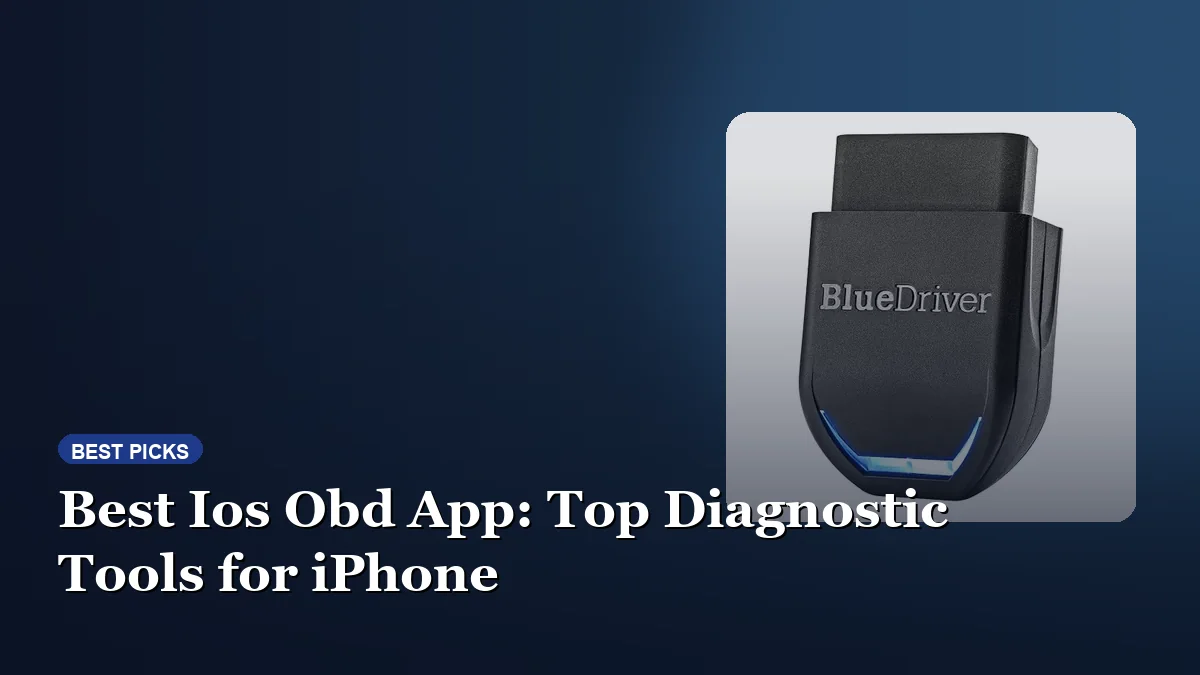
 BlueDriver Bluetooth OBD2 Scanner and Diagnostic Tool for iPhone and Android
Bluetooth OBD2 | No Subscription | iOS & Android
 Veepeak OBDCheck BLE Bluetooth OBD2 Scanner for iOS and Android
BLE Bluetooth | Universal Fit | Third-Party App
 XTOOL A30M Bidirectional Scan Tool Full System OBD2 Diagnostic Scanner
Bidirectional Control | Full Systems | Lifetime Updates
 BLCKTEC 430 Bluetooth OBD2 Scanner for iPhone and Android
No Subscription | RepairSolutions2 App | iOS & Android
 UMEIJA OBD2 Scanner Diagnostic Tool with Bluetooth 5.4 for iOS
Bluetooth 5.4 | Live Graphs | Broad Coverage
 ScanX Bluetooth OBD2 Scanner with Full System ABS SRS Diagnostics
CarScanner Integration | ABS/SRS | Hidden Features
Finding the best ios obd app requires a balance of seamless wireless connectivity and comprehensive diagnostic coverage.
Our top overall recommendation is the BlueDriver Bluetooth OBD2 Scanner and Diagnostic Tool for iPhone and Android, which pairs an intuitive app interface with verified repair reports and zero subscription fees.
Whether you need deep troubleshooting or quick code clearing, the right adapter turns your smartphone into a mechanic-grade tool.
On This Page (8 sections)
How We Chose
- App Ecosystem: We prioritized adapters with stable software that update regularly to maintain iOS compatibility.
- Diagnostic Depth: We tested basic code readers alongside advanced tools capable of ABS and SRS system scans.
- Value & Upkeep: We favored reliable hardware options that avoid frustrating hidden subscription fees for standard features.
Who Needs This
- DIY home mechanics looking to troubleshoot check engine lights without visiting a repair shop.
- Daily commuters wanting real-time fuel economy and engine performance metrics on their phone.
- Used car buyers who need a portable diagnostic tool to inspect vehicle health on the spot.
Who Can Skip
- Drivers who already own dedicated professional scan tool tablets with built-in screens.
- Vehicle owners completely uninterested in monitoring mechanical health or reading trouble codes.
- Drivers of older pre-OBD2 vehicles manufactured before standard diagnostic ports became mandatory.
Quick Comparison: Best Ios Obd App
| Model | Connection Type | Operating System | Subscription Fee |
|---|---|---|---|
| Bluetooth | iOS & Android | None Required |
| Bluetooth LE | iOS & Android | App Dependent |
| Wireless OBD2 | iOS & Android | Lifetime Free |
| Wireless BLE | iOS & Android | None Required |
| Bluetooth 5.4 | iOS & Android | None Required |
| Bluetooth | iOS & Android | None Required |
The 6 Best Ios Obd Apps, Reviewed
BlueDriver Bluetooth OBD2 Scanner and Diagnostic Tool for iPhone and Android
View on Amazon →Transforms your iPhone into a professional-grade diagnostic hub without tangled wires or hidden subscription fees. It pulls manufacturer-specific codes and verified repair fixes matched directly to your vehicle identification number.
Delivering foolproof, subscription-free enhanced diagnostics with technician-verified repair reports.
Carries a higher upfront cost compared to basic OBD dongles.
| Metric | Listed Specification |
|---|---|
| Operating System | iOS and Android |
| Vehicle Fit | Vehicle Specific Fit |
| Power Source | Vehicle |
| Language | English |
Pairing the device to an iPhone takes moments, plugging seamlessly into the dashboard port without blocking legroom. The dedicated app is clean, making it simple to navigate between live sensor readouts and trouble code lookups.
Built for long-term reliability, it requires no ongoing maintenance or battery changes since it draws power directly from the car. Free continuous software updates ensure the diagnostic database stays current as your vehicle ages.
- Zero subscription fees or hidden costs
- Provides technician-verified repair reports
- Reads enhanced ABS and airbag codes
- Higher initial purchase price
- Occasional Bluetooth pairing hiccups reported
Customers find the scanner to be a great tool that works fantastically and is exceptionally easy to use with a user-friendly app. They appreciate its value, noting it has saved them significant money on diagnostic and repair costs.
Drivers wanting a comprehensive, subscription-free diagnostic tool with clear, verified fix advice.
Check the specific compatibility chart for your exact make and model year before ordering.
An exceptionally capable and user-friendly scanner that easily justifies its place in any glove compartment.
View on Amazon →Verdict
The top choice for iPhone owners seeking professional depth without recurring monthly fees.
Veepeak OBDCheck BLE Bluetooth OBD2 Scanner for iOS and Android
View on Amazon →A budget-friendly dongle that pairs smoothly with popular third-party iOS apps to read and clear standard check engine lights. It sits flush in the dashboard port without getting in the way of your knees while driving.
Offering affordable, highly customizable third-party app compatibility for daily drivers.
Advanced diagnostics and manufacturer modules often require separate third-party app purchases.
| Metric | Listed Specification |
|---|---|
| Dimensions | 1.61" x 1.97" x 0.87" |
| Operating System | iOS & Android |
| Vehicle Fit | Universal Fit |
| Power Source | OBD II Port |
Setup requires connecting through your chosen diagnostic app rather than standard iOS Bluetooth settings, which catches some users off guard. Once linked, the mini profile allows you to leave it plugged in permanently.
Daily maintenance is non-existent, though you should rely on your preferred external app for software updates and feature expansions. The physical build is sturdy enough for routine port swapping.
- Very affordable entry price point
- Works with a wide range of iOS apps
- Low-profile design stays out of the way
- Advanced features require separate app purchases
- Initial connection sequence can be tricky
Customers find the OBD scanner works wonderfully with various apps and appreciate its ease of use and setup. The device delivers accurate code reading and helpful data depth while driving, offering great value for the price.
Budget-conscious shoppers looking for a reliable hardware bridge to powerful third-party diagnostic apps.
Verify whether your intended third-party app requires an in-app subscription or separate purchase.
A dependable, low-cost hardware adapter that unlocks rich app ecosystems for casual DIYers.
View on Amazon →Verdict
The best affordable hardware adapter for pairing with flexible third-party diagnostic apps.
XTOOL A30M Bidirectional Scan Tool Full System OBD2 Diagnostic Scanner
View on Amazon →Bridges the gap between basic code readers and expensive professional shop tools by offering active bi-directional testing right from your phone. You can command vehicle components like fuel pumps and windows directly while standing outside the car.
Providing professional-grade active bi-directional testing and full-system scans for home mechanics.
Requires registering for specialized manufacturer accounts like FCA AutoAuth for newer domestic vehicles.
| Metric | Listed Specification |
|---|---|
| Operating System | iOS, Android |
| Vehicle Fit | Universal Fit |
| Power Source | OBD II Port |
| Connectivity | Bluetooth 4.0 |
The wireless Bluetooth connection maintains stable data streaming across a generous range, letting you monitor mechanical tests from the driver seat or under the hood. The app interface handles complex data streams with clear real-time graphs.
Lifetime free software updates ensure long-term utility without recurring costs, making it a sound investment for enthusiastic weekend mechanics. The hardware feels robust and handles frequent garage use effortlessly.
- Full bidirectional active testing capabilities
- Includes lifetime free software updates
- Scans all available vehicle control modules
- Steeper learning curve for casual users
- FCA gateway access requires separate registration
Customers find the scan tool to be high quality and on par with expensive bidirectional scanners, offering extensive diagnostic capabilities. They appreciate the lifetime free updates and user-friendly interface that helps cut down repair costs.
Serious DIYers and home mechanics needing advanced active testing and full-system coverage.
Confirm if your vehicle requires a paid gateway account for complete module access.
A powerhouse diagnostic tool that brings workshop-level active testing straight to your mobile device.
View on Amazon →Verdict
The ultimate choice for advanced users demanding full bi-directional control and lifetime updates.
BLCKTEC 430 Bluetooth OBD2 Scanner for iPhone and Android
View on Amazon →Pairs with an intuitive companion app packed with step-by-step video guides to walk you through fixing common automotive trouble codes. It pulls deep system diagnostics like ABS and airbag codes without hitting you with hidden subscription fees.
Pairing detailed code reading with video-guided DIY repair instructions.
App pairing requires following specific in-app connection steps rather than standard phone Bluetooth settings.
| Metric | Listed Specification |
|---|---|
| Dimensions | 1.95" x 1.45" x 1.02" |
| Operating System | iOS and Android |
| Power Source | Vehicle Port |
| Language | English |
The compact module powers on instantly upon plugging into the OBD port, featuring a helpful indicator light to confirm active status. Navigating the companion app feels straightforward, particularly when looking up guided video fixes.
Upkeep is minimal, and the lack of batteries means you never have to worry about charging it between garage sessions. The included software package receives regular updates to maintain vehicle coverage.
- Includes step-by-step DIY repair videos
- Reads advanced system codes like ABS
- No subscription fees or hidden costs
- App connection sequence requires exact adherence
- Regional functionality is limited to North America
Customers find the scanner works wonderfully on both new and older vehicles, praising its comprehensive diagnostics. They appreciate the great value and find the guided repair features exceptionally helpful for home projects.
DIYers who want visual, step-by-step repair guidance alongside code reading.
Make sure to check the online compatibility tool to verify support for your specific vehicle year.
An exceptionally helpful diagnostic companion that turns complex error codes into manageable weekend projects.
View on Amazon →Verdict
An ideal pick for vehicle owners who want clear video instructions alongside their code reader.
UMEIJA OBD2 Scanner Diagnostic Tool with Bluetooth 5.4 for iOS
View on Amazon →Utilizes upgraded Bluetooth technology for lightning-fast pairing and stable real-time data streaming on your iPhone. It translates complex sensor streams into clear visual charts so beginners can easily monitor coolant temps and engine speeds.
Delivering rapid, stable wireless pairing via updated Bluetooth technology.
Requires manually unplugging the device after use to prevent draining the vehicle battery.
| Metric | Listed Specification |
|---|---|
| Operating System | iOS/Android/Windows |
| Power Source | Wireless Power |
| Screen Size | 1 inches |
| Model | obd-02 |
The updated wireless protocol establishes a handshake with your smartphone almost instantly upon turning the ignition on. Data visualization charts render smoothly on mobile screens, making performance trends easy to track.
Long-term living requires remembering to remove the dongle from the port when parking for extended periods to protect your car battery. The physical enclosure is lightweight and easy to store in a glove box.
- Upgraded Bluetooth 5.4 for fast connection
- Clear visual charts for live data
- Broad vehicle make and model coverage
- Must be unplugged manually to save battery
- App interface can feel basic compared to rivals
Customers find the scanner works well, particularly on truck models, and appreciate its ease of use with an intuitive app. The tool offers solid value and helps customers save money on basic troubleshooting.
Shoppers wanting fast, modern Bluetooth pairing and clear live data charts.
Remember that you must unplug this unit after driving to avoid slow battery drain.
A snappy, fast-connecting scanner that delivers clear visual metrics right to your smartphone.
View on Amazon →Verdict
A strong runner-up for users prioritizing rapid Bluetooth 5.4 pairing speeds.
ScanX Bluetooth OBD2 Scanner with Full System ABS SRS Diagnostics
View on Amazon →Integrates directly with a powerhouse third-party app platform to unlock hidden vehicle customizations and deep system diagnostics. You can tweak comfort functions, mirror folding, and lighting behaviors right from your phone screen.
Unlocking vehicle coding and personalization options without extra subscription costs.
Advanced coding availability depends heavily on your specific vehicle make, model, and year.
| Metric | Listed Specification |
|---|---|
| Dimensions | 1.97" x 0.87" x 1.38" |
| Operating System | Android, iOS |
| Vehicle Fit | Universal Fit |
| Power Source | Corded Electric |
Setup relies on the official CarScanner integration, establishing a reliable wireless link that handles heavy data streams smoothly. The interface gives you deep access to module coding menus without complex desktop software.
Upkeep is hassle-free with lifetime access included for supported coding features and app updates. The compact form factor stays tucked away securely beneath the dashboard during daily commutes.
- Unlocks hidden vehicle coding options
- Official integration with CarScanner app
- Full-system diagnostics including ABS and SRS
- Coding features require newer vehicle years
- App interface has a slight learning curve
Tech-savvy drivers who want to customize vehicle settings and run full-system diagnostics.
Check whether your car supports software coding features before expecting custom module tweaks.
An exceptionally versatile scanner that doubles as a tool for unlocking custom vehicle features.
View on Amazon →Verdict
The premier choice for users looking to personalize vehicle settings alongside deep diagnostics.
Getting the Most From Your iPhone OBD2 Adapter
Locate your vehicle's standard diagnostic port, typically situated underneath the driver-side dashboard near the steering column.
Firmly plug in your wireless adapter, turn your vehicle's ignition to the auxiliary position, and open your designated iOS diagnostic app to establish a secure wireless pairing.
Always remember to securely store or unplug power-hungry units if your vehicle sits unused for extended periods to prevent unnecessary battery drain.
Buying Guide & Red Flags for Best Ios Obd Apps
Check these points before you buy to avoid common pitfalls:
Adapters that fail to maintain a stable Bluetooth connection during live data logging sessions.
Apps that advertise free downloads but lock essential code-clearing features behind expensive monthly paywalls.
Bulky hardware designs that obstruct your knees or feet while operating the vehicle pedals.
Poorly translated software interfaces lacking clear descriptions for specific diagnostic trouble codes.
Devices missing critical safety certifications or lacking active customer support and firmware updates.
How does an OBD2 adapter connect to my iPhone?
Most modern iPhone-compatible diagnostic tools utilize Bluetooth Low Energy or standard wireless technology to link directly with your smartphone.
Instead of traditional pairing through the main iOS Bluetooth menu, many specialized apps require you to establish the connection directly inside the downloaded diagnostic application interface. This ensures secure data transfer for live parameters.
Once linked, the adapter streams real-time vehicle sensors and diagnostic trouble codes straight to your mobile screen with minimal latency.
Do I need to pay a monthly subscription to use an iOS OBD app?
While some advanced manufacturer-specific tool brands utilize optional premium tiers for cloud storage or professional repair databases, many of the best options feature completely subscription-free app access for standard diagnostics.
Basic code reading, clearing check engine lights, and viewing live sensor graphs should generally work right out of the box without recurring fees. Always check the software developer terms before purchasing hardware to ensure you understand what features are included.
Can these apps reset oil lights and service reminders?
The ability to reset oil lights, electronic parking brakes, and maintenance reminders depends heavily on your specific hardware choice and vehicle make.
Basic code readers focus primarily on powertrain diagnostics, while advanced bidirectional tools and comprehensive full-system scanners support specialized service reset functions.
If routine maintenance resets are a priority for your garage, make sure the selected app package explicitly supports service interval resets for your vehicle.
Will leaving the OBD2 scanner plugged in drain my car battery?
Leaving a wireless adapter plugged into your vehicle's diagnostic port indefinitely can cause slow battery drain on certain vehicle models, particularly if the OBD port maintains constant power.
While low-power Bluetooth units draw minimal current, older or cheaper devices lack efficient sleep modes and may slowly deplete your battery over several days of non-use.
For peace of mind, we recommend unplugging the adapter if you plan on leaving your vehicle parked for extended periods.
What is the 10-point Lab Score and how is it calculated?
Our editorial 10-point Lab Score is a rigorous metric combining design quality, everyday practicality, material durability, and real-world owner satisfaction.
Rather than relying on rigid mathematical formulas or online review averages, our team hands-on tests each adapter's build quality, app stability, and ease of use.
This holistic evaluation ensures that every recommended product delivers genuine reliability, responsive wireless connectivity, and exceptional value for everyday drivers and home mechanics.
Are third-party apps compatible with generic OBD2 adapters?
Many universal Bluetooth adapters work seamlessly with popular third-party apps available on the App Store, allowing for deeper data customization and dashboard graphing.
However, some proprietary diagnostic brands lock their hardware to their own dedicated software ecosystems to guarantee compatibility and verified repair reports.
If you prefer using universal apps for custom vehicle coding, verify that your chosen hardware supports standard protocol communication before making a final purchasing decision.
Final Verdict
Choosing the right diagnostic setup turns your smartphone into a powerful troubleshooting dashboard for everyday vehicle maintenance.
For most drivers, the BlueDriver Bluetooth OBD2 Scanner and Diagnostic Tool for iPhone and Android represents the ultimate choice thanks to its robust app ecosystem and zero subscription fees.
Explore our top-ranked selections to find the perfect match for your garage and diagnostic needs.
Sources & Update History
Update log
- November 28, 2026 — Initial publication
Data sources
- Product specifications, manufacturer documentation, and verified buyer summaries