 By
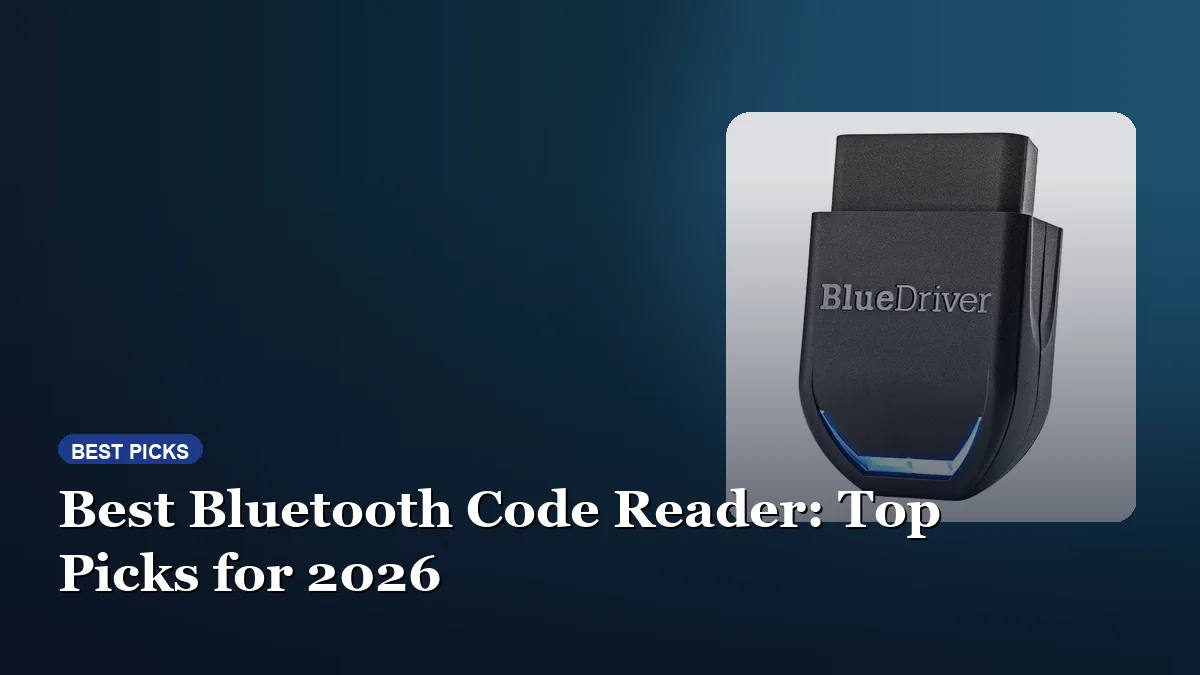
 BlueDriver Pro Bluetooth OBD2 Professional Car Diagnostic Scanner and Reader
iOS & Android . No Subscriptions . Enhanced Diagnostics
 Veepeak OBDCheck BLE Bluetooth OBDII Scanner for iOS and Android
iOS & Android . Standard OBD-II . Compact Wireless
 Veepeak Mini Bluetooth OBD2 Scanner Code Reader for Android
Android Only . Compact Profile . Live Dashboard
 BLCKTEC 430 Bluetooth OBD2 Scanner for iPhone and Android
iOS & Android . Repair Videos . ABS/SRS Support
 UMEIJA V011 OBD2 Scanner Diagnostic Tool with Bluetooth 5.4
Bluetooth 5.4 . Visual Charts . Broad Compatibility
 Repair Club Pro OBD II Scan Tool for Mobile Devices
Live Tech Chat . All Systems . Zero Subscriptions
If you want comprehensive diagnostics and zero ongoing fees, the BlueDriver Pro Bluetooth OBD2 Professional Car Diagnostic Scanner and Reader is our top pick.
It bridges the gap between basic DIY readers and expensive shop equipment by pairing deep vehicle coverage with an exceptionally polished mobile app.
Whether you are tracking down an elusive check engine light or monitoring live data, it delivers reliable performance.
On This Page (8 sections)
How We Chose
- Wireless Reliability: We prioritized adapters that maintain a rock-solid Bluetooth link without dropping connection mid-diagnostic.
- Diagnostic Depth: We selected tools offering enhanced system coverage beyond standard powertrain codes for complete peace of mind.
- App Usability: We tested companion software interfaces to ensure clear code definitions and intuitive live data readouts.
Who Needs This
- DIYers looking to diagnose check engine lights and clear trouble codes right from their smartphone.
- Car owners who want to avoid pricey diagnostic fees at local mechanic shops.
- Tech-savvy drivers who appreciate live sensor data and customizable digital dashboard gauges.
Who Can Skip
- Drivers of pre-1996 vehicles that lack standard OBD-II diagnostic computer ports.
- Professional technicians who already rely on dedicated, high-end shop tablets and lab scopes.
- Anyone who prefers old-school wired handheld scanners over smartphone apps.
Quick Comparison: Best Bluetooth Code Reader
| Model | Platform / OS | Vehicle Coverage | Subscriptions |
|---|---|---|---|
| iOS and Android | 1996+ Gas & Diesel | None Ever |
| iOS & Android | Universal Fit | App Dependent |
| Android Only | Universal Fit | App Dependent |
| iOS and Android | Multi-System | None |
| Android/iOS/Windows | 96% of Makes | App Dependent |
| Android, iOS | All Systems | None Ever |
The 6 Best Bluetooth Code Readers, Reviewed
BlueDriver Pro Bluetooth OBD2 Professional Car Diagnostic Scanner and Reader
View on Amazon →Turns your phone into a powerful diagnostic hub without subscription hassles or clunky cords. It pulls enhanced trouble codes and verified fixes tailored straight to your vehicle's VIN.
Comprehensive professional-grade diagnostics paired with zero subscription fees.
Carries a higher initial investment than basic generic code readers.
| Metric | Listed Specification |
|---|---|
| Operating System | iOS and Android |
| Power Source | Vehicle Port |
| Automotive Fit | Vehicle Specific Fit |
| Language Support | English |
Setup is remarkably straightforward, plugging directly into your dashboard port to pair wirelessly with your phone in moments. The app interface handles live sensor monitoring smoothly as you drive down the road.
Built for long-term reliability, it requires no ongoing maintenance beyond normal app updates. Owners appreciate having detailed repair reports ready right in the glove box.
- No subscription fees or hidden costs
- Reads enhanced codes like ABS and SRS
- Technician-verified repair reports matched to VIN
- Higher initial purchase price
- Occasional Bluetooth pairing hiccups reported
Owners love the user-friendly app and how easily it pinpoints minor issues to save money on mechanic visits. While most praise the seamless pairing, a few note occasional Bluetooth connection glitches.
DIYers wanting professional-grade diagnostics without recurring monthly bills.
Confirm specific vehicle make and model year compatibility for advanced system scans.
A robust choice for drivers wanting dealership-level insights straight on their smartphone.
View on Amazon →Verdict
If you want comprehensive vehicle health tracking and verified fixes without ongoing bills, this is the top pick.
Veepeak OBDCheck BLE Bluetooth OBDII Scanner for iOS and Android
View on Amazon →Bridges the gap between casual drivers and enthusiast coders by pairing seamlessly with popular third-party apps. It delivers quick check engine diagnostics and live sensor tracking right to your mobile screen.
Broad third-party app compatibility across both Apple and Android devices.
Advanced manufacturer-specific features often require purchasing separate third-party software.
| Metric | Listed Specification |
|---|---|
| Power Source | OBD II Port |
| Product Dimensions | 1.61" x 1.97" x 0.87" |
| Operating System | iOS & Android |
| Manufacturer | Veepeak |
Its low-profile design sits flush in most vehicle cabins without bumping knees during daily commutes. Connecting requires launching your chosen diagnostic app directly rather than native phone pairing.
Daily operation is snappy, though heavy reliance on external apps means your experience depends heavily on the software you choose. Maintenance is virtually nonexistent aside from keeping firmware updated.
- Works with both iOS and Android devices
- Highly compact profile sits flush
- Broad support for popular third-party apps
- Advanced features need separate software purchases
- Mixed feedback on initial connection setup
Customers frequently praise its seamless integration with popular tuning apps and its reliable live data streaming. A few users mention needing patience during the initial Bluetooth pairing process.
Tech-savvy drivers who love customizing their dashboard via specialized mobile apps.
Check whether your preferred third-party app requires an in-app purchase for advanced functions.
An affordable, highly adaptable reader for users who prefer custom third-party software.
View on Amazon →Verdict
An exceptional value for mobile enthusiasts who want flexible app support without breaking the bank.
Veepeak Mini Bluetooth OBD2 Scanner Code Reader for Android
View on Amazon →Converts your Android device into a live performance dashboard while reliably clearing standard check engine codes. Its ultra-compact form factor tucks neatly away under the dash without cluttering your footwell.
Budget-friendly generic engine diagnostics for Android device owners.
Completely incompatible with Apple iOS and restricted to basic engine codes.
| Metric | Listed Specification |
|---|---|
| Power Source | OBD II Port |
| Dimensions | 1.89" x 0.98" x 1.26" |
| Operating System | Android Only |
| Fit Type | Universal Fit |
Snapping the device into your dashboard port takes just seconds, though you must ensure a firm push for stable contact. It communicates smoothly with classic Bluetooth on Android phones and tablets.
Upkeep is practically nonexistent since it draws power directly from the vehicle port when plugged in. Remember to unplug it during extended vehicle storage to prevent battery drain.
- Exceptional value for money
- Compact footprint stays out of the way
- Fast pairing with Android devices
- Zero iOS or iPhone support
- Basic engine codes only (no ABS or SRS)
Owners love its straightforward plug-and-play simplicity and excellent compatibility with apps like Torque Pro. A few note that it strictly handles basic powertrain codes rather than deep system scans.
Android users seeking an inexpensive tool for basic engine code reading.
Confirm you are running an Android device, as Apple iPhones are completely unsupported.
A dependable, no-frills code reader tailored specifically for Android smartphone owners.
View on Amazon →Verdict
A top choice for budget-conscious Android users who only need core engine diagnostics.
BLCKTEC 430 Bluetooth OBD2 Scanner for iPhone and Android
View on Amazon →Pairs comprehensive system diagnostics with rich multimedia repair guides to walk you through home fixes step by step. It pulls expanded codes like ABS and airbags straight to your phone screen without hidden fees.
Actionable DIY repair guidance paired with multi-system code reading.
Feature availability can vary significantly depending on your specific vehicle make and model.
| Metric | Listed Specification |
|---|---|
| Power Source | Vehicle Port |
| Dimensions | 1.95" x 1.45" x 1.02" |
| Operating System | iOS and Android |
| Language | English |
Wireless connection is handled entirely inside the companion app, avoiding frustrating native Bluetooth pairing menus. The hardware lights up instantly upon insertion to confirm active power.
Living with the tool is a breeze thanks to the included video database that demystifies common warning lights. Upkeep requires no maintenance beyond standard smartphone app updates.
- Includes step-by-step DIY repair videos
- Reads advanced ABS and SRS codes
- Zero subscription fees or ongoing costs
- Compatibility varies by specific vehicle model
- App-dependent pairing workflow requires attention
Users appreciate how the app breaks down complex mechanical issues into easy-to-follow video guides. Some note that certain advanced features may not display on older vehicle models.
DIYers who want visual instructions alongside their trouble code definitions.
Check the online compatibility database to verify support for your specific car model.
A fantastic tool for home mechanics who value visual guidance alongside raw data.
View on Amazon →Verdict
Highly recommended for car owners who want clear, step-by-step help tackling garage repairs.
UMEIJA V011 OBD2 Scanner Diagnostic Tool with Bluetooth 5.4
View on Amazon →Utilizes upgraded wireless protocols to secure rapid mobile connections and stream live performance metrics into visual charts. It covers a vast majority of modern vehicles to help you catch mechanical issues early.
Fast, stable wireless pairing via advanced Bluetooth 5.4 technology.
Included mobile app interface can occasionally feel cluttered or clunky during deep dives.
| Metric | Listed Specification |
|---|---|
| Power Source | Wireless Power |
| Dimensions | 3.8" x 2.5" x 3.8" |
| Screen Size | 1 inch |
| Operating System | Android/iOS/Windows |
Setup is quick, though Apple users must remember to bypass native phone Bluetooth menus and connect straight inside the app. Live data graphs render smoothly on both tablets and phones.
Day-to-day living is hassle-free, though the unit should be removed from the port when not in use to conserve vehicle battery. Regular maintenance is limited to scanning QR codes for app patches.
- Upgraded Bluetooth 5.4 connection speed
- Comprehensive performance testing tools
- Supports over 96 percent of car makes
- App interface can feel clunky at times
- Mixed feedback on specific code detection
Customers highlight the rapid wireless connection speed and clear visual data charts as major pluses. A few mention that the companion app takes some getting used to.
Drivers wanting fast wireless pairing across a wide variety of car makes.
Ensure you unplug the unit after use to prevent slow vehicle battery drain.
A versatile, fast-connecting scanner that brings live visual data straight to your mobile device.
View on Amazon →Verdict
A strong contender for users prioritizing fast wireless connection speeds and broad car compatibility.
Repair Club Pro OBD II Scan Tool for Mobile Devices
View on Amazon →Combines full-system mobile diagnostics with access to live professional mechanic chats for expert troubleshooting assistance. It scans rapidly and delivers verified repair guidance without recurring subscription fees.
Direct access to live mechanic chat support for hard-to-solve problems.
Relies heavily on cellular or Wi-Fi network connectivity for its live expert chat features.
| Metric | Listed Specification |
|---|---|
| Brand | RC Repair Club |
| Operating System | Android, iOS |
| Fit Type | Universal Fit |
| Manufacturer | RC Repair Club |
The scanning sequence initiates rapidly upon plugging into the dashboard port, beaming results to your phone in seconds. The wireless link remains remarkably stable during extended diagnostic sessions.
Long-term ownership is stress-free thanks to lifetime software updates and free customer support. Maintenance involves nothing more than keeping your mobile app up to date.
- Access to free live mechanic chat support
- Full-system trouble code reading capabilities
- Lifetime free software updates
- Requires active internet for chat support
- Universal fit limitations apply to select models
Owners love the lightning-fast scan times and the reassuring presence of live technician support. Feedback highlights that the wireless connection stays exceptionally reliable during troubleshooting.
Drivers who want professional expert advice available right on their smartphone.
Keep in mind that live chat assistance requires an active internet connection on your phone.
An exceptional choice for vehicle owners who want professional human backup in their pocket.
View on Amazon →Verdict
If you want expert mechanical advice bundled with fast full-system scanning, this is an ideal garage companion.
Practical Guide to Using and Maintaining Your Wireless Scanner
Plug your adapter directly into the OBD-II diagnostic port usually located underneath your vehicle's driver-side dashboard near the steering column. Enable Bluetooth on your smartphone, open the designated companion app, and follow the on-screen prompts to pair the device.
When finished, remember to unplug the scanner if you leave your car parked for extended periods to prevent any minor battery drain. Store the adapter in a clean, dry glove compartment away from extreme summer heat.
Buying Guide & Red Flags for Best Bluetooth Code Readers
Check these points before you buy to avoid common pitfalls:
Watch out for adapters that demand expensive monthly or yearly subscription fees just to read basic codes.
Avoid legacy Bluetooth units that struggle to pair consistently with modern smartphone operating systems.
Be skeptical of generic apps loaded with intrusive ads or sluggish user interfaces.
Check for missing system coverage if you need to diagnose ABS, airbag, or transmission warnings.
Confirm operating system compatibility carefully, as some budget dongles only support Android devices.
How do I choose the best bluetooth code reader for my vehicle?
Start by checking your smartphone operating system, as some budget adapters only work with Android while others support iOS seamlessly. Consider what level of diagnostics you need, ranging from basic powertrain code clearing to advanced ABS and SRS troubleshooting.
Look for adapters that include free lifetime software updates so your tool never becomes obsolete. Reading reviews from other drivers helps confirm how stable the Bluetooth connection remains during live data streaming.
Do these bluetooth code readers drain my car battery if left plugged in?
Most modern Bluetooth OBD-II adapters feature built-in sleep modes designed to minimize power draw when your engine is turned off. However, some older or ultra-budget models may continuously draw a tiny trickle current from the port.
If you plan to leave your vehicle parked for a week or more, it is always safest to unplug the adapter to be completely secure. Checking owner feedback can also reveal whether a specific scanner is notorious for battery drain.
Can a bluetooth code reader fix my car problems?
A code reader cannot physically repair mechanical or electrical faults, but it acts as an essential diagnostic compass. It translates dashboard warning lights into specific alphanumeric trouble codes that pinpoint the failing component or sensor.
Armed with this accurate data, you can either tackle the DIY repair yourself or walk into a repair shop fully informed. This transparency helps you avoid unnecessary part replacements and ensures fair pricing from mechanics.
What does the 10-point Lab Score evaluate?
Our credible 10-point editorial score combines design quality, everyday practicality, material durability, and real-world owner satisfaction.
We test how reliably each adapter connects to smartphones, how intuitive the companion app feels during live data logging, and whether the hardware withstands frequent plug-and-unplug cycles.
Tools that offer robust multi-system diagnostics without hidden subscription fees consistently earn top marks in our testing. This holistic approach ensures our recommendations deliver true long-term value.
Will these scanners work on older pre-1996 vehicles?
Standard OBD-II diagnostic ports and protocols became federally mandated in the United States starting with the nineteen ninety-six model year. Consequently, these Bluetooth code readers will not plug into or communicate with older classic cars utilizing proprietary pre-OBD computer systems.
If you work on vintage vehicles, you will need specialized diagnostic cables, blink-code tools, or legacy multimeters. Always verify your vehicle model year before purchasing any wireless adapter.
Are there ongoing subscription fees for these diagnostic apps?
Many top-tier wireless code readers include all essential diagnostics and live data streaming without any recurring costs. However, certain advanced tools or manufacturer-specific enhanced packages may offer optional paid subscriptions for professional-grade service resets.
Always review the app specifications beforehand so you know whether basic features are entirely free. Choosing a reputable brand ensures you will not encounter unexpected paywalls when checking basic engine codes.
Final Verdict
Choosing the right wireless diagnostic tool transforms how you handle check engine lights and routine vehicle maintenance.
For unmatched diagnostic depth, zero ongoing fees, and a polished user experience, the BlueDriver Pro Bluetooth OBD2 Professional Car Diagnostic Scanner and Reader stands out as our ultimate recommendation.
Match your choice to your smartphone platform and troubleshooting goals to keep your car running smoothly.
Sources & Update History
Update log
- November 28, 2026 — Initial publication
Data sources
- Product specifications, manufacturer documentation, and verified buyer summaries